From time to time, I love to download a video stream to watch it later. For example the relive feature from
bitsundso.de provides a stream to watch live or later, but no simple video download. Same for Apple with the keynotes in stream only format.
First you need the URL of the stream. e.g. for the last Apple website for their recent keynote:
https://p-events-delivery.akamaized.net/18oihuabsdfvoiuhbsdfv03/m3u8/hls_vod_mvp.m3u8
You find it for bitsundso after
login on the status page and than copying the link for video for QuickTime player. How you get the stream URL doesn't matter, but as soon as you have the URL to the m3u8 file, you can download all segments and merge them to one file.
But first you download that m3u8 file and you see inside the links for the various resolutions. You also find redirects for other languages there. What you need is the final m3u8 file URL to download.
e.g. we pick full resolution for the Apple keynote:
https://p-events-delivery.akamaized.net/18oihuabsdfvoiuhbsdfv03/vod327/8500/8500_vod.m3u8
Now you need a copy of
ffmpeg command line utility, which I just downloaded as
disk image and copied to home folder. Now you can go into Terminal application and use a command like the following with your URL and desired file name:
./ffmpeg -i 'https://p-events-delivery.akamaized.net/18oihuabsdfvoiuhbsdfv03/vod327/8500/8500_vod.m3u8' -c copy -bsf:a aac_adtstoasc keynote.mp4
Once finished, you have a nice mp4 file, which is suitable for watching offline. And now you know why I need this from time to time. e.g. for watching something later in the train without reliable wifi or payable cellular.
PS: I tried the same myself with a self written app, but merging videos with AVMutableComposition and AVExportSession fails when you try to merge a few hundred little videos.
PPS: Apple's keynote podcast does have the video files, so no need to use the stream.
For the next MBS FileMaker Plugin, we add a new function
JSON.ToHTML to display JSON to user in a web viewer:
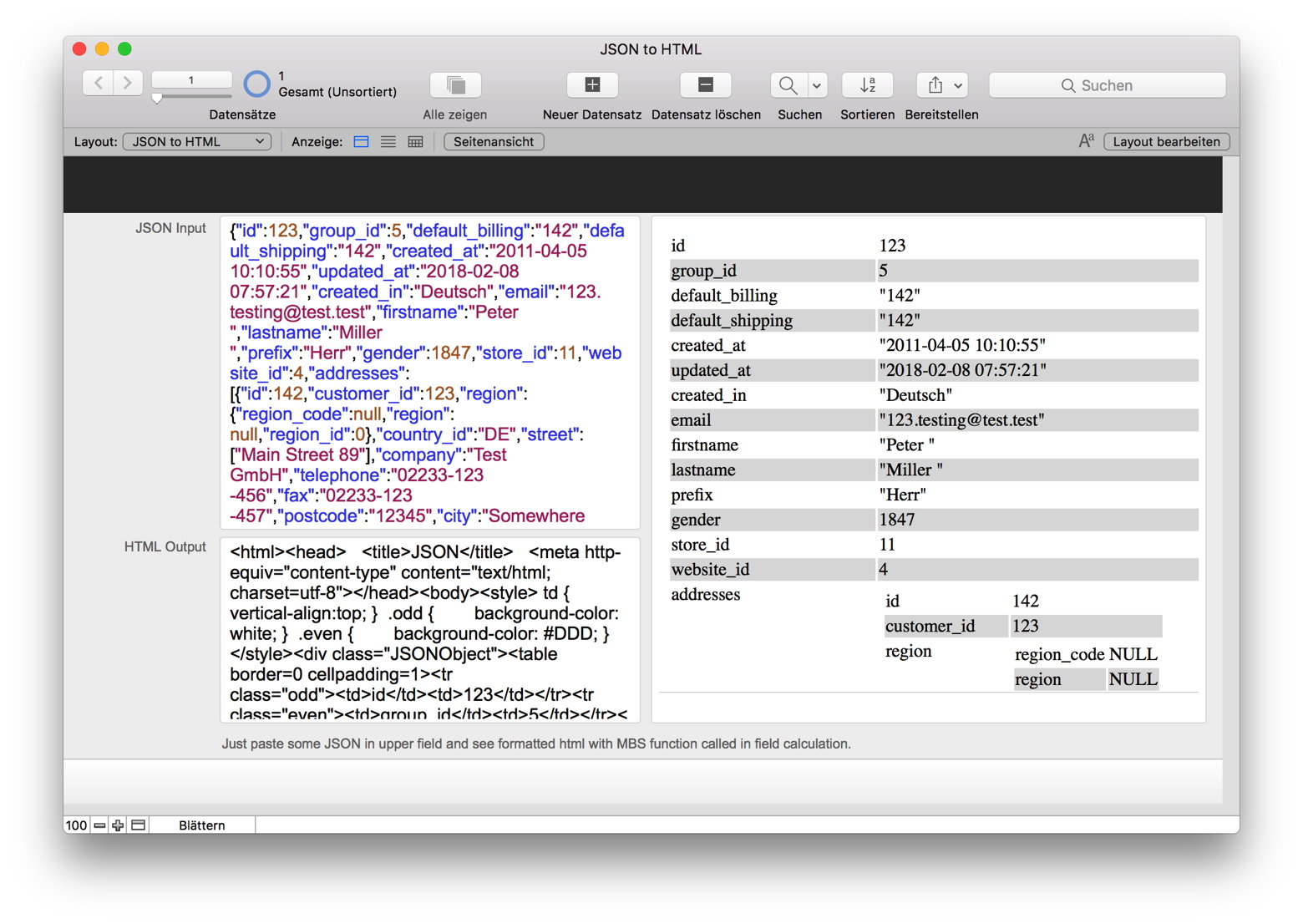
We include some CSS class tags, so you can colorize this a bit. Please try when next prerelease is available or just email us for a testing copy today.
PS: Also coming for Xojo to
JSONMBS class.

For the next version of MBS FileMaker Plugin for the FileMaker iOS SDK, we are adding
HealthKit functions.
For some time now we had people asking for it, so now we start with adding some basic HealthKit support:
- Checking for availability of health data.
- Authentication to get permission to use it.
- Query basic values like sex, blood type, birth date, skin type and wheelchair use.
- Query sample data like step counts and return results as JSON block.
The new
HealthKit.SampleQuery function is really very universal, so you can query 30+ things using it and request values in various units.
If you like this, please try it soon and let us know what you think. More functions are possible, but it all depends on what you like to do and what we can do from a plugin.
Coming soon for MBS FileMaker Plugin 8.2 with the next prerelease.
Requires you to enable health kit for entitlements and declare usage in info.plist of course.

Am 29. Mai 2018 treffen sich interessierte FileMaker Entwickler bei der Denkform in Hofheim (Taunus).
Wir schauen uns Neues in der FileMaker Welt an.
Michael Valentin von FileMaker Deutschland kommt vorbei und präsentiert Neuigkeiten und steht dann für Fragen bereit.
Anschließend zeigt Christian Schmitz gerne ein paar Neuerungen im MBS Plugin 8.x.
Anmeldung auf der Denkform Eventseite (Link kommt noch). Zeitlich vermutlich 18 bis 21 Uhr. Eventuell mit optionalem Abendessen.
Bitte den Termin frei halten. Mehr Details zu den Programmpunkten folgen.
Anmeldung hier

New in this prerelease of version 8.2 of the MBS FileMaker Plugin:
Download at
monkeybreadsoftware.de/filemaker/files/Prerelease/ or ask for being added to the dropbox shared folder.

In both
MBS FileMaker Plugin and in the
MBS Xojo SQL Plugin, we have a built-in SQLite library with various extensions. You activate it in FileMaker with
SQL.InternalSQLiteLibrary.Activate and in Xojo with methods in
InternalSQLiteLibraryMBS module.
Once you use a SQLite library with JSON functions, you can use seventeen new functions from the
json1 extension that are useful for managing JSON content stored in an SQLite database. Twelve of the fourteen SQL functions are scalar functions:
- json(json)
- json_array(value1,value2,...)
- json_array_length(json)
- json_array_length(json,path)
- json_extract(json,path,...)
- json_insert(json,path,value,...)
- json_object(label1,value1,...)
- json_patch(json1,json2)
- json_remove(json,path,...)
- json_replace(json,path,value,...)
- json_set(json,path,value,...)
- json_type(json)
- json_type(json,path)
- json_valid(json)
- json_quote(value)
There are two aggregate SQL functions:
- json_group_array(value)
- json_group_object(name,value)
The two table-valued functions are:
- json_each(json)
- json_each(json,path)
- json_tree(json)
- json_tree(json,path)
e.g. in a query you can use the function like in the following example:
SELECT json_array_length('[1,2,3,4]')
Or
SELECT * FROM MyTable WHERE json_extract(JSON, '$.type') = "person"
Could be useful for projects, where you store a JSON blob in a field and you like to query against it.

With next MBS FileMaker Plugin you can ask the user to review your application.
The
StoreKit.RequestReview function allows you to ask the user to rate your application. The function returns directly and the dialog shows asynchronously.
Although you should call this method when it makes sense in the user experience flow of your app, the actual display of a rating/review request view is governed by App Store policy. Because this method may or may not present an alert, it's not appropriate to call it in response to a button tap or other user action.
When you call this method while your app is still in development mode, a rating/review request view is always displayed so that you can test the user interface and experience. However, this method has no effect when you call it in an app that you distribute using TestFlight.
When you call this method in your shipping app and a rating/review request view is displayed, the system handles the entire process for you. In addition, you can continue to include a persistent link in the settings or configuration screens of your app that deep-links to your App Store product page. To automatically open a page on which users can write a review in the App Store, append the query parameter action=write-review to your product URL.
Coming soon in the next MBS FileMaker Plugin 8.2 prerelease.

For the next MBS Plugin we work on functions for the Mac and iOS App Store.
While this is still work in progress and getting your iOS or Mac App in the app store is quite a challenge, we prepare the necessary functions to do sell items to the user. For example you could have a solution where user buys a subscription or upgrades from trial to full version with an in-app purchase.
Before you would check our plugin functions, please read documentation from Apple on how this works. You will have to setup products in iTunes Connect website and add entitlements for in-app purchase to your app.
First you query products and you get back the product definitions you entered on Apple's website. Our StoreKit.QueryProducts function will do this and you may call it in the start script in your solution. Than later you can use StoreKit.Products to get the JSON with the definitions:
[
{
"localizedDescription" : "Just a little contribution from you. Thanks.",
"formattedPrice" : "$8.99",
"price" : 8.99,
"productIdentifier" : "123",
"downloadable" : false,
"localizedTitle" : "A donation to developer",
"priceLocale" : "en_US@currency=USD"
}
]
At any time you can use StoreKit.Transactions function to query transactions and their status:
[
{
"transactionIdentifier" : "C2CF465A-BC94-4705-BE9E-E5A02A6DD422",
"transactionState" : "Failed",
"payment" : {
"quantity" : 1,
"productIdentifier" : "123"
},
"error" : "Cannot connect to iTunes Store"
}
]
And with StoreKit.AddPayment function you can start a payment process for an item. You setup a trigger to run when transactions update. So you can check if something is purchased. Than you unlock functions and call StoreKit.FinishTransaction function to let the App store know you delivered.
We are looking for interested FBA partners who want to add this to their FileMaker iOS SDK application or Mac runtime. Let us know if you are interested.
The 11th
Macoun conference 2018 will be at 15th and 16th September 2018. This is one of the biggest Mac and iOS developer conferences in Europe with over 400 participants.
With 20+ sessions about coding topics & tricks it feels like a smaller WWDC in German.

I expect it to be located again in Frankfurt in Germany and if you speak German or at least English, please join it!
In preparation for the
Privacy and Electronic Communications Directive here in Europe, we made a few adjustments already to comply better with regulation:
- Attended training at denkform: Europäische Datenschutzgrundverordnung EU DS-GVO
- We setup a new privacy policy website in English and German.
- Our website no longer tracks access and no longer stores IP in logs. We just keeps sum counts for web analyzer. We actually did that years ago and just verified that it's configured now for all domains.
- Our plugin's update checker is disabled for new plugin version.
- Mailing lists are opt-in.
- We track newsletter opt-in now in database.
- We got a new shredder to finally destroy all papers older than 10 years safely.
- All web forms should be on https websites and going there you should be redirected to https if needed.
- We got some additional SSL certificates to cover more domains.
- Google analytics is in the privacy policy, but currently we don't use it.
- Forms got checkboxes so people can agree to send data.
So if everything works, those changes may benefit you.
Anything we may have missed so far?
As you may know, you can create PDF form fields with our MBS Plugin using the DynaPDF functions. The plugin can do a lot there and not just read/write form field values, but also create new fields. In the following article, we want to show you how we do this. Our goal is to dynamically create a template PDF based on a form file created in a word processor. We add fields with data, send it to a client and when we get the modified file back, we can import the new values.

We start with a sample database. This database has a table for people and the following fields. All just plain text fields and the ID field is set to be come an UUID. That is important as a random UUID makes it difficult to guess a valid ID, which would be easy if you just count up record IDs. We store the ID in the PDF and don't want someone to make up a valid ID. Here is the field list:
Firstname Text
Lastname Text
Address Text
City Text
Country Text
Email Text
ID Text Indexed, Auto-enter Calculation replaces existing value, Can't Modify Auto
(more)

Our
transparent screensaver is still the choice of screensaver for computers running in an office. You can see the statistics of your running applications, the console log or activity monitor to check quickly what's going on. Only when you move mouse or touch a key, you need to enter your password or use Touch ID. But otherwise the view is free to see stats.
Try it today and let me know how you like it.
On all commenters here on this blog article, we raffle on free license on Sunday.
Below the
announcement from the last update:
(more)
New in this prerelease of version 8.1 of the MBS FileMaker Plugin:
Download at
monkeybreadsoftware.de/filemaker/files/Prerelease/ or ask for being added to the dropbox shared folder.

As you may know FileMaker comes with a plugin SDK, which C++ developers like me use to develop plugins. Now the Plugin SDK offers a way to register functions and script steps and provide additional features to the FileMaker developer.
The plugin developer can get a list of parameters with the function call and inspect them, e.g. do different things for containers, texts or numbers passed in. And the plugin can return a value as result and the SDK offers functions to return texts, numbers and assemble containers. Over the years we got a few SQL functions to do queries and modify data in the database on behalf of the FileMaker developer. With the evaluate function in the SDK, we can call Get(Functions) or do calculations.
From a plugin we can trigger a script. That means the script call is put on a queue and executed later after the current script finished. But for some reason, we can't trigger a script on FileMaker Server. The plugin SDK doesn't provide the functionality to do this.
In the plugin we can work with styled text stored in FileMaker fields. We use that to format
JSON and
XML text now. But we can't access alignments in a styled text.
So as a plugin developer I submitted a few ideas over time:
Please vote for them if you like. FileMaker Inc. may look right now what to deliver in 2019 and we would appreciate if something would be picked based on popular vote.
Those ideas could help to make a better plugin SDK, which may lead a dozen plugin developers to make better plugins, which hundreds of FileMaker developers could use in thousands of solutions.
Yesterday I did make a presentation about how to use
mimetic library with curl to parse email:

We use mimetic library for our
MBS Xojo and
FileMaker plugins.
The location is excellent for such a conference with all the technic decoration and there is much to learn. I met a few interesting people ranging from students, small companies to big players like Apache organization or Google Inc.
Monkeybread Software today is proud to announce Combine PDFs 5.2.8, an update to their popular PDF merge and split tool for Mac OS X. With a focus on ease-of-use, Combine PDFs is a lightweight utility which allows anyone to merge PDF files and images into a single PDF file. The user need only drag & drop files onto the program icon. The main window appears, allowing the user to set the order in which the files are joined.
Version 5.2.8 is a port to 64-bit, which we provide now for testing. Let us know if you see an issue. If it works fine for everyone, we can push it to the users next week via auto update.
Combine PDFs Website
Requires MacOS 10.9 or newer for 64-bit. Older 32-bit version stays available and still works well.
Greetings from the CURL conference in Stockholm
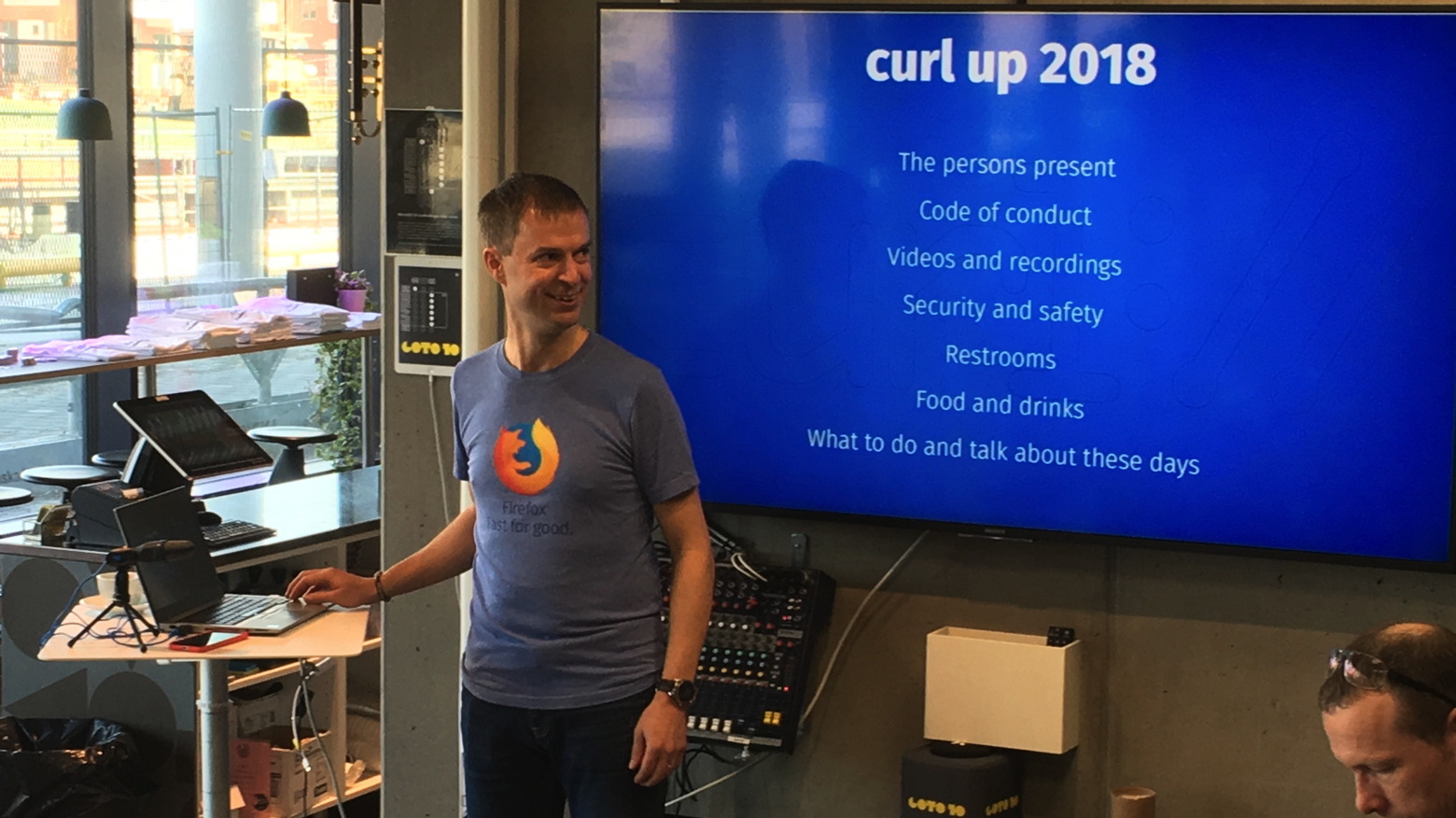
We'll going to learn more about CURL and how to use it. See
agenda.

NICHENICH, Germany (April 13rd, 2018) -- Monkeybread Software Releases IP in menubar v4.6, an application to show the current IP address in the menubar.
This small application runs in the background and shows the current IP address of your Mac in the menu bar. There are options available to customize the appearance of the menu entry. The IP address is updated regularly. Switch on the Router option if you are behind a router or gateway. You can still see your local IP address in the menu.
You can quit this application using the menu or by using the Activity Monitor (see /Applications/Utilities folder).
This application is freeware and provided as is.
IP in menubar is an example of what you can do in Xojo using the MBS Plugins and their NSStatusItemMBS class.
New in version 4.6 is 64-bit support.
With Xojo moving this app to 64-bit was just a switch in the settings and rebuilding the application. As far as we see everything works fine and we hope you enjoy this application.
The application is freeware, but contributions are accepted through PayPal.
Download at the
IP in menubar website.
New in this prerelease of version 8.1 of the MBS FileMaker Plugin:
Download at
monkeybreadsoftware.de/filemaker/files/Prerelease/ or ask for being added to the dropbox shared folder.
Do you display XML text somewhere for debugging? How about some color?

As you see, we just added a new
XML.Colorize function for our MBS FileMaker Plugin which may be useful to add color. Coming in the next plugin version...

Whenever I come to a hotel room, I first need to check if everything is right. Do I have light, power and warm water? Does the toilet work, is the bed tidied and doesn't the room smell strange? Do we have good Wifi reception?
Next I check if it's silent and can be made dark at night. I really hate noise when sleeping so I routinely unplug power supply for fridges or TVs with LEDs blinking all night. Usually I need to turn off a thermostat to find sleep. Sometimes it can even happen that the room next door contains the heating or air conditioning engine which may make sound day and night.
If anything is really bad, I need to request a different room before I made myself comfortable there. What do you check?
One think I always do at the first day, is to walk down the stairs, so I know the way in case of an emergency. Depending on the hotel layout, it can even be more convenient to take the steps next to my room than walking a long way to the lifts.
When choosing a hotel, I usually check if they have a lift, a restaurant, a 24h reception for checking in & out at any time, Wifi and free parking if possible.
What criteria do you have?
Do you display JSON text somewhere for debugging? How about some color?

As you see, we just added a new
JSON.Colorize function for our MBS FileMaker Plugin which may be useful to add color. Coming in the next plugin version...
Did you know EU directive 2014/55/EU? Starting 27th November 2020, the invoices to government over 1000 Euro must be sent electronically with structured format. So no longer printed invoices or simple PDFs, but you can send PDF in ZUGFeRD format!
Several FileMaker developers now use MBS FileMaker Plugin to create their invoices in ZUGFeRD standard. That's a data exchange format defined here in Germany, but other countries have similar formats. Basically we have a PDF in PDF/A 3b format and an embedded XML file. The PDF provides the visual and printable view of the invoice while the XML contains the same data readable for computers.
With MBS Plugin and DynaPDF we can create such a ZUGFeRD PDF. We can either create a new file or import pages from existing PDFs. So even if you generate your invoices in FileMaker from layouts, you can convert them later. Here you see an example script for doing exactly this:
#Initialize DynaPDF if needed
If [MBS("DynaPDF.IsInitialized") ≠ 1]
Perform Script [“InitDynaPDF”]
End If
#Make new PDF environments
Set Variable [$pdf; Value:MBS("DynaPDF.New")]
#Set import flags with Prepare For PDF/A enabled
Set Variable [$r; Value:MBS( "DynaPDF.SetImportFlags"; $pdf; "ImportAll¶ImportAsPage¶PrepareForPDFA" )]
#Load PDF from container
Set Variable [$r; Value:MBS("DynaPDF.OpenPDFFromContainer"; $pdf; ZUGFeRD Invoice::Invoice Template)]
#Import all pages
Set Variable [$r; Value:MBS("DynaPDF.ImportPDFFile"; $pdf)]
#PDF/A requires a language set
Set Variable [$r; Value:MBS("DynaPDF.SetLanguage"; $pdf; "en-US")]
#PDF/A requires a structure tree
Set Variable [$r; Value:MBS("DynaPDF.CreateStructureTree"; $pdf)]
#add xml with invoice data
Set Variable [$FileHandle; Value:MBS("DynaPDF.AttachFileText"; $pdf; ZUGFeRD Invoice::Invoice XML; "UTF-8"; "ZUGFeRD-invoice.xml"; "Invoice as XML")]
Set Variable [$r; Value:MBS("DynaPDF.AssociateEmbFile"; $pdf; "Catalog"; -1; "Alternative"; $FileHandle)]
#Check if this PDF conforms to PDF/A-3b
Set Variable [$c; Value:MBS("DynaPDF.CheckConformance"; $pdf; "ZUGFeRD Basic")]
If [$c = 1]
# A RGB ICC profile must be added to the document
Set Variable [$r; Value:MBS("DynaPDF.AddOutputIntentEx"; $pdf; ZUGFeRD Invoice::RGB ICC Profile)]
Else If [$c = 2]
# A CMYK ICC profile must be added to the document
Set Variable [$r; Value:MBS("DynaPDF.AddOutputIntentEx"; $pdf; ZUGFeRD Invoice::CMYK ICC Profile)]
Else If [$c = 3]
# A Gray, RGB, or CMYK ICC profile must be added to the document
Set Variable [$r; Value:MBS("DynaPDF.AddOutputIntentEx"; $pdf; ZUGFeRD Invoice::RGB ICC Profile)]
End If
#save to container
Set Variable [$PDFData; Value:MBS("DynaPDF.Save"; $pdf; "invoice.pdf")]
Set Field [ZUGFeRD Invoice::Output PDF; $PDFData]
Commit Records/Requests []
#cleanup memory
Set Variable [$r; Value:MBS("DynaPDF.Release"; $pdf)]
As you see we first initialize DynaPDF if it's not already done. In a new PDF environment, we import from a container the whole PDF. Of course you can import from files or just import pages from different PDFs as needed to build in memory your final PDF. Than we define language and structure tree as required for PDF/A. We attach the XML from a field in this example. The XML is just a block of text which you can generate before, e.g. by filling values into a template.
Next we check conformance with ZUGFeRD standard. If you have DynaPDF Lite license, we only check and report okay or error. If you have a DynaPDF Pro + PDF/A license, we can fix errors and convert any PDF to PDF/A here (DynaPDF Editions). Next we add the required output intent ICC color profiles. Finally we save the PDF to a container.
Please do not hestiate to contact us with your questions. We also have the same examples for Xojo.
New in this prerelease of version 8.1 of the MBS FileMaker Plugin:
Download at
monkeybreadsoftware.de/filemaker/files/Prerelease/ or ask for being added to the dropbox shared folder.

Wir bieten in Zusammenarbeit mit der Denkform, Brainworks und dem Verein FM Konferenz einige MBS Workshops an.
Nehmen Sie sich einen Tag Zeit sich über das MBS FileMaker Plugin und all die Funktionen zu informieren.
Themen:
- Einführung in das MBS Plugin
- Rundgang durch ausgewählte Beispiele
- Gemeinsames Implementieren von Plugin Funktionen in eine Datenbank:
- Einbau von Auditing in eine Datenbank
- Upload einer Datei mit CURL auf einen FTP Server
- Download einer Datei
- Ausfüllen eines Formular auf einer Webseite
- Bilder bearbeiten
- Eine Excel Datei laden und ausfüllen
- Fragen und Antworten
Wenn Sie bei der Veranstaltung oder kurz danach eine Pluginlizenz bestellen möchten, erhalten Sie 50 Euro Rabatt.

Due to the
CURL conference, we will come to Stockholm in April.
So let's organize a FileMaker developer meeting! Anyone interested?
Currently we'd like to know if there is interest for a dinner meeting or more?
Please fill the
survey.
We meet 15th April 2018 in Stockholm in the evening.
For a dinner, we would just meet in a restaurant and chat.
If you are interested in some private consulting or training, let me know and we can arrange an appointment.

1st April 2000 I found my company. Well, I registered as a business by getting my Gewerbeanmeldung (business registration) here in Germany.
That was 2 months before I finished school (Gymnasium). While alternative civilian service (Zivildienst) and my time at the
university, the company run well and I didn't have to depend on my parents or student loans. Actually the company got me so busy over the years, that I spend less time at university and since 2007 this is my full time job.
I had a few clients in that time interested in development in
REALbasic, a very young development environment which started two years earlier. At that time I had a website with a
few freeware utilities, so people could see that I can do development. Two years later the demand for plugins got so high, that end of 2001 I started publishing my own plugins.
Thanks everyone for supporting me over the years!
PS: If you need a license (update) this weekend, use coupon code Birthday for an 18% discount.