All three interfaces are still in use with customers. For some scanners, you only get one driver, so your decision is made by the manufacturer of the device. 64-bit can be a problem as TWAIN is very old and you may not find a 64-bit driver, although you can have a compatibility DLL for Windows to help translate 64-bit app to 32-bit driver.
To select the feeder, you would use ImageCapture.requestSelectFunctionalUnit early to request the DocumentFeeder as functional unit, before setting up other parameters. For WIA, you would later when requesting the scan pass Feeder as the item to use for WIA.Scan function. For TWAIN you need to enable feeder with Twain.SetFeededEnabled and enable auto feeding with Twain.SetAutofeed function. If used correctly, you should be able to scan a stack of papers on your scanner.
But before scanning, you may want to set a few options. For the feeder, you may want to enable duplex. To do this for TWAIN, you call Twain.SetDuplexEnabled passing 1 to enable duplex mode. For ImageCapture, you need to use ImageCapture.SetParameter with the duplexScanningEnabled property and the value 1. And for WIA, it is the WIA.SetItemPropertyValue function with the property named "Document Handling Select". Usually you pass a combination of values including 4 for duplex. You may also include 256 for preferred automatic selection or +512 for auto advance. The specs also allow to specify 8 for front page first, but may scanner here doesn't recognize that and returns an error. It's always good to double check and query the value you set to verify what was saved.
Next you may want to define resolution for the scan. Usually most scanners can interpolate in hardware if needed, but asking for a common resolution of 150 or 300 dpi may simply be okay for most scanners. For ImageCapture you call ImageCapture.SetParameter with parameter resolution and value 300. For WIA, you may need to call WIA.SetItemPropertyValue several times. First for item Feeder as well as item Flatbed, than for properties "Horizontal Resolution" and "Vertical Resolution" to set both. For TWAIN you call Twain.SetResolutionX and Twain.SetResolutionY to set the resolution. As said, 300 dpi usually works. But we have seen scanners which can do 200 and 100 dpi, but not 150 dpi. For ImageCapture, you can use ImageCapture.GetParameter with parameter nativeXResolution and nativeYResolution to query native resolution, preferredResolutions to query preferred resolution and supportedResolutions for a list of supporters resolutions. With WIA, the WIA.DevicePropertyValue function can query the "Vertical Optical Resolution" to let you know the native resolution.
If you scan only for OCR, you may just limit it to be black and white or grayscale. For ImageCapture, you can use ImageCapture.SetParameter to set pixelDataType to gray and bitDepth to 8 to get a 8bit grayscale image file. With WIA, you can use WIA.SetItemPropertyValue to set the item's current intent property to 2 for grayscale. For TWAIN, you would use Twain.SetPixelType to pass 1 for grayscale images.
For all three variants, you can scan with dialog and see options as well as define defaults for your scanner. That may be more convenient for some users to simply use the dialogs.
The options above are listed as MBS FileMaker Plugin calls, but for Xojo the properties are named similar and values are the same. So if you have problems translating this, let me know. And if you miss an option, please let us know. We may be able to add more options to documentation in examples.
Registration just started for the FileMaker Developer Conference 2018.
The training on Monday 6th costs $399. Keynote will start later that evening, probably at 6pm and is followed with the welcome reception. Prices for the conference are $1299 Early Early Bird - through March 15, $1399 Early Bird - through May 31 and $1499 USD Standard.
This is a fantastic conference hotel with 1500 rooms, 10 restaurants, several pools indoor and outdoor. And as may know this was my guess for the conference hotel.
Rooms can be reserved on the hotel website ($189 +tax per night). As you can cancel rooms and they may run out of them, you better reserve now a room and block the week in your calendar! See you there at the MBS booth.
For any software out there, the latest version is of course the best version ever released. That is true for our plugins, Xojo and FileMaker. But a lot of people do not use the latest one, but stay with older versions. That is usually fine as we don’t want to change a running system and risk that one change on a component requires other components or scripts to be updated to work again.
But some versions are really not recommended, especially if they have security related issues. In the release notes for every new version, you can learn about what bugs have been fixed. So you know what issues the old software has. Of course in most cases you are not affected and you may never notice the bug existed. To give you three examples:
Xojo
If you send emails with an application built using Xojo 2015r2 with SMTPSecureSocket, you may run into the bug I found: Feedback case 39516. Due to a problem in the secure socket class, the email was transferred unencrypted in some situation. This problem was fixed later in 2015r3, so please do not use 2015r2 and maybe older versions for sending emails over encrypted connections.
FileMaker
The update to FileMaker 16.0.3 fixed the problem where reconnecting to a server could delete all scripts in file. To avoid this bug you should not use older FileMaker 16 releases.
Due to SSL problems in FileMaker 13, all users of FileMaker 13 must use 13.0v9 to be safe.
MBS Plugins
In our plugins we do have a few bug fixes in each release. An important one for Linux was the linking issues we found last year:
MBS FileMaker Plugin for FileMaker Cloud is fixed for version 7.5 (for Xojo in 17.3 plugins). The problem was that in older versions the plugin called a function in the plugin, but as FileMaker already defined a function with the same name, the loader would connect those functions to call the existing ones. The result was that MBS Plugin using CURL functions called the CURL library provided by FileMaker (without SFTP) instead of the built-in library (with SFTP). And both libraries usually have different versions, so you may see unexpected problems. The same happened with Xojo months before, where we got zip, jpeg and png libraries to not be the right ones. So for FileMaker Cloud servers, please do not use MBS Plugin 7.4 or older due to thís specific problem. Same for Xojo where 17.2 and earlier are affected (Linux only).
A second important bug is the boolean result problem in FileMaker, see product issue #711010. If a plugin returns a boolean, FileMaker may evaluate true being false. To work around, we changed MBS Plugin 7.5 to use numbers for booleans always. Using older plugin versions can lead into scripts running differently in debugger!
Old Libraries
Regularly we update our plugins to use the latest versions of various libraries. Libraries for basic stuff like compression (e.g. zlib), encryption (e.g. openssl) or image file reading (e.g. jpeg). By using the older libraries, you risk running into a bug which may cause a crash or allow an hacker to run code in your application.
If you still use FileMaker 11 with the openssl 0.9.8i from 2008 inside, you are at the risk of all the vulnerability found in openssl over the last ten years. Same if you still use REAL Studio which depends on QuickTime for loading pictures on Mac and the old QuickTime stuff hasn't been fixed a lot by Apple. So there may be picture files around, which can crash your app or execute arbitrary code from a hacker.
Recommendation
Please do not stay with old OS, old tools and old plugins. The risks of problems in the software, which have been fixed are quite real. Regularly clients report bugs which have been fixed long ago, but don't reach them as we can't fix older versions remotely. Please keep an eye on the release notes to check whether you are directly affected by any change. Update all tools when your own release cycle starts, so you have time to adjust if needed. Stay safe!
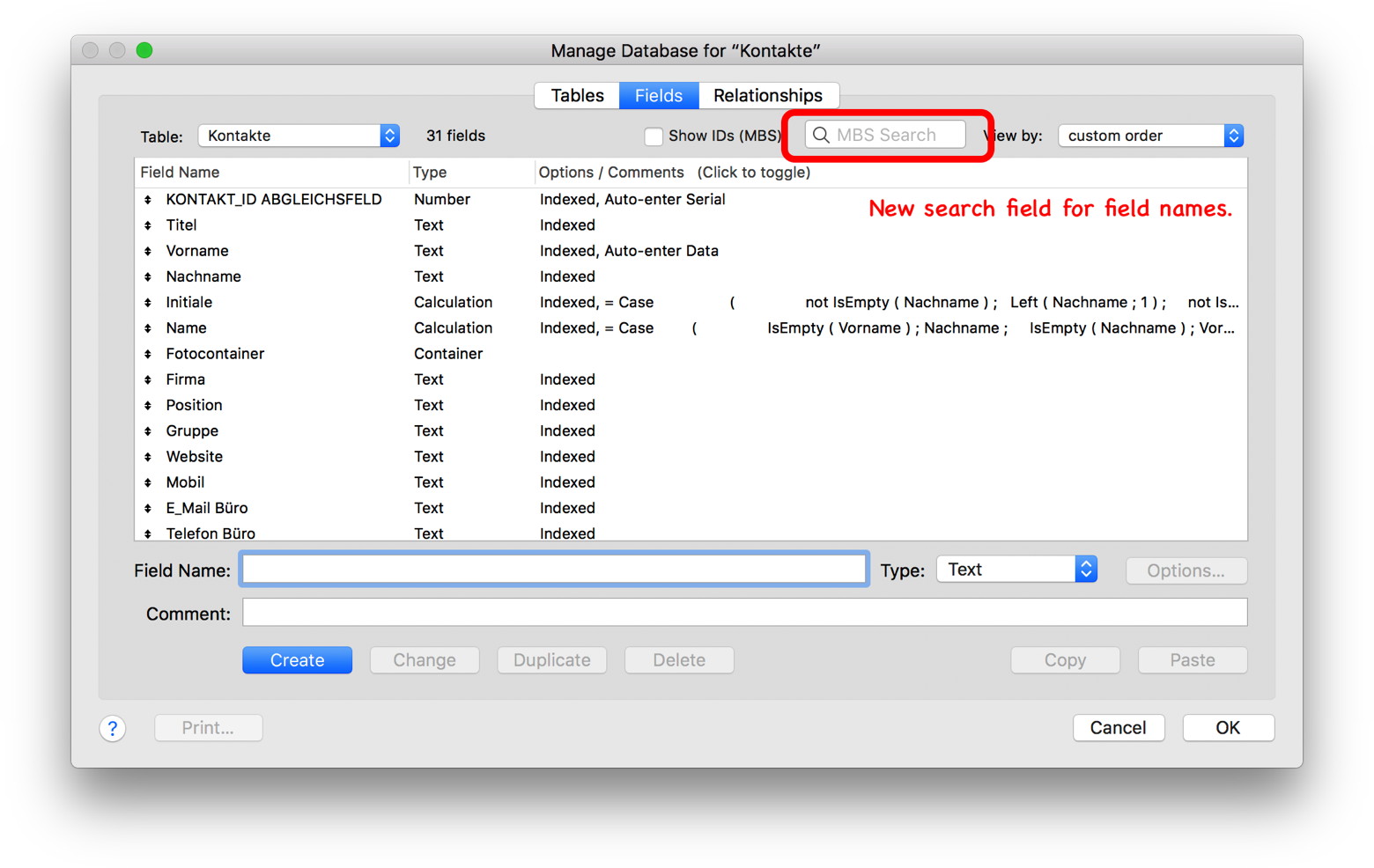
For the next plugin version, we add a new search field for database design dialog to search fields and tables for name:
When you stop typing or press return, we search the table for the text. If no text is found, we beep. Otherwise, we jump to the next line which matches. This way you can quickly find all names, all fields with birth or whatever you look for. The visible text is only searched, so if there is text in a formula after a few paragraphs, we may not see it.
Coming soon for MBS FileMaker Plugin 8.1pr5 or if like to try on the weekend, drop us an email.
In Zusammenarbeit mit der DenkForm GmbH bieten wir eine Schulung zum MBS Plugin an. Am 1. März 2018 (auch 3. Mai 2018, 6. Dezember 2018, 7. März 2019) können Sie in Hofheim am Taunus an einer eintägigen Schulung teilnehmen. Lernen Sie die über 5000 Funktionen einmal näher kennen und wie Sie sie effektiv einsetzen. Sammeln Sie Ideen und verbessern Sie ihre FileMaker Lösungen durch den Einsatz unseres Plugins.
Das Monkeybread Software Plugin für FileMaker stellt eine vielseitige Erweiterung der eigenen Datenbank dar. Der Kurs bietet nicht nur einen tiefgreifenden Überblick in die Benutzung und Entwicklung, sondern bietet auch die Chance das Plugin günstiger zu erstehen.
Einführung in das MBS Plugin
Überblick über die Funktionsbereiche
Neues im MBS Plugin dieses Jahr und in der dann aktuellen Version 7.5
Rundgang durch ausgewählte Beispiele
Gemeinsames Implementieren von Plugin Funktionen in eine Datenbank.
Upload/Download mit CURL auf einen HTTP/FTP Server
Ausfüllen eines Formulares auf einer Webseite
Bilder bearbeiten
PDF Verarbeitung
Druckerfunktionen
Einbinden von Webservices with JSON/XML für REST/SOAP.
Fragen und Antworten
Die Teilnahme kostet 99 Euro inkl. MWSt. und Verpflegung. Trainer ist der Plugin Entwickler und Monkeybread Software Geschäftsführer Christian Schmitz persönlich.
Im Anschluss besteht die Möglichkeit zum FileMaker Rhein-Main Stammtisch zu kommen. Bei einem leckeren Abendessen im Restaurant Bella Bari in der Nähe der Denkform können Sie sich mit anderen FileMaker Entwicklern aus der Gegend austauschen.
PS: Die Mindestteilnehmerzahl wurde erreicht und die Schulung am 1. März findet statt.
Die Anmeldung zur FileMaker Konferenz 2018 ist eröffnet.
Vom 17. bis 20. Oktober diesen Jahres findet die neunte deutschsprachige FileMaker Konferenz in Malbun, Liechtenstein statt. FileMaker Anwender und Entwickler können ihre Teilnahme ab sofort buchen. Anmeldungen bis zum 23. Juni 2018 erhalten einen Frühbucher-Rabatt auf die Konferenzpauschale.
Die Veranstalter vom Verein FM Konferenz erwarten auch 2018 rund 180 Entwickler, Anwender, IT-Fachleute und Entscheidungsträger aus Wirtschaft, Bildung und Verwaltung. Rund um über 25 Fachvorträge und Workshops wird es viel Zeit zum Vernetzen in den gemeinsamen Pausen und beim Abendprogramm geben.
Eventuell gibt es auch 2018 wieder eine MBS Plugin Schulung bzw. Workshop. Hat da jemand Interesse?
Changed XML.GetPathValue to return CDATA section as text if possible.
Improved Sendmail functions to not encode subject, email names or attachment names, if it contains no special characters in more cases by reducing the characters which trigger encoding.
Added option to preferences to block ESC key on Touch Bar and use Option-ESC instead.
Changed preferences dialog to shrink on smaller screen resolution and allows scrolling through options.
With next MBS Plugin, you can put a WebKit 1.x web view on the Popover and load whatever you like.
The WebView.CreateOnPopover function will place the web view there until you close it later with WebView.Close.
Do not hesitate to contact us if you like to try the new plugin on the weekend.
Do you have a MacBook Pro with Touch Bar?
If yes, how often may you have pressed ESC key in FileMaker unintentionally?
Well, to keep you sane and not loose valuable custom functions by pressing ESC accidentally, we got a new option in MBS Plugin preferences dialog for you:
So optional the MBS FileMaker Plugin 8.1 and newer will be able to block ESC key presses without modifier keys. And if you press option key, we remove the flag for the option key from the event and pass it though to FileMaker. So ESC alone is blocked, but Option-ESC goes through as if you pressed ESC.
The feature only takes effect on MacBook Pros with TouchBar, only inside FileMaker application, only if enabled, and only if you use the internal keyboard.
If you like to try this today, please get in touch.
FileMaker, Inc. has created a dedicated web page highlighting upcoming in-person and virtual events submitted by FileMaker partners and enthusiasts around the world. Upcoming workshops, trainings, user group meetups, trade shows, and webinars can all be found in this new area in the Learn section of FileMaker’s website.
See upcoming events in your area and submit your own event by going to filemaker.com/events/.
Additionally, we will send out event notification emails periodically to help drive attendance. Manage your FileMaker email subscription here.
It's a great move to provide a gathering point for events. I do hope all the conferences and local meetings end up being there, so people can easily find them.
Currently, the events page lists over 190 events including 108 trainings, 44 workshops, 5 conferences.
Sending Emails with various servers can be a challenge. In this blog article we like to collect the settings needed for using our SendMail functions in FileMaker or CURLEmailMBS class in Xojo to send emails. As you see we always prefer to use encryption.
Bei checking certificates, we can detect and avoid giving our password to a transparent proxy. And we enable TLSv1.2 for all here and require encrypted connection. It's important to test and verify this, as I once run into a hotel reading my emails to count them and prevent spamming.
(more)
Today we got a problem with SQL. It’s not the usual SQL injection worries, but more the convenience of building SQL statements containing values, which causes problem.
We see a lot of SQL queries to lookup values, but people love to include the
MBS("FM.ExecuteFileSQL"; Get(FileName); "SELECT Name FROM Contracts WHERE ID=" & $ID)
Now if ID is a text, but $ID contains the number 1234, this causes an error:
[MBS] ERROR: FQL0018/(1:32): An expression contains incompatible data types.
You would need to use quotes at least:
MBS("FM.ExecuteFileSQL"; Get(FileName); "SELECT Name FROM Contracts WHERE ID= '" & $ID & "'")
Although you don’t see the double quotes having single quotes easily here. This may work, until someone includes a single quote in that variable.
When you use parameters in the query, you can avoid this:
MBS("FM.ExecuteFileSQL"; Get(FileName); "SELECT Name FROM Contracts WHERE ID = ?"; 9; 13; $ID)
You can pass parameter as text or number even if it does not the match the field type. FileMaker will converted the data type automatically to match.
Next, lets assume you have a variable containing a number and you make a query
Set Variable [ $x ; Value: 123.45 ]
Show Custom Dialog [ MBS( "FM.ExecuteFileSQL"; Get(FillName); "SELECT Name, Price FROM Items WHERE Price= " & $x; 9; 13 ) ]
If $x is a number, it will be converted by FileMake to a text. Or it is a text already with some user entered number. Now if the field is empty, you get a syntax error, because your SQL ends in a = character. But you may have noted that the number is passed directly here without parameter. So a German user typing "123,45" with comma as decimal separator will cause a SQL error. SQL always uses dot as decimal separator, so the query fails in Germany with comma, but works in USA.
Show Custom Dialog [ MBS( "FM.ExecuteFileSQL"; Get(FillName); "SELECT Name, Price FROM Items WHERE Price = ?"; 9; 13; $x ) ]
Using parameters helps you to avoid problems here and this works for any locale. If needed, you can use GetAsNumber() to explicit convert text to number and use localized decimal separators to get a numeric value.
We do support running Windows scripts with both JavaScript and VBScript with our plugins for Xojo and FileMaker:
In Xojo, you can use the WindowsScriptMBS class. It allows you to add code, evaluate some expressions and run functions with parameters. Errors are reported and you can even define a timeout.
In FileMaker the WindowsScript functions to do the same. Our examples show how to use various scripts to use OS functions in FileMaker.
Microsoft did not port the ScriptControl to 64-bit, so by default the plugin functions only work properly in 32-bit. But the open source Tablacus Script Control 64 does work in 64-bit with our plugins. The source code is available here: github.com/tablacus/TablacusScriptControl.
Of course nowadays you can do a lot of things directly instead of using VBScript. But if you have existing scripts, it may be convenient to use the plugin functions to run it.
For years people asked for our DragDrop functions to work on Windows too.
Due to a few technical difficulties, the feature was in development for a year and put on hold several times. But last week we found the missing piece for the puzzle to get it working.
So for next prerelease, the DragDrop functions will work on Windows, too. A few little details, will be different. First we accept currently text and file drops. The image view used for drop destination needs a picture as on Widows we can't have it transparent. But that is normally not a problem as we just add a picture there with a note to user for the drop area.
Drop data can be text, file paths or file data. So some files like the files from explorer come usually by file paths. But attachments from Outlook (as seen in video), come as file descriptor with on demand data. So there is actual file, but the data comes directly from the application initiating the drag operation.
As you may know we provide PHP support in our Xojo and FileMaker plugins. You can load a precompiled PHP library, get/set variables and run PHP code. That is useful for reusing existing PHP code in your solutions. There is a wide variety of uses including processing JSON or XML, doing SOAP or REST requests for various web services, calculating hashes or tokens for authentication or using the same functions in Xojo/FileMaker for encryption as in the PHP code running on your website for the counterpart.
We added PHP support a long time ago. At least 9 years ago for Xojo (called REALbasic at that time) and later for FileMaker in the year 2012 with version 2.9, about 5 years ago. The code is mostly identical for both and even allows to call back to the host application. In Xojo you can call an event in your Xojo code. In FileMaker you can trigger scripts, use evaluate and SQL to query your database. It works quite well for a few customers.
(more)
Added support for SQL Anywhere API v1 in addition to v2.
On shutdown, the plugin now closes progress dialog, frees notifications and drag & drop areas to avoid later callbacks to unloaded plugin which would crash. Usually only happend when you had such a thing in use and updated plugin.
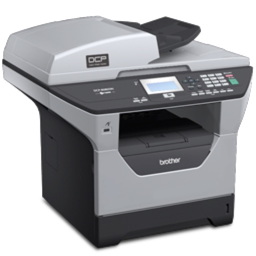 As you may know we do offer three ways to scan for our MBS Plugins:
 For any software out there, the latest version is of course the best version ever released. That is true for our plugins, Xojo and FileMaker. But a lot of people do not use the latest one, but stay with older versions. That is usually fine as we don’t want to change a running system and risk that one change on a component requires other components or scripts to be updated to work again.
 New in this prerelease of version 8.1 of the MBS FileMaker Plugin:
 In Zusammenarbeit mit der DenkForm GmbH bieten wir eine Schulung zum MBS Plugin an. Am 1. März 2018 (auch 3. Mai 2018, 6. Dezember 2018, 7. März 2019) können Sie in Hofheim am Taunus an einer eintägigen Schulung teilnehmen. Lernen Sie die über 5000 Funktionen einmal näher kennen und wie Sie sie effektiv einsetzen. Sammeln Sie Ideen und verbessern Sie ihre FileMaker Lösungen durch den Einsatz unseres Plugins.
 Die
Die 


 Sending Emails with various servers can be a challenge. In this blog article we like to collect the settings needed for using our
 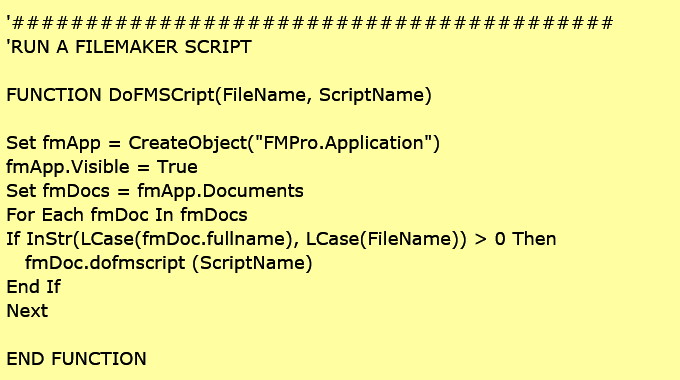 We do support running Windows scripts with both JavaScript and VBScript with our plugins for Xojo and FileMaker:
 As you may know we provide PHP support in our
  Am 8. Februar treffen sich interessierte FileMaker Entwickler in Neu-Ulm zum Austausch von Neuigkeiten, Erfahrungen und Tipps & Tricks.