If you need our plugins for a bigger organization, it may be difficult to order each license or consulting service on it's own. For some organizations it can take a year between someone needing a license an the delivery of a license key! The bigger the organization the longer orders may take due to bureaucracy.
So instead of going through specifications, offer, purchase order, invoice and license delivery, we can offer alternatives.
First, you can order license with updates for several years included. This way you don't need to come back every year for a license update.
Second, we can setup a software maintenance contract. This gives you a subscription for the plugins you need. We would send license keys and invoice for initial purchase or when old keys expire. If you need help with using a plugin, your support requests gets priority and of course billed. On the month end, we send an invoice for development time. The contract defines rates and availability.
If you are interested, please contact us.
I just packed a few hundred pens in my bags for the conferences in
Houston and
Salzburg.
If you want one, be sure to visit the conference and look for me.

As you see over the years we got different designs for the pens. Xojo used to be named Real Studio and REALbasic. We even fixed the typo in FileMaker and capitalized the M. Next time we make pens, I will probably change again and use the
.com domain.
Did you get one of my pens the last year?
If you have a different design, please let me know.

Recently I visited developers in Switzerland and we discussed visiting conferences. Some developers love to go to conferences and others are skeptical whether the cost is worth it. So lets think about reasons why you should go:
1. Get out of your office
Some developers have not much contacts to other developers. They code in their offices or at home. Some have no colleagues to talk with or don't participate in the forums.
So please use the conference as a chance to get out of office and meet others. A little bit travel may make a difference to your normal work week. Meet other people who may have the same problems and give you conceptions to solve them. Get a different point of view on your development workflow.
2. Add extra days
When you decide to visit a conference, please add a few extra days. No need to rush to save a few bucks. Stay at least a day before and after the conference to relax a bit, join any before/after activity with other attendees and enjoy a bit of sight seeing.
Especially when I fly internationally I often need a day to do the work left on the desk while I was in the airplane.
Often it can be much cheaper to fly to another city, enjoy a few more days there and drive to the conference city.
As far as I see my ticket price to Dallas is about half of the cost to flight to Austin. And Frankfurt Dallas would be a direct flight. With the savings on airfare, I can easily pay a few extra hotel nights. And even the accounting will not complain if I show them the cost for short stay (expensive) vs. longer stay (cheaper).
(Last year's Xojo conference was in Austin. But for next year's FileMaker DevCon in Phoenix, I may get a flight to Los Angeles or Denver.)
3. Learn something
At the conference, go and visit a few sessions. The title often doesn't tell whether this will be interesting or not. Don't go to topics where you know most already as that could be a waste of time. If some sessions are recorded, go into the others who aren't. You can watch recordings later. Try to pick sessions with new topics you are not familiar with or at least some which have a different view on something you know. This way you have more things to learn about.
Be sure to visit the keynotes to learn what is new and coming soon. You depend on our development tools and if something is going to change soon, you should know it first hand. And later on the conference ask all the questions you may have.
4. Get contacts
Simple rule: Try to talk to everyone a few minutes. Ask what they do, what they think about the news at the keynote and how they enjoy the conference. It is always good to have contacts to people which may at some day help you. For example in a forum, or as contractor or employee. For self employed developers, it may be good to present yourself and maybe someone will hire you in future.
5. Talk to engineers
Talk to the developers writing your tool. Know who does what in the company, so you can email them directly with problems to get a quick answer.
Tell the engineers what you need, what you like, what you don't like. Telling them what concerns you have could lead to a change in some things. If you have concerns about licensing, platform support, upcoming features or problems they may not be aware of, please tell them.
Also fill bug reports and send them the IDs, so they can keep an eye on the cases and follow up with you.
6. Show problems to experts
If you have a problem, bring an example project to the conference. Show it some engineers and ask for help. Maybe they can run Xojo/FileMaker in debugger itself and see what line in the C code causes the exception you see. The conference visit may be paid if a big problem is solved for you at the conference!
At least you may find a workaround with the engineer and get a fix with the next version.
7. Lobby
Stay at the conference. Don't go shopping in-between. You are here to learn and get contacts. So use the time between sessions or if no interesting session is running to talk to people. Especially use the time to have some private time with a tool vendor in the exhibition area or an engineer. You easily pay $100 per hour at the conference for your trip, so don't waste it.
I highly recommend everyone to visit a conference if they can. If the conference is in a holiday destination, maybe bring family and enjoy a few extra days. If the company pays for your flight, your hotel room and a rental car, it should be no big problem to buy an additional flight ticket and just take your wife to a holiday with low cost for yourself.
See you at the next conferences:
FileMaker Inc. announced their new
FileMaker Cloud service. In your amazon account add can add an EC2 instance for a virtual private server. Inside you can now install CentOS 7 64-bit with FileMaker Server for Linux. This gives you a server in the cloud which you don't need to maintain yourself. Amazon will keep it updated and running. You can upload your database on the admin panel and use your solution. The use case for this could be:
- You have a team of users needing a solution, so FLT is the matching licensing scheme.
- You don't want to host yourself.
- You are okay with hosting your server with Amazon.
- You are okay with using data centers in US. Other data centers will come in next months.
- You are okay with using FileMaker Server 15 and clients in version 15.
If you met those criteria, you should try it. Those virtual servers are great for temporary solutions. If a client needs a new solution for a sale promotion for a few months, you can start a server today. Run it for 3 months, download a copy of the database and stop the server. No need to sign up for a year long contract.
We'll see how this works for people in US trying it. This is a 1.0 release, so there will be issues. Other data centers will be added according to FileMaker Inc. And once we have data centers within the same jurisdiction as our company, we can start using this for real testing. Currently I have myself a small test server in Ireland and it is pretty responsive.
MBS Plugin for Linux is available if you need. We will include it in 6.5 betas soon. Gladly I started building libraries for Linux at DevCon in July when we heard first time about FileMaker Cloud. Be sure to watch the Cloud Videos:
Nickenich, Germany - (September 27th, 2016) -- MonkeyBread Software today is pleased to announce
MBS FileMaker Plugin 6.4 for Mac OS X or Windows, the latest update to their product that is easily the most powerful plugin currently available for FileMaker Pro. As the leading database management solution for Windows, Mac, and the web, the FileMaker Pro Integrated Development Environment supports a plugin architecture that can easily extend the feature set of the application. MBS FileMaker Plugin 6.4 has been updated and now includes over 4100 different functions, and the versatile plugin has gained more new functions:
For Mac we now support scanning directly via the OS APIs called
ImageCapture. So we can support all the scanners supported by Image Capture application by Apple. For Windows we now support
TWAIN with 64-bit better.
When using FileMaker on Mac you can now enjoy our contextual menus. We add a generic contextual menu to all table controls. We used to have a menu there since version 6.0 to copy the content of the table. Now you can use copy, cut, paste and delete in addition. For the script workspace we have a command to activate and deactivate script steps.
If you like SQL, you can now use the queries made with
FM.SQL.Execute and insert the records via
FM.SQL.InsertRecords into your FileMaker database, e.g. another table. Or you use
FM.SQL.InsertRecordsToSQL and insert the result of the query into another SQL database, e.g. MySQL. Both functions help to easily copy records from one table to other.
With
DynaPDF you can now create interactive buttons in your PDFs and link them to javascript actions. We now provide details on all colorspaces and allow to easily list and extract embedded images.
The
new time parse and format functions help you with importing or exporting times and dates. You can specify the format and let the plugin parse any date, time or timestamp. Of course you can format times, dates or timestamps as well.
We improved our
dialog,
toolbar,
list,
LDAP,
PHP,
RichText,
RunTask,
slideshow,
file and
email parser functions. We rewrote the
AppleScript functions to better work in 64-bit applications and prepared the plugin for future FileMaker releases.
Finally we updated OpenSSL to version 1.0.2i, SQLite to 3.14.2 and
DynaPDF to 4.0.3.9.
More details in the
release notes. Please take the time to check our 400 example databases and check where you can use our plugin features in your solutions.
PS: We have a version for Linux, if you like to try it with FileMaker Cloud, too.

New in this prerelease of the 6.4 plugins:
Download at
monkeybreadsoftware.de/filemaker/files/Prerelease/ or ask for being added to the dropbox shared folder.
 Do you have a need to synchronize Todos from your FileMaker database to the Mac, iPad or iPhone?
Today I have a script which may serve as an example on how to synchronize from a table in FileMaker with Todos to the Reminders app on a Mac. Those reminders can than be sychronized via iCloud to your iPhones and iPads. For a Server based solution, you need a Mac (a robot) doing this with FM Pro and share reminder lists from there to your devices.
The script needs to be compatible for us with FileMaker 13, so we use the older Calendar API. For newer projects with 64-bit only (and possibly iOS), you prefer the newer Events API. Be aware that in the older Calendar API in newer OS X versions the DueDate is no longer a timestamp, but just a date. The Events API can do it correctly and use a timestamp. FileMaker 15 is 64-bit only, so you can use both function sets, but please decide which is better for you.
The script can be run regularly, e.g. via Schedule functions. It loops over current set of records. You may want to limit the records to only the ToDos for the next three weeks. If there is an UID saved for the todo, the reminder is checked. If it exists and is newer, we sync back title, notes and completed flag. You can add more fields. A special case here is to allow user to store in notes how long it took to do the job. That value is stored in a field in FileMaker. If the event is newer in FileMaker, we overwrite all values. If we have no UID, we create a new reminder in the right reminder list (calendar). How you map your priorities and completed state, is of course dependent to your database. But please save the UID for later sychronization.
If you build a solution with this scirpt please edit it. Change all fields to your field names and add some more error checking. You may want to implement slightly different rules for synchronization, especially on who wins in case of conflicts.
(more)

As you may know the Webviewer in FileMaker uses Internet Explorer version 7 for rendering websites, even if you have a newer version of Internet Explorer installed.
We can change that version to 10 or 11 if you need with our new
Webview.SetInternetExplorerVersion function. There we can switch FileMaker to use a newer version, e.g. version 11.
In a test on Windows 10, we get by default this browser version:
Mozilla/4.0 (compatible; MSIE 7.0; Windows NT 6.2; Win64; x64; Trident/7.0; .NET4.0C; .NET4.0E; Tablet PC 2.0; .NET CLR 2.0.50727; .NET CLR 3.0.30729; .NET CLR 3.5.30729)
and with setting it to 11000, we get this:
Mozilla/5.0 (Windows NT 6.2; Win64; x64; Trident/7.0; rv:11.0) like Gecko
Just call the function once when running your solution.
Available for 6.4pr9 plugin or by email on request.
New in this prerelease of the 6.4 plugins:
- Added FM.GetSQLBatchMode and FM.SetSQLBatchMode functions to speed up some SQL inserts.
- Changed trace feature to not log calls to Log function.
- Added List.HasValue function.
- Trace now logs duration in seconds for long running SQL commands.
- Added contextual menu commands for copy/paste to script workspace and other list controls.
- Changed plugin to show dialogs when using expired license key.
- Fixed Dialog.AddField to work on OS X 10.9 or older. Also fixed black label background for FileMaker 11.
Download at
monkeybreadsoftware.de/filemaker/files/Prerelease/ or ask for being added to the dropbox shared folder.
This evening we had an excellent dinner together with FileMaker and Xojo developers in Zurich:

Second meeting with 12 people in total (and 8 the day before).
Interesting what people do and what they can show. The
LehrerOffice application, made in Xojo, has an impressive feature set with custom reporting, self written controls including a grid and impressive user interface.
Sett you at the next conference in
Houston,
Salzburg,
Berlin or
Phoenix.

The following product ideas for FileMaker are related to the plugin SDK and plugin usage. I appreciate if your vote helps getting some attention for them from FileMaker Inc.. If the plugin SDK improves over future releases, the plugin authors can write better plugins and provide better features to you. Here 5 new ones which I got the idea from our FileMaker developer meeting in Zurich today:
As you see some basic needs like having any idea why a plugin doesn't load, or easily access content of a container or just getting a 64-bit number precisely returned to you from a plugin.
And some older ideas:
Thanks for reading and voting.
This evening we had an excellent dinner together with FileMaker and Xojo developers in Zurich:

We had a lovely talk about plugins, Xojo and FileMaker and about the things people do with the tools. Amazing how many here use both tools to build solutions!
Talking about conferences, I hope to see you guys again in
Houston,
Salzburg,
Berlin and
Phoenix.
PS: Tomorrow the second round, maybe with double the number of people.
On the trip to Zurich I had some spare time and worked on extending the contextual menu for use in FileMaker. So the plugin will simply provide in contextual menu some menu entries from FileMaker's menu. If you choose a menu entry, we redirect the call to trigger the original menu command internally. So FileMaker doesn't notice. We even take the txt from FileMaker menu bar so they are localized automatically.
Here in German FileMaker 15 with script workspace:

and in English FileMaker 13 with script editor:

Soon available with next plugin. Or earlier if you ask kindly by email.
Today we want to show you how to register our plugins properly in a solution.
This is the start script for your solution which calls the InitMBS script to register:
#Register for client
Perform Script [“InitMBS”]
#Register for server. Will be ignored if no server or no plugin installed on server
Perform Script on Server [“InitMBS”]
As you see we register both locally for the client and for the server. As we don't wait for server script to finish, it can run on server when there is time. And if there is no server, the line will be ignored. The InitMBS script looks like this:
#Enable debug logging. Shows messages in DebugView/Console.app
Set Variable [$r; Value:MBS("Trace")]
#Register if needed for right platform
If [MBS("IsRegistered") = 0]
If [MBS("IsRuntime")]
Set Variable [$r; Value:MBS("Register"; "test"; "Complete"; "Runtime"; 123; 123)]
Else If [MBS("IsServer")]
Set Variable [$r; Value:MBS("Register"; "test"; "Complete"; "Server"; 123; 123)]
Else If [MBS("IsClient")]
Set Variable [$r; Value:MBS("Register"; "test"; "Complete"; "5 Seats"; 123; 123)]
Else
Set Variable [$r; Value:"Unknown platform: " & MBS("Platform")]
End If
#Show errors, so developer can fix them
If [$r ≠ "OK"]
Show Custom Dialog ["InitMBS failed."; $r]
End If
End If
#May initialize other stuff
#like dynapdf with library in extensions folder
If [MBS("DynaPDF.IsInitialized") = 0]
Set Variable [$DynaPDFLicense; Value:"1003637-16022016-3-8-12-685C57F..."]
If [MBS("IsWindows")]
Set Variable [$r; Value:MBS( "DynaPDF.Initialize"; "dynapdf.dll"; $DynaPDFLicense)]
Else If [MBS("IsMacOSX")]
Set Variable [$r; Value:MBS( "DynaPDF.Initialize"; "dynapdf.dylib"; $DynaPDFLicense)]
Else
Set Variable [$r; Value:"Unknown platform: " & MBS("Platform")]
End If
#Show errors, so developer can fix them
If [$r ≠ "OK"]
Show Custom Dialog ["InitMBS failed."; $r]
End If
End If
As you see we enable Trace. This is useful to see calls to the plugin in DebugView application (Windows) and Console.app (Mac). For Server the messages are written to /Library/FileMaker Server/Logs/stderr.log file. On Windows you need to run DebugView as admin and enable Global Win32 Debug logging to see messages from Server plugin.
Next we check if plugins are not registered and register them with the right key depending on whether we are a client or server. If this fails, we show an error message. Next we check for DynaPDF and register it with a license key and the right name of the library. By just passing the library name, the plugin will look for this file in the same folder as the plugin itself.
If you have questions, please do not hesitate to contact us.
New in this prerelease of the 6.4 plugins:
- Updated SQLite to 3.14.2.
- Added Toolbar.SetImage, Toolbar.SetLabel, Toolbar.SetPaletteLabel, Toolbar.SetTooltip.
- Added Dialog.AddField, Dialog.ClearFields, Dialog.GetFieldText and Dialog.SetFieldText.
- Added SQL.ListCommands and SQL.ListConnections.
- Changed SQL.NewCommand and SQL.NewConnection so you can pass your own ID instead of getting one from plugin.
- Added SQL.GetCommandTag, SQL.GetConnectionTag, SQL.SetCommandTag and SQL.SetConnectionTag.
- Added ImageCapture functions to replace TWAIN on Mac.
- Added ProgressDialog.Reset function.
Download at
monkeybreadsoftware.de/filemaker/files/Prerelease/ or ask for being added to the dropbox shared folder.

For our Germans speaking users:
Wir haben die Artikel zum MBS Plugin aus dem FileMaker Magazin gesammelt hier online gestellt: FileMaker Magazin Artikel:
- FMM 201604: Webservices in FileMaker einbinden, Verwendung von CURL-Befehlen im „MBS-Plugin“
- FMM 201603: 4000 Funktionen in zehn Jahren, Ein kleiner Rückblick auf das MBS-Plugin
- FMM 201601: iOS App SDK, Eigene iOS-Apps auf Basis von FileMaker
- FMM 201506: Authentizität durch Signaturprüfung, Daten übertragen und Veränderungen bemerken
- FMM 201505: Wünsche werden wahr, Neues im „MBS-Plugin“ bei der FMK 2015
- FMM 201504: Datensätze effizient kopieren, Mit etwas SQL und dem MBS-Plugin
- FMM 201503: Neue Datensätze ohne Layoutwechsel, Mit Hilfe von SQL-Befehlen und dem MBS-Plugin
- FMM 201501: QuickList, Schnelle Listen für FileMaker
- FMM 201405: E-Mail-Versand, Mehr Möglichkeiten mit dem MBS Plugin
- FMM 201405: Vorbereiten von PDFs für den Versand, Verkleinern großer Dateien
- FMM 201402: Variablen, Globalisierte Lösungen per Plugin
- FMM 201401: Kalendertermine und Erinnerungen, Wie man Ereignisse aus FileMaker anlegt
- FMM 201306: Zip-Archive auslesen, Bilder aus OpenOffice-Dokumenten extrahieren
- FMM 201303: Script-Träger übers Netzwerk, Scripts triggern übers Netzwerk
- FMM 201303: Syntax Coloring, Berechnungen und Scripts bekennen Farbe
- FMM 201203: Arbeiten mit Dateidialogen, Komfortablere Dateiexporte per MBS Plugin
- FMM 201105: Bilder skalieren mit dem MBS FileMaker Plugin, So bleibt Ihre Datenbank schlank
Wir empfehlen allen FileMaker Anwender ein Abo vom Magazin und den Kauf der alten Ausgaben. Das FileMaker Magazin ist eine excellente Quelle von Informationen, Anleitungen und Profitips.
A little idea which came to mind today:
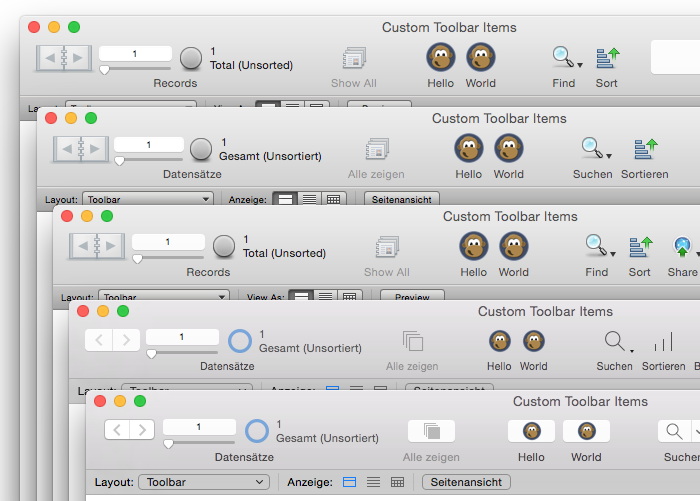
FileMaker 11, 12, 13, 14 and 15.
As you see we put a custom label and image on the toolbar items for delete and add record buttons.
You may know that we can create our
own toolbar buttons. But we can now also modify existing toolbar items. You can now tell the plugin to keep an eye on the toolbar items which FileMaker uses. And when the plugin sees a FileMaker button being created, it can put a modified label on the button. Enjoy!
PS: You can even use triggers to setup this before you open a new window, so the new window will use the customized icons/labels.
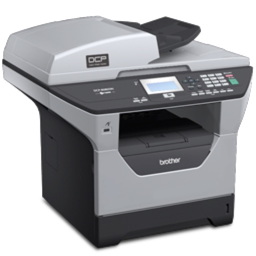 For next version of our FileMaker plugin, got a few new ImageCapture functions.
Those functions should allow you to scan images from a flatbed or document feeder scanner. Even for 64-bit and without TWAIN drivers.
So all scanners working in Digital Images application coming with OS X should work just fine in FileMaker. You can query device informations and parameters. And of course you can set parameters like whether you like to get gray scale or color images, the file type, resolution or the area to scan. All scans are performed to files on disk in a given directory. Than you can import them to container fields. Here a sample script:
# set parameters
Set Variable [$physicalWidth; Value:MBS("ImageCapture.GetParameter"; "physicalWidth")]
Set Variable [$physicalHeight; Value:MBS("ImageCapture.GetParameter"; "physicalHeight")]
Set Variable [$r; Value:MBS("ImageCapture.SetParameter"; "documentType"; "USLetter")]
Set Variable [$r; Value:MBS("ImageCapture.SetParameter"; "documentName"; "Scan")]
Set Variable [$r; Value:MBS("ImageCapture.SetParameter"; "resolution"; 300)]
Set Variable [$r; Value:MBS("ImageCapture.SetParameter"; "bitDepth"; 8)]
Set Variable [$r; Value:MBS("ImageCapture.SetParameter"; "pixelDataType"; "RGB")]
Set Variable [$r; Value:MBS("ImageCapture.SetParameter"; "documentUTI"; "jpeg")]
Set Variable [$r; Value:MBS("ImageCapture.SetParameter"; "downloadsDirectory"; "temp")]
Set Variable [$r; Value:MBS("ImageCapture.SetParameter"; "scanArea"; 0; 0; $physicalWidth; $physicalHeight)]
Set Variable [$p; Value:MBS( "ProgressDialog.Reset")]
Set Variable [$p; Value:MBS( "ProgressDialog.SetTitle"; "Scanning" )]
Set Variable [$p; Value:MBS( "ProgressDialog.SetBottomText"; "" )]
Set Variable [$p; Value:MBS( "ProgressDialog.SetTopText"; "Scan from Flatbet scanner." )]
Set Variable [$p; Value:MBS( "ProgressDialog.SetButtonCaption"; "Cancel" )]
Set Variable [$p; Value:MBS( "ProgressDialog.SetProgress"; -1 )]
Set Variable [$p; Value:MBS( "ProgressDialog.Show" )]
Set Variable [$r; Value:MBS("ImageCapture.requestScan")]
Set Variable [$p; Value:MBS( "ProgressDialog.Hide" )]
If [MBS("iserror")]
Show Custom Dialog ["Failed start scan"; MBS("Text.RemovePrefix"; $r; "[MBS] ")]
Exit Script []
End If
Set Variable [$Paths; Value:MBS("ImageCapture.ImagePaths")]
Set Variable [$Count; Value:ValueCount ( $Paths )]
Set Variable [$Index; Value:1]
Loop
Set Variable [$Path; Value:GetValue($Paths; $index)]
New Record/Request
Set Field [Images::Image; MBS("Container.ReadFile"; $path)]
Set Variable [$r; Value:MBS( "Files.Delete"; $Path )]
Commit Records/Requests [No dialog]
Set Variable [$Index; Value:$index + 1]
Exit Loop If [$index > $count]
End Loop

Today ten years ago we released the MBS FileMaker Plugin in Version 1.0.
Here the original announcement:
[ANN] MBS Plug-in For Filemaker
Make FileMaker Windows Semi Transparent!
Take Screenshots from FileMaker
Run an Applescript on field exit
and more...
Monkey Bread Software, maker of the popular MBS Plug-in for RealBasic and geist interactive have teamed up to bring the extensive MBS function library to FileMaker. The MBS RealBasic plug-in contains over 10000 functions, and this release represents the first step in a project to bring as many of those functions to FileMaker as make sense. Many many more features to com in the future.
The plug-in is available for FileMaker 8 and 8.5. It is available for Windows XP and as Universal Binary for Mac OS X There is a Developer Tool available to help you get started quickly with documentation and Calculation builder. Demos are available on the website
more info: geistinteractive.com
download: monkeybreadsoftware.de/filemaker/
Read also:
4000 functions in 10 years
Thanks for the support over years. If you need a license: Try coupon code TenYears for orders via Share-It.
New in this prerelease of the 6.4 plugins:
- Updated to DynaPDF 4.0.3.9
- Added Container.ReadFile and Container.WriteFile.
- Changed email functions to return error if you pass email address, subject or message ID including newline character.
Download at
monkeybreadsoftware.de/filemaker/files/Prerelease/ or ask for being added to the dropbox shared folder.

Once again I come to Switzerland in the Zurich area.
If you like, you can join me for a dinner with other developers. Please vote for a date here:
I will be there and would appreciate some companion for the evening. Some shop talk about development, plugins, conferences and other cool topics.
Update: I will do both days and everyone is welcome. See you there!
There is an upcoming meeting of FileMaker developers in Dallas, Texas:
When: 4th October 2016.
Time: 11 am
Where: Egg and I restaurant, 15203 Knoll Trail Dr., Dallas, TX 75248
We meet, have lunch together and I can tell you all about my MBS Plugin for FileMaker.
If you like to meet the
FMP User Group regularly, feel free to check the
website and join the September meeting.
If you are interested in personal training, consulting or help with our plugin, feel free to contact me for additional meetings.