The last days I chatted with a FileMaker developer who had a need for some XML handling functions. So I added a few functions, first one to extract node names from an XML:
XML.NodeNames. You pass in a XML and it can give you the list of node names in the first layer or if you want recursively all layers.
Next we got a function to get a subtree (
XML.SubTree). So you may have a big XML with a smaller chunks and we can query nodes inside a bigger tree. This includes getting the nth entry like the nth record in a list of records.
The
XML.ExtractText extracts the text inside an XML tree. So all text portions are returned as a list. You can first use the subtree function to get a part of a XML to only get a portion of the texts.
We got a few functions to handle attributes.
XML.GetAttribute returns the value for the attribute.
Setting Variables
Now we got something special for FileMaker Scripts.
We parse an XML with the
XML.SetVariables function, identify all nodes with text values and create variables for you automatically. The plugin sets those variables and returns a list of the names. Later you can pass the list to
XML.ClearVariables to clear them for another run.
For example the script looks like this:
Set Variable [$XMLVariables; Value:MBS( "XML.SetVariables"; test::input; 1)]
Set Variable [$otherVariable; Value:1]
#See Variables in Data Viewer
Set Field [test::output; MBS( "XML.ClearVariables"; $XMLVariables)]
Set Variable [$someVariable; Value:1]
The test XML:
<?xml version="1.0" encoding="UTF-8"?>
<Job>
   <Name>Test</Name>
   <CreationDate>2016-11-23 12:34:56</CreationDate>
   <Reference>8F223E5F-6A57-4ECD-9AB2-0FD0DA3414FF</Reference>
   <Priority>5</Priority>
   <Comment>Just a test.</Comment>
   <Labels>
      <Label>green</Label>
      <Label>work</Label>
      <Label>test</Label>
      <Label>important</Label>
   </Labels>
</Job>
And in the debugger all the variables may look like this for a test XML:
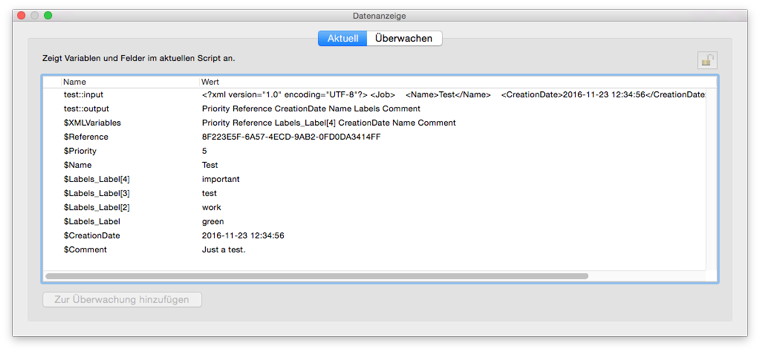
So you can have an input XML, split the values into variables using our plugin and process them in your script. I hope this is handy for you. What do you think?
Plugin will be available soon. If you like to test today, you can email me.
Just in time for Christmas Dana posted a
teaser for
XDC 2018.
The question to be answered is where the conference will take place. Until the next newsletter (
subscribe here) in January tells us, we can enjoy betting where it could be.
Austin is not easy to reach, but convenient for Xojo Inc. as they have a couple of people living there who won't need any airplane ticket. Houston for 2016 was similar easy for Xojo Inc. with just a few hours drive from Austin. Dallas could fill a similar role with a big airport and in drivable distance from Austin.
We know that it will be USA and probably somewhere with direct flights internationally.
I would expect New York, San Francisco, Boston, Miami and and a few others to be too expensive.
And with the list of direct flights available from Paris and Frankfurt, I would bet on Seattle.
What is your guess?
There is no XDC 2017, so if you like to join a conference before 2018, please consider our conference in Europe:
The
MBS Xojo Developer Conference will take place 4th/5th May 2017 in Berlin, Germany. An optional training day is available.
Frohe Weihnachten und ein gutes neues Jahr!
Merry Christmas & Happy New Year
Joyeux Noël et Bonne Année
Buon Natale e Felice Anno Nuovo
Franziska, Sebastian, Michael, Monika & Christian Schmitz
With iOS 10.2 we finally got the option in accessibility settings to define for the home button that it should not activate voice control or Siri.

For years I hated it when accidentally voice control turned on with iPhone in my pockets. Depending on what the iPhone recognized, it dialed people or played music. I did disable voice calling and Siri, but the voice control for music stayed on. Now Apple added the switch we needed for at least 5 years!
For me the best feature of 10.2 and a reason to upgrade immediately.
Anyone else so happy?

Do you sometimes run into a Windows error code?
Sometimes one like -2147221499 or 80040005 and you have no clue what it is?
You can lookup error codes on Microsoft Website:
https://msdn.microsoft.com/en-us/library/windows/desktop/ms681381(v=vs.85).aspx
But that list is only for regular error codes.
The COM/OLE functions return different error codes called HRESULT. They can be decoded, see
Structure of COM Error Codes and there are various lists for
HRESULT values.
Which brought me last year to write a little tool to collect errors from various header files and put them in a big table:
Windows Error Codes
There you can quickly lookup the error codes, in both decimal and hex notation.
We had a nice meeting with FileMaker developers in the
bear and wolf park:

We even had some guests from Swiss and Frankfurt/Main coming. Topics included using SVGs to display complex layout information of print jobs with creating the SVG data on the fly in a script, access to web services, FileMaker news/licensing, developing business apps and of course using MBS FileMaker Plugin.
I recorded the presentation about the MBS Plugin goodies from the
FMValencia conference.
Learn about the syntax coloring, error highlighting, context menus, script and relation graph search.
Check the
SyntaxColoring functions.
To see notifications for wrong variables, please
enable the variable checks and enable notifications for FileMaker in system preferences.
(more)
The new year 2017 is coming soon and I am already looking for which conferences I may visit. So here is a list of conferences which may be of interest for FileMaker developers:
- MBS Xojo Conference, English, 4th/5th May 2017 in Berlin, Germany, see monkeybreadsoftware.de/conference
In case you want to check out Xojo.
- .fmp[x]Berlin, English, 1st to 3rd June 2017 in Berlin, Germany, see dotfmp.com
The biggest english speaking FileMaker conference in Europe.
- FMValencia, Spanish/English, 17th June 2017 in Valencia, Spain, see fmvalencia.com
The FileMaker group from Valencia is meeting again.
- FileMaker DevCon, English, 24th to 26th July 2017 in Phoenix, USA, see filemaker.com/developers/devcon/
The conference in USA with 1500+ attendees.
- FileMaker Konferenz, German/English, 12th to 14th October 2017 in Salzburg, Austria, see filemaker-konferenz.com
The German conference with around 200 people usually.
Somewhere in October we expect also conference in Dutch: fmsummit.info, Italian: fmdevcon.com, French: fmconf.com, Japanese: filemaker.com/jp/conference/2016/ and one in scandinavian countries.
Is there one I missed? Please let me know. Especially when you have dates.
Am 16. Dezember 2016 treffen sich ab 15 Uhr FileMaker Entwickler im Restaurant Bärenblick im Alternativer Wolf- und Bärenpark Schwarzwald in Bad Rippoldsau-Schapbach.
Es empfiehlt sich etwas früher zu kommen und eine Runde durch den Park zu machen und den Bären zuzuschauen.
Der Eintritt in den Park ist obligatorisch und kostet 5 €.
Ich versuche selber dabei zu sein bei diesem Termin. Wer kommt noch?
siehe
Stammtischseite beim FileMaker Magazin und
baer.de.
The year 2016 will end in less than three weeks. Do you need some more licenses?
- You can order licenses for 2017 or later and have delivery plus payment done in 2016.
- And of course you can order updates for several years in advance for all your MBS products.
- As all licenses are per developer, you should check if you got a new developer in your team this year and adjust licenses to match team size.
- If you need a Xojo license (new or update), we can always check whether a bundle with Xojo offers an advantage for you.
- For FileMaker please check if you have enough license for the number of seats or servers you have in use.
Especially if you run on a budget and you want to spend some money in the old year, you can buy updates for several years in advance.

Nickenich, Germany - (December 12th, 2016) -- MonkeyBread Software today is pleased to announce
MBS FileMaker Plugin 6.5 for Mac OS X, Linux and Windows, the latest update to their product that is easily the most powerful plugin currently available for FileMaker Pro. As the leading database management solution for Windows, Mac, and the web, the FileMaker Pro Integrated Development Environment supports a plugin architecture that can easily extend the feature set of the application. MBS FileMaker Plugin 6.5 has been updated and now includes over 4300 different functions, and the versatile plugin has gained more new functions:
For this release we now include a Linux version. This plugin file can be used with
FileMaker Cloud, or on any FileMaker Server running under 64-bit Linux. Over
2200 functions are instantly available for Linux, others may follow later. Please let us know what features you'd like to see for FileMaker Cloud in the future.
We rewrote our
Audit function. It's now much faster, eliminates duplicate log entries and only records one log entry for a new record to reduce the amount of log records. You should see a big performance gain when using tables with a lot of fields and a FileMaker Server for hosting.
The
menu commands have been reimplemented for Windows. Now we support all the
font styling we had on Mac before. You can now use custom fonts, bold/italic/underline/strikeout styles,
font sizes, colors and a background color. Instead of simple checkmarks, you can use bullet, diamond or mixed marks.
For macOS 10.12 we added several
TouchBar functions. You can define one
app wide and per
window touch bars. Each can have buttons which trigger scripts or evaluate expressions. This way you can offer contextual commands on the keyboard and react in FileMaker. You can even define buttons to use in FileMaker itself, like a button to show/hide the debugger.
To interface existing
Java classes, the plugin can now optionally talk to
Java. From older
Java 6 to latest
Java version 8, you can load whatever
Java version you like. Than you can create objects from classes and call both class and object methods. You can set and query properties on those classes or objects and exchange data directly. Containers can be passed/returned to/from
Java as byte arrays for efficient data exchange.
For those using flatbed/feeder scanners, we can now interface them on Windows via native drivers. We use the official
WIA interface from Microsoft which most scanners nowadays support. You can either use
system dialogs to scan or send scan commands directly. On Mac we now provide optionally windows to select scanner or perform scans. In total, we now provide three ways to scan: 1st
TWAIN for macOS and Windows, 2nd
ImageCapture for macOS and 3rd
WIA for Windows. All three ways can get your scans with or without a
dialog to an image file.
For the Script Workspace we provide an enhanced contextual
menu. We provide copy/cut/paste/delete commands at your finger tips and commands to enable/disable script steps. For perform script steps we now provide a way to jump directly to the target script.
On Windows you can now control the print
dialog. Our plugin can automatically select
printer, paper format, paper tray and other options. You can query available printers, paper formats and trays. For Mac, please use our existing PrinterDialog functions.
We added more
DynaPDF functions: You can now directly draw styled text from a field in your layout to a PDF. The plugin internally converts the styles to
DynaPDF formatting commands. You can now
process data from XFA forms automatically and when printing PDFs on Windows, you can now optionally show a print
dialog.
On Mac you can workaround the printing issues with FileMaker and macOS Sierra. If you don't like the scrolling elasticity in your layouts, you can disable it. The plugin can now list and trigger commands on the FileMaker windows directly. For example in a table view, we can trigger the
dialog to customize which fields are shown. Via plugin functions you can control the
updater in FileMaker, trigger update search or change various options.
For editing Excel documents, you can copy sheet content from one sheet to another, even across books. You can copy rows from one sheet to another. When writing formulas you can now include the pre-calculated result as number, text or boolean value.
You can now calculate the width of a text with a given
font. So you can automatically cut text and add dots via custom functions in your layouts.
For Windows we added still photo capture to our video recorder. For the Webviewer you can now switch it to silent mode and
javascript errors are not longer displayed to users.
Our
barcode generator learnt two new types: DotCode and HanXin. You can query the memory used by FileMaker, clear recent
files in
preferences on Mac, list mounted volumes, change orientation for images in EXIF metadata, send text attachments in emails and get/set the current working directory.
We updated
CURL library to version 7.51.0,
DynaPDF to 4.0.5.15, libSSH2 to 1.8, libXL to 3.7.0, OpenSSL to 1.0.2j, SQLAPI++ to 4.1.10, SQLite to 3.15.0 and zint to 2.5.
More details in the
release notes. Please take the time to check our 450 example databases and check where you can use our plugin features in your solutions.
Current MBS FileMaker Plugin in version 6.4/5 support all FileMaker versions from 8.5 to 15. That is ten years!
Our plugin uses the FileMaker 7 plugin format. So until FileMaker 6 the way of writing plugins was different and changed for version 7. When I started writing a FileMaker plugin, the version 8 was current and so I started there and quickly made sure my plugin works on 7 and 8. Over the years we continue with the same interface to FileMaker. All newer functions are weak linked, so our plugin loads in older versions.
For Mac you can use FileMaker 8.5 (Released 2006) to current one. That is due to the switch to Intel CPUs by Apple in 2006 and 8.5 was the first version to support x86 CPUs. We later dropped PPC support and you still can get a copy of our plugin in version 2.4 for PPC support. Current plugin requires Mac OS X 10.6 and newer.
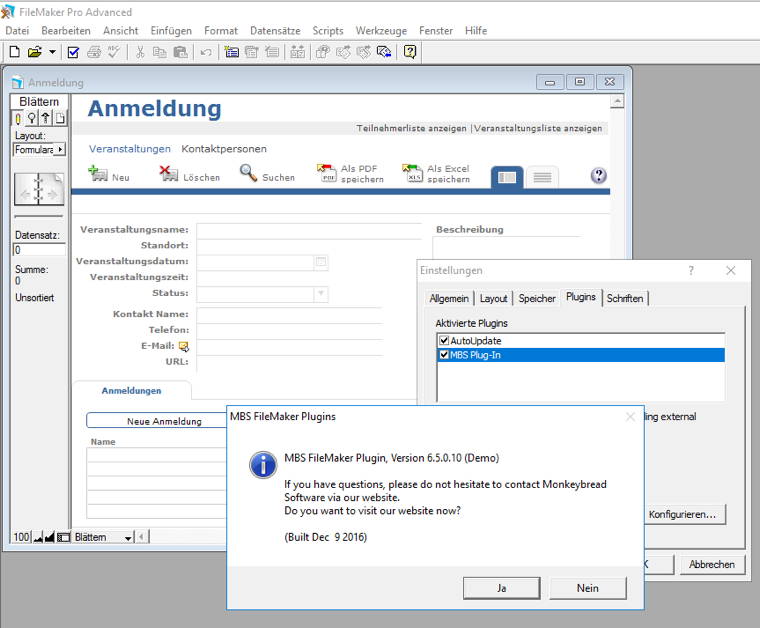
With Windows you can even go back to FileMaker 7 if you like, 12 years back! Current plugin works fine there as well as with newer versions of FileMaker. The picture above shows FileMaker 8 on Windows 10 (Server 2016) with current MBS Plugin from earlier today. We support Windows XP and newer.
If you are lucky to be a member of FileMaker's beta testing, you an even try our plugin with the next FileMaker version and find some new features.
Finally please keep your plugin installation up to date to benefit from bug fixes and improved features. Don't waste hours figuring out details about a bug in an ancient plugin version, which has been fixed last year.
Just to remind everyone. If you have an older license and you missed to update it for 3 years, you are no longer eligible to order an update for the license. You can of course order a new license at any time.
So today we emailed people from 2014 to remind them to update before the end of 2016.
The key idea is that we offer discounted license prices for renewing licenses to honor you staying up to date.
Thank you for supporting Monkeybread Software.
New in this prerelease of the 6.5 MBS FileMaker Plugin:
Download at
monkeybreadsoftware.de/filemaker/files/Prerelease/ or ask for being added to the dropbox shared folder.
Guest post from Ulrich Bogun, Xojo evangelist for German speaking countries and living in Berlin:
The Ellington Hotel where the conference takes place is close to the Kurfürstendamm which used to be the Berlin boulevard during cold war times. While the Kudamm (the „official“ abbreviation) has lost its position which was taken by the East Berlin boulevards, it is still home of expensive boutiques, and as such you probably will not find much cheaper hotels in the close vicinity. If you want to look, however, here’s a list of some situated close enough to take a walk: kurfuerstendamm.de/berlin/hotels/
If you are looking for night life after the conference, you might want to look a bit more to the east. Mitte, Friedrichshain-Kreuzberg and Prenzlauer Berg offer food, music, dance and drinks all night (well, there is no closing hour in all of Berlin, but in these districts you won’t have to search more than a few minutes).
Good places to look for alternative hotels are trivago.de, booking.com or tripadvisor.de. Here you can find holiday flats, pensions and hostels too.
If you want some nostalgic flair the https://www.ostel.eu mimics a East Berlin (GDR) hotel during cold war times ;)
In general, public transport is quite good in Berlin, and you can expect bus, subway or railway waiting times not longer than a few minutes in these core districts, but I would advise you not to choose a district too far away from the center. Berlin’s public transport is a mixture of subway, S-Bahn (public railway), tram and buses. All share the same tariff, which means usually a ticket for 2,80 € (tariff AB) allows you to travel once from Berlin’s eastern to its western outbounds. See ticket shop and the journey planner. You’ll find a map of the transportation system here too.
You may buy a week ticket at the airport when arriving. Tegel is within AB range and a week ticket costs only 30 Euro and you can take U/S-Bahn, tram and busses anywhere.
And places to go? There’s simply too many of them. This site gives a good overview.
If you should be taking a walk around the Ellington, you will inevitably find the Tauentzienstraße which leads to the famous Kaiser-Wilhelm-Gedächtniskirche. Strolling around the Kurfürstendamm might lead you to the Story of Berlin museum (if you are interested in German history): story-of-berlin.de, and if you want some recreation and are into excellent tea I would very strongly recommend you to sip a cup of Berlin tea at kingsteagarden.de.
If you still can stand technology after two days of technobabble, the Deutsches Technikmuseum shows reconstructions of the first computers, Z1 and Z3, explained by the son of computer pioneer Konrad Zuse himself.
The historical core of Berlin is the Nikolaiviertel with the Fernsehturm, the Alexanderplatz and the Museumsinsel (island of museums) close by. IF you stay longer, taking a ship tour along the Spree allows a very different view of Berlin.
Nightly places to visit for dancers and young tourists are the arena-berlin.de (which is close to where I live, so if you want some guidance, join me after conference day’s end) and several clubs along the Warschauer Straße like the matrix-berlin.de. View the areas on Google maps – there’s literally something for every taste around.
Missing something? Just tell me!
Looking forward to see you in May
Ulrich Bogun
This little function can be called anywhere to optimize a PDF. Of course you should initialize DynaPDF in startup script of your solution. But than you can call OptimizePDF function everywhere and pass in a PDF container value. The PDF is optimized and returned.
If you like add further parameters to decide what optimization to do. The example be low uses a good default setting to reduce PDFs for email delivery.
# Custom Function OptimizePDF(InputPDF)
#
# Optimizes PDF and returns either new one or old one in case of error.
Let ([
PDF = MBS("DynaPDF.New");
OpenResult = MBS("DynaPDF.OpenPDFFromContainer"; PDF; InputPDF);
OpenError = MBS("IsError");
ImportResult = MBS("DynaPDF.ImportPDFFile"; PDF);
ImportError = MBS("IsError");
Options = "FlattenLayers DeleteInvPaths ScaleImages NewLinkNames DeletePrivateData IgnoreZeroLineWidth DeleteAlternateImages DeleteThumbnails";
OptimizeResult = MBS("DynaPDF.Optimize"; PDF; Options; 50; 50; 50; 150; 150; 150; "JPEG"; "JPEG"; "JPEG");
OptimizeError = MBS("IsError");
OutputPDF = MBS("DynaPDF.Save"; PDF; GetAsText(InputPDF));
SaveError = MBS("IsError");
ReleaseError = MBS("DynaPDF.Release"; PDF);
Result = If(
// all okay?
OpenError = 0 and ImportError = 0 and OptimizeError = 0 and SaveError = 0 and MBS( "Container.GetSize"; OutputPDF; "PDF " ) > 0;
// than return new PDF
OutputPDF;
// return old PDF
InputPDF)
];
result )
New in this prerelease of the 6.5 MBS FileMaker Plugin:
Download at
monkeybreadsoftware.de/filemaker/files/Prerelease/ or ask for being added to the dropbox shared folder.
I just got this morning a nice email from a plugin user in Sweden:
...
I have been working as a full time FileMaker developer in my one-man company since 1986, and have stumbled on the MBS plugin from time to time over the years but never taken the time to dive into it. But now I needed to upload via SFTP, and that made me download and start learning the plugin - and I was totally blown away!
I have spent about two days writing and rewriting Custom Functions with the MBS plugin as the base, and I will from now on ONLY use this plugin for more or less everything. I also love the Trace, Notifications and Dialogs that I can run from calculations, and I now understand that the MBS plugin is like a sphere surrounding and enhancing FileMaker in a way I didn't thought possible. And for the SFTP...? It works like a charm and was very easy to implement.
I started to work with software development in the 1980's, so the "toolbox" that the MBS plugin is supplying me with is perfect for my way of thinking and building solutions.
I am also very happy for all the example databases, for without them I wouldn't have realized the potential of the plugin but just have focused on the SFTP 
Best regards,
Mikael
---------------------------------------------------
Mikael Bohlin
HuConn - Human Connection
Sweden
Thanks to Mikael and enjoy our plugins.
Grown over 10 years the
MBS FileMaker Plugin features over
4200 functions.
And our
MBS Xojo plugins cover over
60000 documented features.
More or less all the things we needed for consulting projects with clients over the years.
Greetings from the spanish
FMValencia conference in Madrid.

Over 35 attendees are here already this morning
Have you seen the
plan for DevCon 2017?
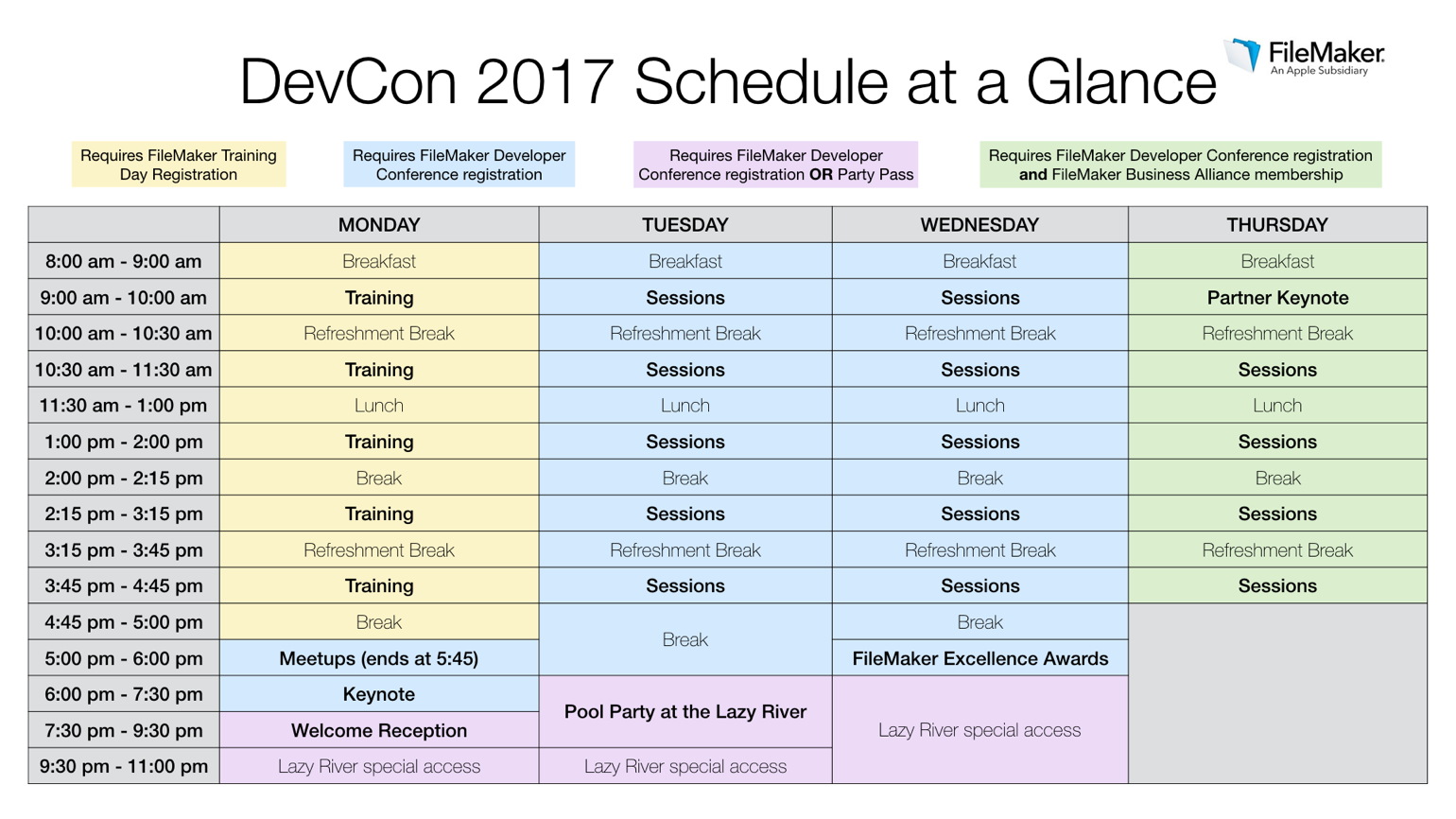
The conference is in total four days, but first one is training and keynote, last day is FBA only. This is a change from previous conferences and the reduced cost for FMI could lead into cheaper tickets which may bring more new faces to the conference.
If you like to speak, you can
apply for a session. Please make your FM 15 certification first if you are not yet certified. Speaking has the advantage of 4 free hotel nights and a free ticket to the conference.