
Since our plugin supports AWS and we built a Linux version of it, we had questions on how to troubleshoot problems. First, the plugin can be installed twice on a FileMaker Server, once for server scripting (PSoS and Scheduled Scripts) and for Web Direct. Both are separate folders, but usually you'll just use the Install Plugin Script Step to install them automatically.
Sometimes you may want to debug a problem related to MBS FileMaker Plugin calls on a FileMaker Cloud server on AWS. So here a few notes:
Trace
First you may want to try our
Trace function. This function logs calls to the MBS Plugin. You may see them on MacOS in Console.app, on Windows in
DebugView application and on Linux in the log file.
When the plugin starts on Linux, it may output an info line like this:
MBS Plugin version 9.3.0.04 (Linux 64-bit) loaded for ServerScripting, SDK version 18.
You see the plugin version loaded, the platform, which part of FileMaker loaded it and the SDK version of FileMaker. Platform is ServerScripting for the scripting engine on a FileMaker Server. If the plugin is also installed for Web Direct, you may see an entry there with Web as platform.
Next you may see calls in the trace log like this one. We show the current number of the cal and the parameters:
MBS Plugin call #6 with 1 parameters.
Parameter 0: "
ProgressDialog.Reset"
Result #6: "[MBS] This function is only available on macOS and Windows:
ProgressDialog.Reset"
When the call finishes, the result is print. Calls taking longer may also print how long they run in seconds.
On Linux, those log entries are redirected into files to help debugging. So MBS Plugin redirect stdout into /FileMakerData/Logs/ServerScriptingPluginsStdOut.log and stderr with the error messages /FileMakerData/Logs/ServerScriptingPluginsStdErr.log. You find the trace messages in ServerScriptingPluginsStdErr.log file. For WebDirect the file names are WebPluginsStdErr.log and WebPluginsStdOut.log.
For the log files, it can be very useful to just login via ssh and use tail -f command to show new messages as they arrive in the terminal window:
tail -f /FileMakerData/Logs/ServerScriptingPluginsStdErr.log
CURL
Next if you do CURL transfer, be sure to always check the debug log messages. You query the log with MBS("
CURL.GetDebugAsText"; $curl) function after you performed the transfer. In case you look for a problem which causes a crash in the curl library, you can ask the plugin to log to a file. Use the function
CURL.CreateDebugOutputFile like this: MBS( "
CURL.CreateDebugOutputFile"; $curl; "/tmp/curl-upload.log" ). This will write a log file live, so when a crash happens, you can inspect last line.
If needed, you can include data in the log with
CURL.SetDebugWithData. If you use
CURL.SetDebugWithTime, you also see the time stamps. With
CURL.SetDebugWithProgress we can log the progress happening, so you see how far the transfer got. The whole lines
# create a new debug log file for live log including times and progress details, even if app crashes while the transfer:
Set Variable [ $r ; Value: MBS("
CURL.SetDebugWithData"; $curl; 0) ]
Set Variable [ $r ; Value: MBS("
CURL.SetDebugWithTime"; $curl; 1) ]
Set Variable [ $r ; Value: MBS("
CURL.SetDebugWithProgress"; $curl; 1) ]
Set Variable [ $r ; Value: MBS("
CURL.CreateDebugOutputFile"; $curl; "/tmp/curl-upload.log" ) ]
(more)
es ist wieder ein Jahr vergangen und FileMaker hat die neue Version 18 im Mai vorgestellt.
Gemäß unserer Tradition möchten wir wieder zum "FileMaker 18 - Exklusives Business Event - Launch Event" mit Michael Valentin und Christian Schmitz einladen:
Am Dienstag, den 16. Juli 2019 ab 18 Uhr haben wir folgendes Programm:
ab 18:00:
Einlass und Begrüßung bei der denkform® GmbH in der Alten Ziegelei in Wiesbaden-Igstadt
ab 18:30 Uhr:
Vorstellung der FileMaker 18 Plattform durch Michael Valentin (Solution Consultant, FileMaker, Inc. - An Apple Subsidiary)
ab ca. 19:30 Uhr:
Vorstellung neue Funktionen im mbs Plug-in durch Christian Schmitz (Inhaber von Monkeybread Software)
ab ca. 20:15 Uhr:
Networking
Da die Plätze auf 25 Personen limitiert sind, bitten wir um eine
verbindliche Anmeldung.
We just fixed our sign up form for the MBS FileMaker Plugin Mailing list. See the
mailing list page here.
If you like to be informed about new plugin pre-releases and join discussions about our plugins for Xojo, you can sign up here:
Please do not spam the lists and be polite. If we catch you with an auto responder, we may put you on moderation.
You are welcome to ask questions about our plugin there and get responses from other users.
The list is archived here:
Mail Archive
New in this prerelease of version 9.3 of the MBS FileMaker Plugin:
- Changed C++ to 2017 dialect for Xcode 11.
- Fixed bug in Text.DecodeFromBytes function.
- Fixed memory leak in XML.ReadContainer function.
- Updated DynaPDF to version 4.0.29.84.
- Fixed MapView.ShowAddress to correctly center on the found placemark instead of the region for that placemark.
- Changed web viewer functions to look in front document window on MacOS and Windows instead of any window. This way functions now work in data viewer or the dialog to enter a new calculation.
- Changed FM.CompareTables to skip formulas, summary and global fields.
Download at
monkeybreadsoftware.de/filemaker/files/Prerelease/ or ask for being added to the dropbox shared folder.
Please join
FileMaker DevCon 2019 and come by to our booth. Our vendor session will be Wednesday,
7th August 2019, from
12:00pm to 12:30pm. This is during lunch time, so if you are early, you can grab some food and take a seat in the theater. Or you get your lunch after the session.

Please join us 5th to 8th August 2019 in Orlando, Florida, USA.
Monkeybread Software has a booth as usual and we'll be there for a whole week.
You can book the conference for 2 days (1199 USD) or 3 days ($1699), but I would suggest to add training day for ($399) and make it a 4 day conference. And if you come from far away, please make sure you have a day before/after to enjoy some extra activity with other attendees, like a visit to a Disney Park.
Today
DynaForms GmbH released a new PHP version of the DynaPDF library. You use this PHP modules with your PHP installation to use DynaPDF commands in PHP code. While PHP 5.x is still supported, you may prefer to migrate to the PHP 7.2 version. The DynaPDF library has the same commands for all PHP versions to make sure your existing PHP scripts can easily be upgraded.
You can download on the
DynaForms website:
DynaPDF für PHP 5.3 for 32 Bit Windows and 32/64 Bit Linux.
DynaPDF für PHP 5.4 for 32 Bit Windows and 32/64 Bit Linux
DynaPDF für PHP 7.2 for 32/64 Bit Windows and 32/64 Bit Linux
Source code for the PHP modules. With an Enterprise DynaPDF license you can also download the source code of the DynaPDF library itself.
For the license, your license key for DynaPDF in Xojo and FileMaker will also work for the PHP version!
Try it and enjoy the same commands in your PHP scripts.
In last prerelease we added JSON sort function to our FileMaker and Xojo plugins.
For
FileMaker:
MBS( "
JSON.Sort"; json )
For
Xojo:
Sort method in
JSONMBS class
Both use in-place sorting of the elements for arrays and object keys.
Here two examples:
[9,4,3.2,3.1,123]
returns
[3.1, 3.2, 4, 9, 123]
and
{ "last": 1, "First": 2, "Test": 3, "abc": 4}
returns
{ "abc": 4, "First": 2, "last": 1, "Test": 3 }
As you see it sorts text case insensitive. If you sort a single number, text or boolean value, we just return it as is.
We hope you enjoy the new functions. Please do not hesitate to contact us with questions.
Recently we got a nice idea where the
MBS FileMaker Plugin could help. We got a new
FM.CompareTables function, where the plugin compares two tables and reports the results. The idea is that we can query data about structure and content via SQL and compare it. Very useful to compare the copy of the table form yesterday with the table from today.
MBS( "
FM.CompareTables"; FileName1; TableName1; IDField1; FileName2; TableName2; IDField2 { ; Options } )
You pass the plugin the file names, table names and for each the name of the field for the unique IDs to compare. We first query for both tables the field names and field types. The field names allow us to report which field names are added or removed and find the common set of field names.
Once we have the field names, we can run a query in both tables to query the IDs for the records. This queries the given ID field and not the record numbers given by FileMaker internally. This allows to import a table into another one where the internal row numbers change to still compare the values.
Once we have list of IDs, we can report which IDs are added and which removed. For the common IDs, we load data in blocks of 100 rows and compare values. A value is same if the data type is the same and the content compares as equal. We can then report which fields in which records changed or if you don't need full details just report the changed IDs.
Here a sample query:
Show Custom Dialog [ MBS( "
FM.CompareTables"; "Assets Backup.fmp12"; "Assets"; "PrimaryKey"; "Assets.fmp12"; "Assets"; "PrimaryKey"; 1 ) ]
The field named primary key is the field with the UUIDs to identify the records. The result may look like this:
{
"Messages": [],
"TableName1": "Assets",
"TableName2": "Assets",
"FileName1": "Assets Backup.fmp12",
"FileName2": "Assets.fmp12",
"FieldsIgnored": ["gTest"],
"RemovedFields": ["Serial Number"],
"Fields": ["CreatedBy", "CreationTimestamp", "Description", "Image", "ModificationTimestamp", "ModifiedBy", "Name", "Price", "PrimaryKey", "Purchase Date", "Type", "Vendor"],
"AddedFields": ["Weight"],
"RemovedIDs": ["880F4BC1-7410-4ED0-A3E6-D9BD1B828A16"],
"AddedIDs": ["A8B447FA-74B9-4911-9180-A940CD251DB5"],
"ChangedRecords": {
"B982C9FE-A3A2-49F6-A0A9-8FB9A2CB421B": [{
"Field": "ModificationTimestamp",
"OldValue": "2019-06-21 15:54:33",
"NewValue": "2019-06-21 15:55:25"
}, {
"Field": "Price",
"OldValue": "2",
"NewValue": "2.5"
}]
}
}
As you see we identified the removed and added fields and the common fields. Calculated and summary fields are ignored and global fields skipped. If someone needs to compare those, we may be able to add an option for them. For changed records, we opt-in for the extended version with an array of objects containing the records changed. The detailed array has the list of field changes with field name, old and new value.
If you like, you can show progress dialog via
ProgressDialog.Show and the plugin will update the progress value while comparing data.
We hope you find this useful and if you have further ideas, please contact us.
MBS FileMaker Plugin 9.3pr3 has the function included and for pr4 we changed it to skip globals, summary and calculated fields.
New in this prerelease of version 9.3 of the MBS FileMaker Plugin:
Download at
monkeybreadsoftware.de/filemaker/files/Prerelease/ or ask for being added to the dropbox shared folder.

Vom 16. bis 19. Oktober 2019 findet die zehnte deutschsprachige
FileMaker Konferenz in Hamburg, Deutschland statt. FileMaker Anwender und Entwickler können ihre Teilnahme a sofort buchen. Anmeldungen bis zum
21. Juni erhalten einen
Frühbucher-Rabatt auf die Konferenzpauschale.
Die Veranstalter vom Verein FM Konferenz erwarten auch 2019 rund 180 Entwickler, Anwender, IT-Fachleute und Entscheidungsträger aus Wirtschaft, Bildung und Verwaltung. Rund um über 25 Fachvorträge und Workshops wird es viel Zeit zum Vernetzen in den gemeinsamen Pausen und beim Abendprogramm geben.
Dieses Jahr gibt es wieder eine
MBS Plugin Workshop, diesmal am 16. Oktober 2019.
Anmeldung bei Monkeybread Software.

NICKENICH, Germany (June 19th, 2019) -- Monkeybread Software releases version 1.5 of the
MBS SQLite Extension.
The MBS SQLite Extension is a multifunctional extension to any SQLite powered application.
Our SQLite Extension supports Mac OS, Windows and Linux. You can use it
- in MBS SQL Plugin with SQLite,
- in Cube SQL 4.0 and newer,
- in Studio Stable Database Server 2.0 and newer,
- in Xojo with the SQLiteDatabase class (needs LoadExtensions property set to true),
- in Real Studio with the REALSQLDatabase class,
- with SQLiteManager
- or any other SQLite application using load_extension.
New in Version 1.5:
Our SQLite Extension gives you over 50 new functions for SQLite:
- Additional mathematical functions like Round or Pow.
- Functions to save blob values in files outside the database.
- Functions to calculate checksums on blob values on the server.
- String functions like SoundEx or accents removing for your text searches.
- Regular Expressions in queries.
- UUID generation
Our SQLite Extension supports macOS, Windows and Linux.
Example projects for Xojo and Real Studio are included for SQLiteDatabase, REALSQLDatabase, REALSQLServerDatabase and CubeSQLDatabase classes.
You can test the extension for free up to 10 minutes per launch in a demo mode. Licenses are available for $149 USD per developer with one year of free updates. If you have feature requests for additional functions, please send us an email.
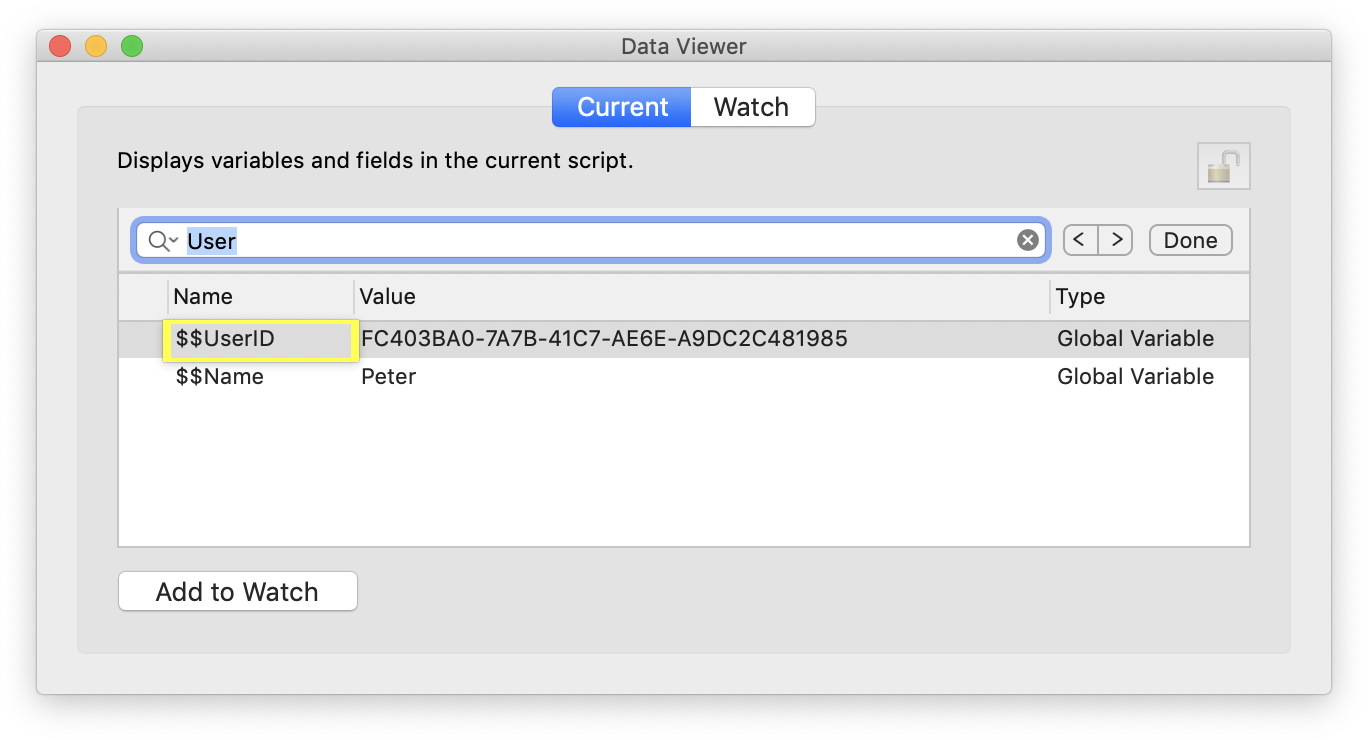
Did you know you can search within the data viewer using
MBS FileMaker Plugin on Mac?
Just click on the list to set focus, press Command-F and the find bar shows.
If you like to see more:
Reasons for FileMaker Pro users on MacOS to install MBS Plugin
One of the features may be worth the license purchase? or using FileMaker on a Mac?
With the last DynaPDF update we got new support for ZUGFeRD 2.0 and Factur-X, two standards to deliver invoices as PDF files with embedded XML data. We supported ZUGFeRD 1.0 before and now upgraded code to support version 2, too.
So here is a little FileMaker script to convert an existing PDF into a ZUGFeRD 2.0 document. Before you start, please assemble the XML for the invoice and know whether it's Minimum, Basic, Comfort or Extended level. So the script here initializes DynaPDF library if needed and then creates a new PDF environment. We set import flags to import all content and prepare for PDF/A. If needed, you could skip some content like annotations directly here.
# Initialize DynaPDF if needed
If [ MBS("DynaPDF.IsInitialized") ≠ 1 ]
Perform Script [ Specified: From list ; “InitDynaPDF” ; Parameter: ]
End If
# Make new PDF environments
Set Variable [ $pdf ; Value: MBS("DynaPDF.New") ]
# Set import flags with Prepare For PDF/A enabled
Set Variable [ $r ; Value: MBS( "DynaPDF.SetImportFlags"; $pdf; "ImportAll¶ImportAsPage¶PrepareForPDFA" ) ]
Next we load an existing PDF from a container field. Of course you can also use functions to create new pages here or open an import PDF from a file on disk. The next line imports the whole PDF file we opened into our work PDF. If you repeat the open and import step, you can merge several documents here. If you need only one page, you can use DynaPDF.ImportPDFPage function.
# Load PDF from container
Set Variable [ $r ; Value: MBS("DynaPDF.OpenPDFFromContainer"; $pdf; ZUGFeRD Invoice::Invoice Template) ]
# Import all pages
Set Variable [ $r ; Value: MBS("DynaPDF.ImportPDFFile"; $pdf) ]
Per PDF/A requirement, we add here the language setting and a structure tree:
# PDF/A requires a language set
Set Variable [ $r ; Value: MBS("DynaPDF.SetLanguage"; $pdf; "en-US") ]
# PDF/A requires a structure tree
Set Variable [ $r ; Value: MBS("DynaPDF.CreateStructureTree"; $pdf) ]
If the PDF contains colorspaces which are not backed by an ICC Profile, we pass in replacement profiles to the PDF engine. So if there is a colorspace missing the profile, it will be using one of our replacement profiles for RGB, Gray or CMYK.
# Set replacements for missing ICC profiles
Set Variable [ $r ; Value: MBS("DynaPDF.SetReplaceICCProfileData"; $pdf; "rgb"; ZUGFeRD Invoice::RGB ICC Profile) ]
Set Variable [ $r ; Value: MBS("DynaPDF.SetReplaceICCProfileData"; $pdf; "gray"; ZUGFeRD Invoice::Gray ICC Profile) ]
Set Variable [ $r ; Value: MBS("DynaPDF.SetReplaceICCProfileData"; $pdf; "cmyk"; ZUGFeRD Invoice::CMYK ICC Profile) ]
Next we attach the XML invoice to the PDF. You can pass attachments as container, file or text, but please use the corresponding function. Here we pass it as text from a field, specify UTF-8 encoding and the ZUGFeRD specific file name. The attachment is associated with the main catalog as an alternative version.
# add xml with invoice data
Set Variable [ $FileHandle ; Value: MBS("DynaPDF.AttachFileText"; $pdf; ZUGFeRD Invoice::Invoice XML; "UTF-8"; "ZUGFeRD-invoice.xml"; "Invoice as XML") ]
Set Variable [ $r ; Value: MBS("DynaPDF.AssociateEmbFile"; $pdf; "Catalog"; -1; "Alternative"; $FileHandle) ]
Now we do the conformance check. If you licensed the PDF/A converter from us (Add-on for DynaPDF Pro), you get the PDF fixed if needed. If the PDF was already PDF/A, this should return okay and tel you which output indent is recommended. We than add the ICC Profile for RGB or CMYK to indicate how the PDF likes to be viewed.
# Check if this PDF conforms to PDF/A-3b
Set Variable [ $c ; Value: MBS("DynaPDF.CheckConformance"; $pdf; "ZUGFeRD2 Basic"; "Default") ]
If [ $c = 1 ]
# A RGB ICC profile must be added to the document
Set Variable [ $r ; Value: MBS("DynaPDF.AddOutputIntentEx"; $pdf; ZUGFeRD Invoice::RGB ICC Profile) ]
Else If [ $c = 2 ]
# A CMYK ICC profile must be added to the document
Set Variable [ $r ; Value: MBS("DynaPDF.AddOutputIntentEx"; $pdf; ZUGFeRD Invoice::CMYK ICC Profile) ]
Else If [ $c = 3 ]
# A Gray, RGB, or CMYK ICC profile must be added to the document
Set Variable [ $r ; Value: MBS("DynaPDF.AddOutputIntentEx"; $pdf; ZUGFeRD Invoice::RGB ICC Profile) ]
End If
Finally we save the PDF in a field, commit the record and cleanup the PDF environment.
# save to container
Set Variable [ $PDFData ; Value: MBS("DynaPDF.Save"; $pdf; "invoice.pdf") ]
Set Field [ ZUGFeRD Invoice::Output PDF ; $PDFData ]
Commit Records/Requests [ With dialog: On ]
# cleanup memory
Set Variable [ $r ; Value: MBS("DynaPDF.Release"; $pdf) ]
We hope you enjoy this blog post. Please check the example databases included with MBS FileMaker Plugin 9.3.

After a few days passed some of the details in various WWDC sessions show up.
I got a few points of interest to look into till the new releases appear in the wild and this includes:
- Text recognition in Vision framework
- Speech functions
- Encryption functions
- Asking for permissions to access user folders
- CoreML functions
- Enhancements for AppKit
- Color picker
- Sign-in with Apple button
Anything else? What are you interested in using in your solution with help of our plugins?
The release for MacOS 10.15 and iOS 13 are expected for September/October. The APIs are still in flux and the betas not yet polished. So let's wait for the public betas in July before we change applications. So maybe in August, we could show you some plugins for some new features.
Xcode 11 is working well and our projects build already with a few little changes.
New in this prerelease of version 9.3 of the MBS FileMaker Plugin:
Download at
monkeybreadsoftware.de/filemaker/files/Prerelease/ or ask for being added to the dropbox shared folder.
We just built a CubeSQL client library for Mac, the cubesql.dylib. You can download it in our
download area in Libs folder.
As you may know you can use
SQL functions in both
MBS Xojo SQL Plugin and
MBS FileMaker Plugin to connect to a CubeSQL server and perform queries. Since SQLabs does not yet provide prebuilt libraries for Mac & Linux, we just made one for Mac 32 and 64 bit with OpenSSL embedded.
For
Xojo, you can of course use
InternalCubeSQLLibraryMBS module which has library embedded for all platforms right into our
MBS Xojo SQL Plugin.
For
FileMaker, please use library files. For example in your script set the library path as a connection option.
For Windows:
MBS( "
SQL.SetConnectionOption"; $Connection; "CUBESQL.LIBS"; "c:\CubeSQL\cubesql.dll" )
For MacOS:
MBS( "
SQL.SetConnectionOption"; $Connection; "CUBESQL.LIBS"; "/Users/cs/Desktop/cubesql.dylib" )
Of course you need different paths depending on your installation. e.g. you can put the CubeSQL library in the same folder as the plugins.
Due to WWDC, I'll come for a visit to California in June. As usual I like to meet other developers beside the conference and like to join local meetings for FileMaker developers in Los Angeles and San José area.
13rd June 2019 @ DIGFM
Database Interest Group for FileMaker: The user group hosted at FileMaker Inc. headquarters in Santa Clara, California. It's like a free DevCon in monthly doses. Meets 2nd Thursday of the month: 1:30pm, Meet & Greet; 2:00pm, Presentation
FileMaker, Inc (The Wedge), 5201 Patrick Henry Dr., Santa Clara CA 95054
see
FileMaker Community and
website
14th June 2019 @ FMDiSC
FileMaker Developers in Southern California started in March of 1999 with a small group of FileMaker Pro developers getting together once a month to exchange development tips and ideas. Meets 2nd Friday at 9:30am
184 Bimini Pl, Hollywood/Korea Town CA
see
meetup.com/de-DE/FMDiSC-FileMaker-Developers-in-Southern-California/ or
website
Please sign up for the groups and let them know if you like to join the meetings. Exact times may change and if you are registered, they may remind you with an email.
If you are interested in private time for consulting, training or discussion MBS or FileMaker topics, we can of course schedule a meeting. Please contact me directly if you are interested.

WWDC is the yearly Apple developer conference. With over 5000 attendees and 1000 Apple engineers on site (plus security and host people from Apple), there are people everywhere. It is a great experience and after several years of trying the lottery, I had the honor to join the conference this year. Here a few notes to make live easier:
- The keynote room is big enough to sit everyone. No need to hurry to get a seat.
- Whether it is worth waiting 4 hours to get a spot in a front row? Next time I'd better come at 9:30, sit in the back and not so close near the screen that I need to move my head to see the other side.
- Watching the keynote on a screen at home has a big advantage: You can press the pause button. And you can open a website in parallel with a newsfeed so you have a transcript to look back. This year the keynote was very fast and there was not enough time to read slides with a lot of text.
- Bring a jacket. It's cold early morning outside and often the temperature in the rooms is chilly.
- Bring a bag folded in your pocket. Over the day, you may need to stuff things there like your jacket, some purchases at the Apple store or simply food for having it later.
- Rucksacks are not optimal as you may run into bag checks on the entry. Laptop bags are more likely to be inspected.
- Skip the waiting lines for sessions. The sessions are in general not very full, so you can just walk into 5 minutes before the session starts and find a good spot. As you can watch all session later at home, the only benefit of going there is to get the information earlier and then ask questions at the labs. There are no questions taken in the session room.
- Go to the labs. Before WWDC make detailed list with things to ask, sample projects to show your issues, radar numbers for the bugs, so they can follow up. And check if the bug is fixed in new beta already before (!) you ask.
- If you need the restroom, best go there when sessions start or leave one a minute before it ends. You may even use restrooms in the session room (on the back wall) before the session starts.
- Grab some food and drinks early when it's delivered, put it in the bag and walk to find an area where you can eat without a thousand people watching you. If you come late to the food tables, the best stuff is taken...
- Bring extra devices to install the beta software. Don't put it on your regular machine unless it's a VM for MacOS. First betas are said to be buggy and may not even boot or cause data loss.
- For hotel booking: Either you pick an expensive one in downtown San Jose or you stay outside. As car park is $25 in the conference center and nearby parking space, the best choice seems to pick a hotel near a train station and use those local trains here in the city. I stayed at the Courtyard hotel in Campbell which is just a few stops away and right next to a train station. The train is $5 per day for two trips.
- A wish to Belkin and Apple: Please make USB-C Ethernet adapters which can charge the MacBook Pro via Power over Ethernet. That would be even better for sitting in the Café area.
The conference can be a great experience with thousands of developers from all over the world. I learnt a ton of things and got a few ideas for new plugins, but more in a future blog post. You can make friends, find a lot of other developers from your country (lots of German) and ask your questions directly to Apple employer. They may not answer everything, but sometimes you can read between the lines. Next year, I'll not enter the lottery to give others a chance to go there!
Today the early bird offer ends for
FileMaker DevCon 2019. Please sign up today (7th June) to get a better ticket price than tomorrow.
Please join us 5th to 8th August 2019 in Orlando, Florida, USA.
Monkeybread Software has a booth as usual and we'll be there for a whole week.
You can book the conference for 2 days ($999 USD) or 3 days ($1299), but I would suggest to add training day for ($399) and make it a 4 day conference. And if you come from far away, please make sure you have a day before/after to enjoy some extra activity with other attendees, like a visit to a Disney Park.
Hotel room is $189 including resort fee, but plus tax.
We'll add new function for next plugin for our
MapView functions:

The new
MapView.SetScript function allows you to define a script to be called when someone clicks on a pin. Showing 10 clients on a map your user can than click on the pin and you get the identifier for the pin. As you can pass the identifier when adding the pin and choose it yourself, you can use e.g. the record ID for your related record.
MapView.AddPin,
MapView.AddPinWithAddress,
MapView.PlanRoute and
MapView.ShowAddress now accept color values beside the new identifier value. The color allows you to color the pins individually.
Coming soon for Mac and iOS in
MBS FileMaker Plugin 9.3pr2.
All functions are available for Xojo, too. Check the
MapKitViewControlMBS control in our
MBS Xojo MacFrameworks Plugin to do the same in your Xojo app.
You may all be
watching videos from WWDC and learn what's coming soon for macOS and iOS.
Now the are a lot of new APIs, but I'd like to know from you what you'd like to see in our plugins for
Xojo and
FileMaker.
Usually we provide lower level wrapper for
Xojo to Apple's APIs for macOS with hiding all the threading issues from you and translating values from native Xojo types to the matching Foundation types. As there is currently no iOS plugin SDK for Xojo, we can't make all features available via declares.
For
FileMaker we usually provide a much more higher level API to do selected things and provide plugin functions for both macOS and iOS.
If you have ideas and wishes, please email me. I'll keep a list and if we have a lot of wishes for a given API, I may give it some priority.
New in this prerelease of version 9.3 of the MBS FileMaker Plugin:
Download at
monkeybreadsoftware.de/filemaker/files/Prerelease/ or ask for being added to the dropbox shared folder.
We got the question what the difference is between the new script steps in FileMaker 18 and the
BinaryFile functions in
MBS FileMaker Plugin. First the script steps from FileMaker 18 only work in the new version, while our plugin functions can work in current as well as several older FileMaker versions. Next FileMaker 18 introduced new script steps, so you may still need the plugin to write files in custom functions or calculations. Here an overview table:
| Platform | FileMaker 18 | MBS Plugin |
|---|
| FileMaker Pro | ✔︎ | ✔︎ |
| FileMaker Server | ✔︎ | ✔︎ |
| FileMaker Cloud for AWS | ✔︎ | ✔︎ |
| FileMaker Go | ✔︎ | - |
| FileMaker iOS SDK | ✔︎ | ✔︎ |
| FileMaker Runtimes | - | ✔︎ |
| Older FileMaker versions | - | ✔︎ |
| Use in Scripts | ✔︎ | ✔︎ |
| Use in Calculations | - | ✔︎ |
| Use in Custom Functions | - | ✔︎ |
|
High level read and write functions
But before you look into the
BinaryFile functions, maybe let us point to some high level functions. To just write some text to a file, you can use
Text.WriteTextFile function. If you need to append text, you can use
Text.AppendTextFile function. For both you can specify text encoding and if needed, you can change line endings with
Text.ReplaceNewline function.
To write something to a file, you can use
Files.WriteFile, which works for containers and text. And this function can do hex/base64 decoding of the data to write. To write just a container value, you can use
Container.WriteFile function.
For reading you can use
Container.ReadFile,
Files.ReadFile,
Files.ReadJPEG,
Files.ReadPDF,
Files.ReadPNG or
Text.ReadTextFile. Depending on what you need to read, you can pick a specialized function or a more generic one.
(more)

Did you know that Bitcode feature in Xcode and LLVM made it possible for Apple to recompile all 32-bit apps for the Apple Watch as 64-bit versions?
Bitcode is the representation of the app as the LLVM compiler internally uses it. The platform independent part parses code, optimizes and then passes this intermediate representation to the platform specific code generator, which then builds machine instructions for the target processor. Instead of outputting 32-bit code, Apple took the intermediate representation (the Bitcode) and let LLVM make a 64-bit version. A few tweaks may be needed like stubs to take 32-bit arguments and than call system functions with 64-bit values, but it looks like Apple figured that out.
Now if Apple goes someday with ARM processor for MacOS, the Bitcode in Mac apps (on the App Store) could allow the system to recompile the app for ARM 64-bit automatically. The developer uploaded his applications to Mac App Store and if bitcode is included, Apple could deliver them as ARM 64-bit for newer Macs automatically. Or if the bitcode is delivered with the final application, this could be done on the Mac on first-run.
I think that is a great way to make transition easier and not require an emulation at runtime like Rosetta for PPC code.
And to play with the bitcode option, I build a couple of libraries with bitcode and got a the
MBS FileMaker Plugin for iOS built with Bitcode included. For a test with our
MBS Xojo Plugins, I built a few of them with bitcode enabled. Maybe I can do the same for MacOS and make sure our plugin would benefit from an on device recompilation if such transition happens. But for now, we keep this as an experiment and disable bitcode again.
 We got a new Page Setup Dialog example for you. As the MBS FileMaker Plugin can control the page setup dialog on MacOS, the following example can create serveral PDF files from one layout and switch between landscape and portrait as well as between different paper names.
The example also shows how to use Schedule.EvaluateAfterDelay in a clever way to run menu commands while a script is paused. Today we use menu entry with ID 57606, which is the page setup menu command.
Set Variable [ $r ; Value: MBS( "PageSetupDialog.Install" ) ]
Set Variable [ $r ; Value: MBS( "PageSetupDialog.Enable" ) ]
#
# A4 Portrait
Set Variable [ $r ; Value: MBS( "PageSetupDialog.SetPaperName"; "iso-a4" ) ]
Set Variable [ $r ; Value: MBS( "PageSetupDialog.SetPaperOrientation"; "portrait" ) ]
Set Variable [ $r ; Value: MBS( "PageSetupDialog.SetNoDialog"; 1 ) ]
Set Variable [ $r ; Value: MBS( "Schedule.EvaluateAfterDelay"; ,1; "MBS( \"Menubar.RunMenuCommand\"; 57606 )") // run Page Setup Dialog in 0.1 seconds ]
Pause/Resume Script [ Duration (seconds): 1 ]
Save Records as PDF [ With dialog: Off ; “test A4.pdf” ; Records being browsed ; Create folders: Off ]
#
# A5 Portrait
Set Variable [ $r ; Value: MBS( "PageSetupDialog.SetPaperName"; "A5" ) ]
Set Variable [ $r ; Value: MBS( "PageSetupDialog.SetNoDialog"; 1 ) ]
Set Variable [ $r ; Value: MBS( "Schedule.EvaluateAfterDelay"; ,1; "MBS( \"Menubar.RunMenuCommand\"; 57606 )") // run Page Setup Dialog in 0.1 seconds ]
Pause/Resume Script [ Duration (seconds): 1 ]
Save Records as PDF [ With dialog: Off ; “test A5.pdf” ; Records being browsed ; Create folders: Off ]
#
# A4 Landscape
Set Variable [ $r ; Value: MBS( "PageSetupDialog.SetPaperName"; "iso-a4" ) ]
Set Variable [ $r ; Value: MBS( "PageSetupDialog.SetPaperOrientation"; "landscape" ) ]
Set Variable [ $r ; Value: MBS( "PageSetupDialog.SetNoDialog"; 1 ) ]
Set Variable [ $r ; Value: MBS( "Schedule.EvaluateAfterDelay"; ,1; "MBS( \"Menubar.RunMenuCommand\"; 57606 )") // run Page Setup Dialog in 0.1 seconds ]
Pause/Resume Script [ Duration (seconds): 1 ]
Save Records as PDF [ With dialog: Off ; “test A4 wide.pdf” ; Records being browsed ; Create folders: Off ]
Set Variable [ $r ; Value: MBS( "PageSetupDialog.Disable" ) ]
The example project will be included with next plugins. For Windows, please use Printer functions.