
We wish everyone a great start in the new year 2018.
We start right away in the next days with a new beta of our plugins. MBS FileMaker Plugin 8.0 is coming soon and we enter the 12th year of development. For Xojo I am now addicted for 20 years and the plugin finally turns 18.
On traveling the schedule is pretty full for 2018 already. Beside Xojo and FileMaker events, you may meet me at other places, e.g. at the
curl-up 2018 in Stockholm.
If you know another conference, let me know:
Not everything is planned or announced yet and some things may get moved or cancelled. But if you are interested in joining, I'd be happy to welcome you at one of those events.
As you may know, we collect some statistics about plugin usage and today I’d like to show the versions of FileMaker used with MBS Plugins:

So we have about half of our users have FileMaker 15. FileMaker 16 is coming We currently have more users with FileMaker 11 as with FileMaker 16, but that will probably change quickly. As you may expect, we do still support FileMaker versions down to version 7 on Windows, but don’t test ancient versions any more (unless someone tells us about an issue).
(more)
Three days left for the DynaForms' Christmas Sale for this year:
Christmas Special: 25% Off on anything!
As a thank you for the good collaboration and your trust, you get 25% Christmas Discount on anything til the end of the year!
I wish you and your family Merry Christmas and a successful new year.
With kind regards
DynaForms GmbH
The MBS online shop is updated and we reduced all our DynaPDF prices by 25%. So if you need a new license or updates for up to five years, please order. If you have questions, please do not hesitate to contact us.
Order for Xojo -
Order for FileMaker
 Some of our clients use the Loigcal DOC software, a document management system.
They do offer a webservice API for their system, so you can connect and query documents from FileMaker or Xojo solutions.
Today we wrote a FileMaker script to query a file given ID and login to the server:
(more)
Frohe Weihnachten und ein gutes neues Jahr!
Merry Christmas & Happy New Year
Joyeux Noël et Bonne Année
Buon Natale e Felice Anno Nuovo
Franziska, Sebastian, Michael, Monika & Christian Schmitz
Monkeybread Software got you a Christmas present for all FileMaker developers using a Mac.
We add Command-F shortcut to show find bar in any text view in FileMaker. Your calculations got long and you can’t find a word? No problem, now you can search for it. The standard search bar on macOS offers controls to find text in a text view. You may have seen the find bar already in TextEdit application and others. Optional you can enable replace and replace text:
 MBS FileMaker Plugin 7.6pr5
 or newer adds this great feature for everyone who has the plugin installed. No license required (but appreciated) as this is one of the many free features included with MBS Plugin. You can turn the feature on and off in our
preferences dialog.
So here is a calculation dialog with search:
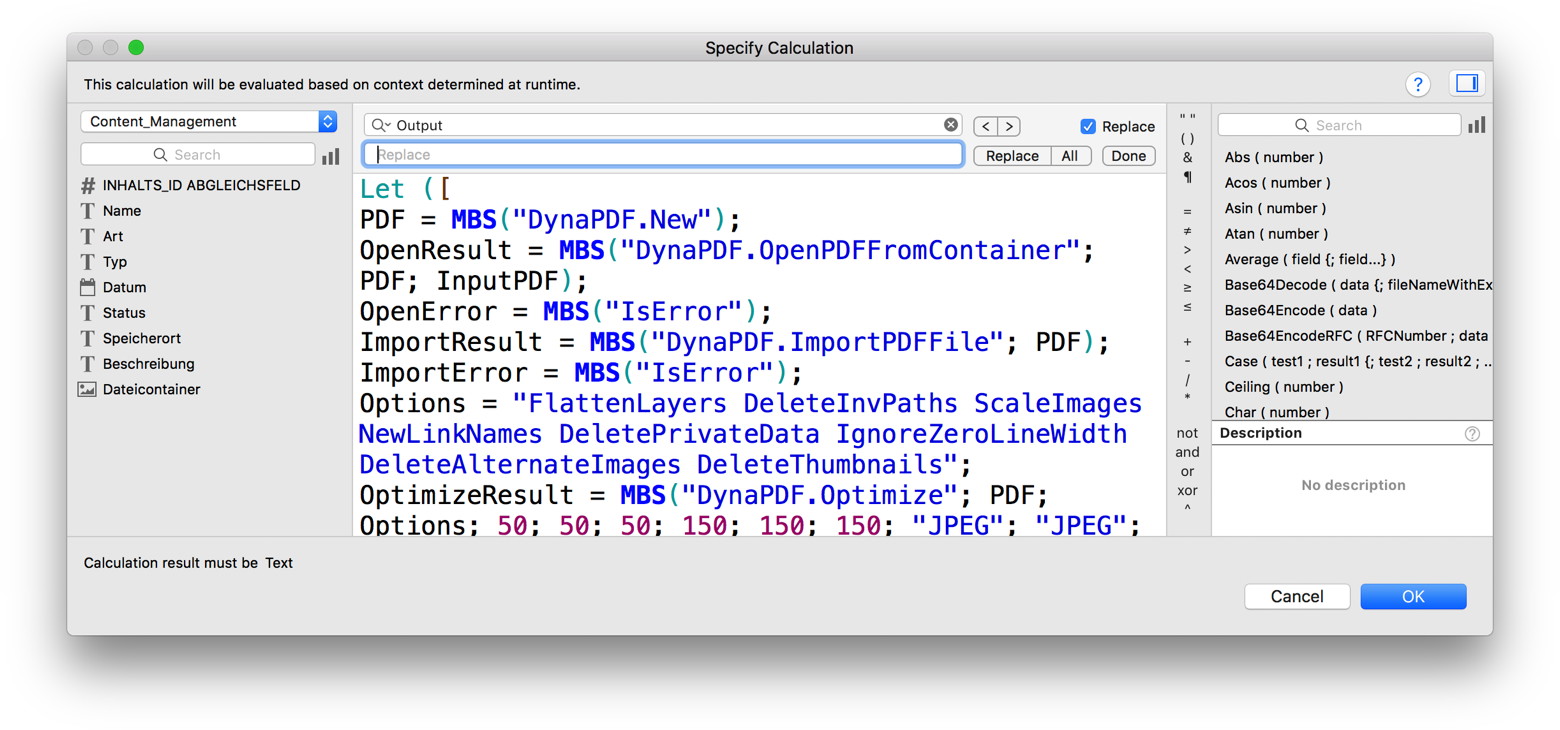
In general this works for every text view in FileMaker. In custom functions window we saw redraw issues with focus ring, but that doesn’t change functionality, so please ignore the blue lines. When working right, it looks like this:

Like all our additions to the FileMaker Development tool, we use very defensive programming techniques. The plugin registers the command-F shortcut here. If FileMaker ever itself needs Command-F, FileMaker comes first, so the plugin would no longer get the key press event. When we get it, we check if focus is on a text view, so for any other control, we just exit. Finally we check if there is a find bar, so if FileMaker ever starts registering one with the text view, we exit and don’t do anything.
Another little thing added with the Command-F is the Command-Option-C shortcut to copy the formatted text of the calculation. This helps to copy calculations and paste them in a forum or on a blog.
Download new plugin
here. Let me know if you like it!

New in this prerelease of the 7.6 MBS FileMaker Plugin:
Download at
monkeybreadsoftware.de/filemaker/files/Prerelease/ or ask for being added to the dropbox shared folder.
Since we introduced the Shell functions in MBS FileMaker Plugin, we find new uses each day. The following example uses the defaults command line tool to add preferences for the Dock application:
Set Variable [ $error ; Value: "" ]
Set Variable [ $result ; Value: "" ]
Set Variable [ $shell ; Value: MBS( "Shell.New" ) ]
Set Variable [ $s ; Value: MBS( "Shell.Execute"; $shell; "/usr/bin/defaults"; "write"; "com.apple.dock"; "persistent-apps"; "-array-add"; "<dict><key>tile-data</key><dict><key>file-data</key><dict><key>_CFURLString</key><string>/Applications/Font Book.app</string><key>_CFURLStringType</key><integer>0</integer></dict></dict></dict>") ]
Set Variable [ $s ; Value: MBS( "Shell.Wait"; $shell; 2) ]
Set Variable [ $error ; Value: $error & MBS( "Shell.ReadErrorText"; $shell; "UTF-8") ]
Set Variable [ $result ; Value: $result & MBS( "Shell.ReadOutputText"; $shell; "UTF-8") ]
Set Variable [ $s ; Value: MBS( "Shell.Execute"; $shell; "/usr/bin/killall"; "Dock") ]
Set Variable [ $s ; Value: MBS( "Shell.Wait"; $shell; 2) ]
Set Variable [ $error ; Value: $error & MBS( "Shell.ReadErrorText"; $shell; "UTF-8") ]
Set Variable [ $result ; Value: $result & MBS( "Shell.ReadOutputText"; $shell; "UTF-8") ]
Set Field [ Shell::Error ; MBS( "Text.ReplaceNewline"; $error; 1) ]
Set Field [ Shell::Output ; MBS( "Text.ReplaceNewline"; $result; 1) ]
Set Variable [ $r ; Value: MBS("Shell.Release"; $shell) ]
Please note that this is the hard way to do this. I think Apple has an official API for adding dock icons and I may add it to the plugin if needed.
As you see you need to specify shell tools with full path, so we pass "/usr/bin/defaults" and not just defaults. Also all parameters are passed as separate parameters to the Execute call. Next we run the killall tool on the same shell to kill the dock application and have it restart automatically.
 As you may know the Swiss will introduce ISO-20022 and have a QR-Code with payment data on invoices containing bank accounts and amount. The specifications are not yet finished and may take another year to get done. Introduction is planned for 2019, so you should make sure your software is ready.
Based on the current spec I made the follow example script for all my plugin users:
# ##### SWISS QR CODE GENERATION
# Sample data for QR-Code. May need adjustment to final standard
Set Variable [ $text ; Value: "SPC" & ¶ &
"0100" & ¶ &
"1" & ¶ &
"CH1234567890123456789" & ¶ &
"Hans Müller" & ¶ &
"Bahnhofstraße" & ¶ &
"123" & ¶ &
"1234" & ¶ &
"Dorf am See" & ¶ &
"CH" & ¶ &
"Hans Müller" & ¶ &
"Bahnhofstraße" & ¶ &
"123" & ¶ &
"1234" & ¶ &
"Dorf am See" & ¶ &
"CH" & ¶ &
"1234.56" & ¶ &
"CHF" & ¶ &
"2018-12-27" & ¶ &
"Lisa Müller" & ¶ &
"Dorfstraße" & ¶ &
"12" & ¶ &
"5678" & ¶ &
"Dorf am Berg" & ¶ &
"CH" & ¶ &
"QRR" & ¶ &
"000000000000000000000001234" & ¶ &
"ligne 28" ]
# Barcode options. We use high level as we draw over barcode.
Set Variable [ $o ; Value: MBS("Barcode.SetOptions"; 4) // ECC Level with values from 1 = low, 2 = middle, 3 = better, 4 high. ]
# CRLF line endings needed
Set Variable [ $text ; Value: MBS( "Text.ReplaceNewline"; $text; 3 ) ]
# We render barcode at 4x size for better drawing later
Set Variable [ $img ; Value: MBS("Barcode.Generate";"QRCODE"; $text; 0; 0; 0; 4; 0; 1; "UTF-8") ]
If [ MBS("IsError") = 0 ]
Set Variable [ $r ; Value: MBS( "GMImage.SetType"; $img; 6) ]
# Load cross image
Set Variable [ $cross ; Value: MBS( "GMImage.NewFromContainer"; base_test::Cross) ]
# Scale to match size of barcode proportional
Set Variable [ $w ; Value: MBS( "GMImage.GetWidth"; $img) ]
Set Variable [ $k ; Value: Round($w / 6,5; 0) // 20 point to 130 point is factor 6.5 ]
Set Variable [ $r ; Value: MBS( "GMImage.Scale"; $cross; $k & "x" & $k) ]
# Draw cross over barcode
Set Variable [ $r ; Value: MBS( "GMImage.Composite"; $img; $cross; "CenterGravity"; 1) ]
# Save to field
Set Field [ base_test::Swiss_QR ; MBS( "GMImage.WriteToPNGContainer"; $img; "barcode.png" ) ]
# Output with around 4.5cm side length so Swiss cross is 7mm big, (130 point in PDF and 20 point for cross)
# Clean up
Set Variable [ $r ; Value: MBS( "GMImage.Destroy"; $cross) ]
Set Variable [ $r ; Value: MBS( "GMImage.Destroy"; $img) ]
End If
As you see, we put together the data for the QR-Code. The given data is not correct (checksums) as I use sample IBANs and the reference number is just 1234. But you can collect the right data in your solution and assemble them as needed. Please use latest specs and make sure your data doesn't contain extra spaces or newline characters. Once you have the data, we convert line endings to Windows format (CRLF). Next we create a barcode in QR-Format with ECC Level High. We load the Swiss cross image overlay and scale it to the right size to composite over the barcode (needs fix in upcoming 7.6pr5 or use GMImage.CompositeXY instead). Than we write it to container, so you can place it on a layout to print or place the image on a PDF with DynaPDF.InsertImage.

Die
Denkform bietet eine Schulung zur Europäische Datenschutzgrundverordnung an:
Die EU-Datenschutz-Grundverordnung (EU-DSGVO) wird künftig das Bundesdatenschutzgesetz (BDSG) ersetzen. Der Trilog aus EU-Rat, EU-Kommission und EU-Parlament hat sich auf die EU-DSGVO geeinigt.
Im Mai 2018 ist es soweit, die neue europäische Datenschutzgrundverordnung (EU DS-GVO) tritt in Kraft.
Erfahren Sie alle wichtigen Punkte die Sie treffen müssen um gesetzeskonform ab Mai wirtschaftlich tätig zu werden.
Unsere Schulung informiert Sie über die Neuerungen der Umstellung auf die EU-DSGVO. Wir zeigen Ihnen, welche Maßnahmen Ihnen den Umstieg erleichtern und vermitteln Ihnen, welche Änderungen im Vergleich zum Bundesdatenschutz-Gesetz (BDSG) anstehen.
Die europäische Datenschutzgrundverordnung (EU DS-GVO) trifft alle Unternehmen die persönliche Daten verwalten.
Was ist neu?
- Neue Risiko- und Folgenabschätzung lösen die Vorabkontrolle ab
- Betroffenen Personen bekommen erweiterte Beschwerde- und Rechtsschutzmöglichkeiten
- Strengerer Rahmen bei meldepflichtigen Vorfällen und umfangreichere Sanktionen
- Öffnungsklausel ermöglicht individuelle Regelungen: Deutschland behält den Datenschutzbeauftragten
4 Stunden, 4 bis 12 Teilnehmer, 175 Euro + MWSt. pro Person.
Da wird das für uns und unsere Kunden umsetzen müssen, dürfte eine Schulung zu dem Thema nicht schlecht sein.
Anmeldung und Informationen
For our German speaking users:
Wir haben die Artikel zum MBS Plugin aus dem FileMaker Magazin gesammelt hier online gestellt: FileMaker Magazin Artikel
- FMM 201706: PDFs drucken, Automatisch via MBS-Plugin
- FMM 201705: Automatisiertes Drucken, Mehr Möglichkeiten mit dem MBS-Plugin
- FMM 201704: Audit per MBS-Plugin, Wie FileMaker Änderungen mitschreiben kann
- FMM 201703: XML-Funktionen, Nützliches zu XML im MBS-Plugin
- FMM 201702: Hole (Cloud), Was meldet die Cloud eigentlich bei „Hole“-Funktionen?
- FMM 201701: Plugin-Installation, Wie man FileMaker Plugins richtig installiert
- FMM 201606: Word-Dateien ausfüllen, Ein Tipp zum MBS-Plugin
- FMM 201605: Das MBS-Kontextmenü, Script-Schritte schneller aktivieren/deaktivieren
- FMM 201604: Webservices in FileMaker einbinden, Verwendung von CURL-Befehlen im „MBS-Plugin“
- FMM 201603: 4000 Funktionen in zehn Jahren, Ein kleiner Rückblick auf das MBS-Plugin
- FMM 201601: iOS App SDK, Eigene iOS-Apps auf Basis von FileMaker
- FMM 201506: Authentizität durch Signaturprüfung, Daten übertragen und Veränderungen bemerken
- FMM 201505: Wünsche werden wahr, Neues im „MBS-Plugin“ bei der FMK 2015
- FMM 201504: Datensätze effizient kopieren, Mit etwas SQL und dem MBS-Plugin
- FMM 201503: Neue Datensätze ohne Layoutwechsel, Mit Hilfe von SQL-Befehlen und dem MBS-Plugin
- FMM 201501: QuickList, Schnelle Listen für FileMaker
- FMM 201405: E-Mail-Versand, Mehr Möglichkeiten mit dem MBS Plugin
- FMM 201405: Vorbereiten von PDFs für den Versand, Verkleinern großer Dateien
- FMM 201402: Variablen, Globalisierte Lösungen per Plugin
- FMM 201401: Kalendertermine und Erinnerungen, Wie man Ereignisse aus FileMaker anlegt
- FMM 201306: Zip-Archive auslesen, Bilder aus OpenOffice-Dokumenten extrahieren
- FMM 201303: Script-Träger übers Netzwerk, Scripts triggern übers Netzwerk
- FMM 201303: Syntax Coloring, Berechnungen und Scripts bekennen Farbe
- FMM 201203: Arbeiten mit Dateidialogen, Komfortablere Dateiexporte per MBS Plugin
- FMM 201105: Bilder skalieren mit dem MBS FileMaker Plugin, So bleibt Ihre Datenbank schlank
Wir empfehlen allen FileMaker Anwender ein Abo vom Magazin und den Kauf der alten Ausgaben. Das FileMaker Magazin ist eine excellente Quelle von Informationen, Anleitungen und Profitips.
Say hello to our 5th generation of Monkeybread Software pens:
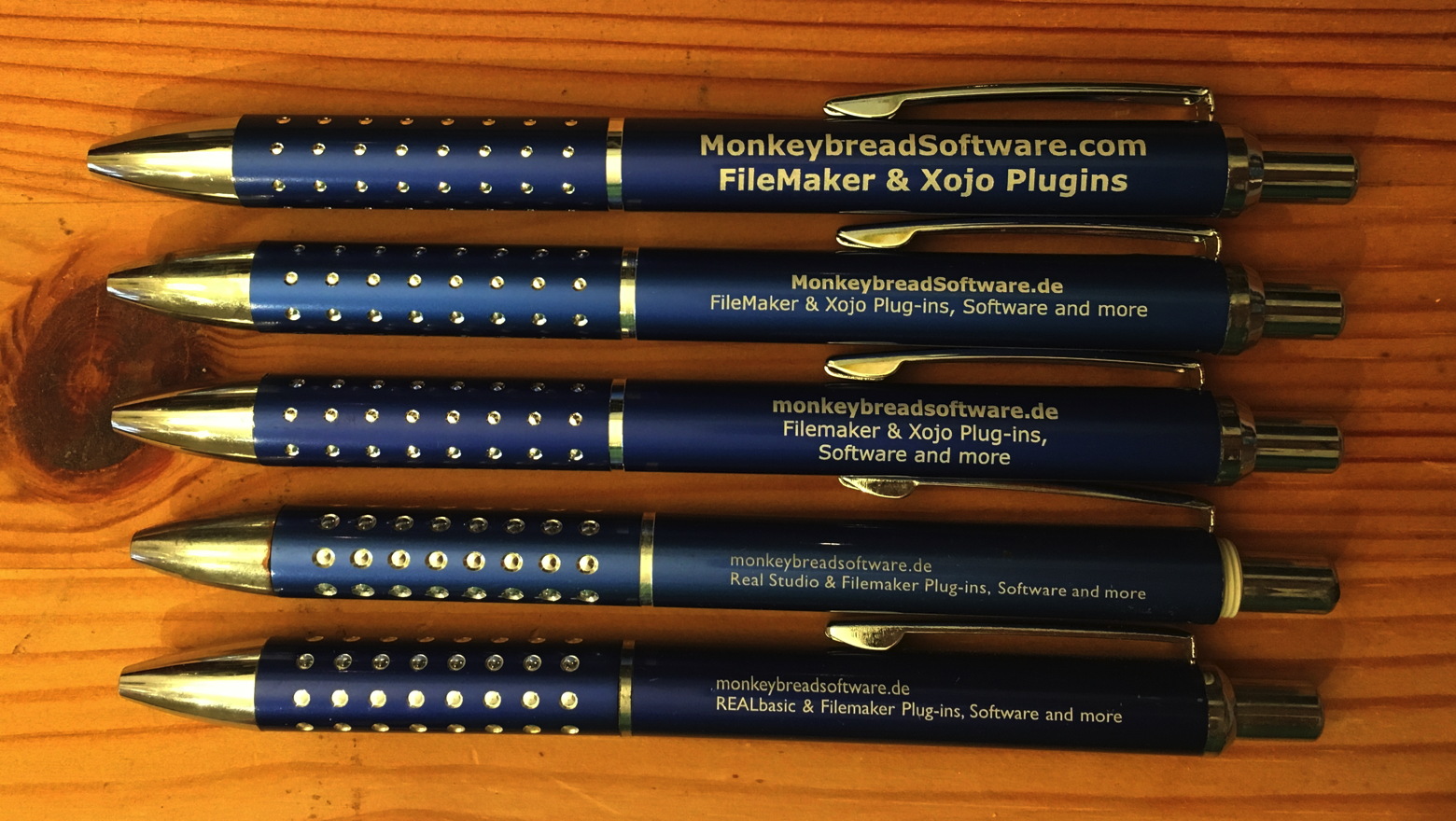
As you see over the years we got different designs for the pens. Xojo used to be named Real Studio and REALbasic. We even fixed the typo in FileMaker and capitalized the M. The new pens have bigger font and use the
.com domain.
We hope you like them. We'll bring a few to
Montreal,
Denver,
Berlin,
Dallas,
Munich and
Malbun.

L'hiver est à nos portes et c'est le moment idéal pour prendre une pause et sortir du quotidien. Quoi de mieux pour ce faire que deux journées en compagnie des développeurs, consultants et autres adeptes de FileMaker®. Le Regroupement
FMQC.CA vous convie à son grand rassemblement, les 15-16 mars 2018, à l'Auberge Saint-Gabriel du Vieux-Montréal, afin d'apprendre les astuces enseignées par des intervenants de la scène internationale et de découvrir les nouveautés de la plateforme FileMaker qui nous tient tant à coeur et qui nous passionne.
Un total de 15 sessions et topos seront présentés par des intervenants provenant de l'Allemagne, de l'Angleterre, de la France, des États-Unis, de l'Ontario et du Québec. La CQDF 2018 regroupera près de 100 développeurs de tous les niveaux, qui ensemble, rejoignent un bassin de plus de 5000 utilisateurs FileMaker de tous les coins du Québec ainsi qu'ailleurs dans le monde.
Situé en plein coeur du Vieux-Montréal, l’Auberge Saint-Gabriel est à quelques minutes de marche de la station de métro Place d’Armes (ligne Orange). L’accès internet sans fil sera offert tout au long des conférences.
Vous pouvez vous inscrire directement sur le site web de la conférence avant le 20 janvier 2018 et ainsi profiter d’un rabais «Réservation hâtive» de 50$ sur les frais d'inscription.
Inscrivez-vous dès maintenant:
cqdf.ca
Nom de l’activité: Conférence québécoise des développeurs FileMaker (CQDF) 2018
Dates:Jeudi et vendredi, 15-16 mars 2018
Lieu: Auberge Saint-Gabriel, 426 Saint-Gabriel, Vieux-Montréal, Qc, H2Y 2Z9 (lien Google Maps)
Tarifs: 199$ à 299$
Note: les non membres peuvent devenir membre pour profiter des tarifs réduits
Two weeks left for the DynaForms' Christmas Sale for this year:
Christmas Special: 25% Off on anything!
As a thank you for the good collaboration and your trust, you get 25% Christmas Discount on anything til the end of the year!
I wish you and your family Merry Christmas and a successful new year.
With kind regards
DynaForms GmbH
The MBS online shop is updated and we reduced all our DynaPDF prices by 25%. So if you need a new license or updates for up to five years, please order. If you have questions, please do not hesitate to contact us.
Order for Xojo -
Order for FileMaker
New in this prerelease of the 7.6 MBS FileMaker Plugin:
- Added MetaDataQuery functions for macOS and iOS, usually called Spotlight search.
- Improved Syntax Highlighting speed for macOS 10.13.
- Fixed problem where plugin would colorize script even when it's disabled in preferences.
- Changed Audit to be able to use UUID field, even if it's not in the field list passed to audit function.
- Fixed bug with PDFKit.Watermark for High Sierra.
- Fixed bugs with DynaPDF.Print and scaling pages for some printers.
Download at
monkeybreadsoftware.de/filemaker/files/Prerelease/ or ask for being added to the dropbox shared folder.
 We got a nice new search feature for our MBS FileMaker Plugin. You can create searches, run them and query results. Here is an example script to search all applications:
Set Variable [ $query ; Value: MBS( "MetaDataQuery.Create" ) ]
Set Variable [ $r ; Value: MBS( "MetaDataQuery.SetQueryString"; $Query; "kMDItemContentType=\"com.apple.application-bundle\"") ]
Set Variable [ $r ; Value: MBS( "MetaDataQuery.StartQuery"; $Query) ]
# Wait for search to finish
Loop
Pause/Resume Script [ Duration (seconds): ,2 ]
Exit Loop If [ MBS( "MetaDataQuery.IsGathering"; $Query ) = 0 ]
End Loop
# Stop
Set Variable [ $r ; Value: MBS( "MetaDataQuery.StopQuery"; $Query) ]
Delete All Records [ With dialog: Off ]
# Put global result on top:
Set Field [ Search Applications::All Results JSON ; MBS( "MetaDataQuery.Results"; $Query ) ]
Set Variable [ $Count ; Value: MBS( "MetaDataQuery.ResultCount"; $Query ) ]
Set Field [ Search Applications::ResultCount ; $Count ]
# And show records:
Set Variable [ $index ; Value: 0 ]
Loop
New Record/Request
Set Variable [ $path ; Value: MBS( "MetaDataQuery.PathAtIndex"; $Query; $Index ) ]
Set Variable [ $result ; Value: MBS( "MetaDataQuery.ResultAtIndex"; $Query; $Index ) ]
Set Field [ Search Applications::Name ; MBS( "Files.FileDisplayName"; $Path ) ]
Set Field [ Search Applications::FilePath ; $path ]
Set Field [ Search Applications::Attributes JSON ; $result ]
Set Field [ Search Applications::Icon ; MBS( "Icon.GetIcon"; $Path; 128 ) ]
Commit Records/Requests [ With dialog: Off ]
# next
Set Variable [ $index ; Value: $index + 1 ]
Exit Loop If [ $index ≥ $count ]
# Lets exit when we have 100 items
Exit Loop If [ $index > 100 ]
End Loop
Set Variable [ $r ; Value: MBS( "MetaDataQuery.Close"; $Query ) ]
As you see, we create a new query. Than we set the query string where we check if content type is an application. We start the search which runs asynchronously in the background. For this example we use a loop to wait for the search to finish getting results. Than we stop query and check results. For the results, we give you two ways: You can have all the attributes as JSON or you just get the file path of the item.
The example database here shows the applications in records. We put in the icon of the application, show the display name, the path. The JSON is also stored and can be inspected. Please try with next prerelease and let us know whether you like it.

As you may know FileMaker 16 on macOS uses WebKit 2.x, so our old
WebView.InstallCallback function broke. We got a workaround using
WebView.Create for creating WebKit 1.x web viewers in FileMaker 16 and using older WebKit functions.
Now we have a new way for WebKit 2.x using a JavaScript bridging. With macOS 10.10 (and iOS 8.0) Apple introduced the ability to install custom JavaScript message handlers for WKWebView. We just added them for our plugins to call back from JavaScript to FileMaker scripts.
First you call
Webview.AddScriptMessageHandler function to register a name:
MBS( "
Webview.AddScriptMessageHandler"; Name )
Next you can use it in Javascript to trigger a script in FileMaker from JavaScript:
window.webkit.messageHandlers.test.postMessage({'filename':'WebView Message Handler.fmp12', 'parameter':'Hello World from JavaScript', 'scriptName':'test'});
And you can evaluate an expression in JavaScript:
window.webkit.messageHandlers.test.postMessage({'evaluate':'MBS( "Msgbox"; "Hello from Evaluate in JavaScript" )'});
As you see, we get for our message handler a new entry in the namespace called window.webkit.messageHandlers.test. This allows us to call postMessage method there and this triggers the plugin code to trigger scripts or do evaluation. The parameter to the postMessage must be a Javascript object with a few properties:
- fileName: The name of the file with the script.
- scriptName: The name of the script to trigger.
- parameter: The parameter to pass to the script.
- evaluate: The expression to evaluation.
This works nice in first tests and we'd love to see what you can do with this technique. Please try with next prerelease or email us for a copy today.
PS: Works in FileMaker 16 runtimes, too.

As you know you can
send emails via the CURL functions in MBS Plugins for
Xojo and
FileMaker. To have your mails how up in sent folder, you need to upload them to the IMAP server. The following script does it for FileMaker. Key thing is to pass in URL to IMAP Server with name of Mailbox, e.g. "imap://imap.monkeybreadsoftware.de/INBOX.Sent". Than you set the upload option and provide the data to send. Of course you should use SSL, certificate verification and pass in your credentials. So here the
FileMaker script from the sample database:
Set Variable [ $curl ; Value: MBS("CURL.New") ]
# Set URL with name of the mailbox included:
Set Variable [ $result ; Value: MBS("CURL.SetOptionURL"; $curl; CURL Test::URL & "/INBOX.Sent") ]
# We upload
Set Variable [ $result ; Value: MBS("CURL.SetOptionUpload"; $curl; 1) ]
Set Variable [ $email ; Value: CURL Test::email ]
Set Variable [ $email ; Value: MBS("Text.ReplaceNewline"; $email; 3) ]
Set Variable [ $result ; Value: MBS("CURL.SetInputText"; $curl; $email; "UTF-8") ]
# your credenticals
Set Variable [ $result ; Value: MBS("CURL.SetOptionPassword"; $curl; CURL Test::Password) ]
Set Variable [ $result ; Value: MBS("CURL.SetOptionUsername"; $curl; CURL Test::Name) ]
# Maybe use alternative IMAP port?
// Set Variable [ $r ; Value: MBS("CURL.SetOptionPort"; $curl; 143) ]
# This turns TLS on and requires connection to be encrypted
Set Variable [ $r ; Value: MBS("CURL.SetOptionUseSSL"; $curl; 3) ]
# force TLS v1.2
Set Variable [ $r ; Value: MBS("CURL.SetOptionSSLVersion"; $curl; 6) ]
# This disables certificate verification, so we accept any:
Set Variable [ $r ; Value: MBS("CURL.SetOptionSSLVerifyHost"; $curl; 0) ]
Set Variable [ $r ; Value: MBS("CURL.SetOptionSSLVerifyPeer"; $curl; 0) ]
# Better with certificates if you have some:
// Set Variable [ $r ; Value: MBS( "CURL.SetOptionCAInfo"; $curl; "/Library/FileMaker Server/certificates.pem") ]
// Set Variable [ $r ; Value: MBS("CURL.SetOptionSSLVerifyHost"; $curl; 2) ]
// Set Variable [ $r ; Value: MBS("CURL.SetOptionSSLVerifyPeer"; $curl; 1) ]
Set Variable [ $result ; Value: MBS("CURL.SetOptionVerbose"; $curl; 1) ]
# do it!
Set Field [ CURL Test::Result ; MBS("CURL.Perform"; $curl) ]
# Check result:
Set Field [ CURL Test::debug ; MBS("CURL.GetDebugAsText"; $curl) ]
Set Variable [ $result ; Value: MBS("CURL.Cleanup"; $curl) ]
Let me know whether this works fine for you.
New in this prerelease of the 7.6 MBS FileMaker Plugin:
- Added FM.VariableNames function.
- Changed CURL.SetOptionCAINFO, CURL.SetOptionCAPATH, CURL.SetOptionCookieFile, CURL.SetOptionCookieJar, CURL.SetOptionIssuerCert, CURL.SetOptionNETRCFile, CURL.SetOptionRandomFile, CURL.SetOptionSSHPrivateKeyfile, CURL.SetOptionSSHPublicKeyfile, CURL.SetOptionSSLCert, CURL.SetOptionSSLKey to use always UTF-8 on Mac/Linux and on Mac do the unicode transformation for decomposed characters to avoid trouble with special characters in file paths.
- Changed FM.RunDataDesignReport to work better on High Sierra with new Save Dialog.
- Fixed issue with preference dialog not hiding when using the cancel and apply buttons on macOS 10.13.
Download at
monkeybreadsoftware.de/filemaker/files/Prerelease/ or ask for being added to the dropbox shared folder.
As you may have noted, FileMaker Could comes preinstalled with around 50 font faces. The font you love and use in layouts may not be included in the list. The fonts include in various styles:
- Baekmuk Batang
- Utopia
- URW Gothic L
- URW Bookman L
- Century Schoolbook L
- Dingbats
- Nimbus Sans L
- Nimbus Roman No9 L
- Nimbus Mono L
- URW Palladio L
- Standard Symbols L
- URW Chancery L
- IPAPGothic
- Liberation Mono
- Liberation Sans
- WenQuanYi Micro Hei Mono
- WenQuanYi Micro Hei
- WenQuanYi Zen Hei Mono
- WenQuanYi Zen Hei Sharp
- WenQuanYi Zen Hei
If you like, you can install more fonts with those easy steps:
- Get login for your FileMaker Cloud Server via SSH.
- Create a new folder in /usr/share/fonts folder for your fonts.
e.g. sudo mkdir --mode=777 /usr/share/fonts/myfonts - Copy fonts in your new folder.
- Run "fc-cache -f -v" command to update cache.
- You can verify with "fc-list" command whether fonts were found.
- Reboot machine or at least restart the WebDirect engine.
Now you can create PDFs with any font you like. Let me know if it works for you.
You can use MBS( "
DynaPDF.AddFontSearchPath"; $PDF; "/usr/share/fonts"; 1 ) with our DynaPDF functions to use the fonts on the FileMaker Cloud.
New in this prerelease of the 7.6 MBS FileMaker Plugin:
Download at
monkeybreadsoftware.de/filemaker/files/Prerelease/ or ask for being added to the dropbox shared folder.
For the next plugin prerelease, we introduce three
JSON functions for use with our
LDAP functions.
So you can use query and get the result as
JSON with the new
LDAP.JSON function. See this little example which connects and makes a query and finally shows the
JSON in a dialog:
# Connect
Variable setzen [ $r ; Wert: MBS("LDAP.Connect"; "ldap.forumsys.com"; 0; 389) ]
Wenn [ MBS("IsError") ]
Eigenes Dialogfeld anzeigen [ "LDAP error" ; "Failed to connect." & ¶ & $r ]
Sonst
Variable setzen [ $ldap ; Wert: $r ]
# Login
Variable setzen [ $r ; Wert: MBS("LDAP.Bind"; $ldap; "uid=tesla,dc=example,dc=com"; "password"; "simple") ]
Wenn [ MBS("IsError") ]
Eigenes Dialogfeld anzeigen [ "LDAP error" ; "Failed to authenticate." & ¶ & $r ]
Sonst
# Search
Variable setzen [ $r ; Wert: MBS("LDAP.Search"; $ldap; "dc=example,dc=com"; "subtree"; "(givenName=*)"; ""; 0; 20; 999) ]
# Check results
Eigenes Dialogfeld anzeigen [ "JSON" ; MBS("LDAP.JSON"; $ldap) ]
Ende (wenn)
# Cleanup
Variable setzen [ $r ; Wert: MBS("LDAP.Release"; $ldap) ]
Ende (wenn)
The answer in JSON looks like this:
[{
"dn": "uid=test,dc=example,dc=com",
"attributes": [{
"name": "objectClass",
"values": ["posixAccount", "top", "inetOrgPerson"]
}, {
"name": "gidNumber",
"values": ["0"]
}, {
"name": "givenName",
"values": ["Test"]
}, {
"name": "sn",
"values": ["Test"]
}, {
"name": "displayName",
"values": ["Test"]
}, {
"name": "uid",
"values": ["test"]
}, {
"name": "initials",
"values": ["TS"]
}, {
"name": "homeDirectory",
"values": ["home"]
}, {
"name": "cn",
"values": ["Test"]
}, {
"name": "uidNumber",
"values": ["24601"]
}, {
"name": "o",
"values": ["Company"]
}]
}]
So we have an array of entries fill with an object for each entry. Each entry has attributes and there each value can have several values.
For add, modify or delete, you can now use the
LDAP.AddJSON and
LDAP.ModifyJSON functions to pass in
JSON formatted changes.
The structure looks like this:
[{
"operation": "Add",
"type": "xxx",
"values": ["Hello", "World"]
},
{
"operation": "Replace",
"type": "yyy",
"value": "Other"
},
{
"operation": "Delete",
"type": "zzz"
}]
Please try in next prelease.
First, you may know we used to simply restart the FileMaker Cloud instance when we installed a new plugin. That is due to the fact that if old and new plugin have the same file name and the OS can’t distinguish them. When FileMaker tries to load a new one, it still gets the handle for the old plugin copy. I suggested to FileMaker Inc. to make a hard link to load it with a random postfix in file name.
But we found a workaround. You can simply rename the plugin each time before adding it to the container to upload. So if first plugin is MBS1.fmx and you install MBS2.fmx via
Install Plugin Script Step, you get the new one loaded and the old file is deleted. That’s great way to solve this. For the next plugins, we simply include the build number in the linux file name, e.g. MBS.3100.fmx to help you install it easily.
Second, whenever a plugin crashes the FileMaker Server scripting process, you see error 812 on the client. That can be irritating, but it simply means the client didn’t get an answer due to the lost connection.
Third, you may want to see debug messages from the plugin. Especially if we want to debug an issue. As none of the log files so far contain our debug messages, we change the plugin for next prerelease to redirect them itself. Within the /FileMakerData/Logs folder we create two new files ServerScriptingPluginsStdOut.log and ServerScriptingPluginsStdErr.log to log messages from stdout and stderr. Trace messages and debug messages end up in stderr. Regular outputs of messages may be in the stdout file.
I now usually connect two Terminal windows via
SSH and run the commands to output the files live:
tail -f ServerScriptingPluginsStdOut.log
tail -f ServerScriptingPluginsStdErr.log
So in both windows I can watch live what is going on. To exit tail, you can press Control-C.
Forth, the FileMaker Cloud linux is secure. This includes that you can’t simply list all environment variables.
EnvironmentVariables.Names returns an empty list. But you can still query some variables:
MBS( "
EnvironmentVariables.Value"; "LANG" ) returns "en_US.UTF-8"
The MBS Plugin performs well on the FileMaker Cloud, although that's currently only 5% of the servers out there as far as we know about. Popular functions used on the FileMaker Cloud include our
CURL functions,
SQL functions within FileMaker and
JSON functions.
The year 2017 will end in less than three weeks. Do you need some more licenses?
- You can order licenses for 2018 or later and have invoice, delivery and payment done in 2017.
This way you secure the current pricing and the possibility to keep upgradeability for older licenses. - And of course you can order updates for several years in advance for all your MBS products.
- DynaPDF licenses are on sale for December 2017 with 25% automatically.
- As all our Xojo and DynaPDF plugin licenses are per developer, you should check if you got a new developer in your team this year and adjust licenses to match team size.
- If you need a Xojo license (new or update), we can always check whether a bundle with Xojo offers an advantage for you. Or we can point you to the next sale or a coupon code for the Xojo Store.
- For FileMaker please check if you have enough license for the number of seats or servers you have in use.
If you upgrade to unlimited seats or servers, the plugin won't need to check the usage.
Especially if you run on a budget and you want to spend some money in the old year, you can buy updates for several years in advance.
If you need help to decide what Xojo, FileMaker or plugin license you need, we may be able to assist you.
For our German speaking users:
Wir haben die Artikel zum MBS Plugin aus dem FileMaker Magazin gesammelt hier online gestellt:
FileMaker Magazin Artikel:
- FMM 201705: Automatisiertes Drucken, Mehr Möglichkeiten mit dem MBS-Plugin
- FMM 201704: Audit per MBS-Plugin, Wie FileMaker Änderungen mitschreiben kann
- FMM 201703: XML-Funktionen, Nützliches zu XML im MBS-Plugin
- FMM 201702: Hole (Cloud), Was meldet die Cloud eigentlich bei „Hole“-Funktionen?
- FMM 201701: Plugin-Installation, Wie man FileMaker Plugins richtig installiert
- FMM 201606: Word-Dateien ausfüllen, Ein Tipp zum MBS-Plugin
- FMM 201605: Das MBS-Kontextmenü, Script-Schritte schneller aktivieren/deaktivieren
- FMM 201604: Webservices in FileMaker einbinden, Verwendung von CURL-Befehlen im „MBS-Plugin“
- FMM 201603: 4000 Funktionen in zehn Jahren, Ein kleiner Rückblick auf das MBS-Plugin
- FMM 201601: iOS App SDK, Eigene iOS-Apps auf Basis von FileMaker
- FMM 201506: Authentizität durch Signaturprüfung, Daten übertragen und Veränderungen bemerken
- FMM 201505: Wünsche werden wahr, Neues im „MBS-Plugin“ bei der FMK 2015
- FMM 201504: Datensätze effizient kopieren, Mit etwas SQL und dem MBS-Plugin
- FMM 201503: Neue Datensätze ohne Layoutwechsel, Mit Hilfe von SQL-Befehlen und dem MBS-Plugin
- FMM 201501: QuickList, Schnelle Listen für FileMaker
- FMM 201405: E-Mail-Versand, Mehr Möglichkeiten mit dem MBS Plugin
- FMM 201405: Vorbereiten von PDFs für den Versand, Verkleinern großer Dateien
- FMM 201402: Variablen, Globalisierte Lösungen per Plugin
- FMM 201401: Kalendertermine und Erinnerungen, Wie man Ereignisse aus FileMaker anlegt
- FMM 201306: Zip-Archive auslesen, Bilder aus OpenOffice-Dokumenten extrahieren
- FMM 201303: Script-Träger übers Netzwerk, Scripts triggern übers Netzwerk
- FMM 201303: Syntax Coloring, Berechnungen und Scripts bekennen Farbe
- FMM 201203: Arbeiten mit Dateidialogen, Komfortablere Dateiexporte per MBS Plugin
- FMM 201105: Bilder skalieren mit dem MBS FileMaker Plugin, So bleibt Ihre Datenbank schlank
Wir empfehlen allen FileMaker Anwender ein Abo vom Magazin und den Kauf der alten Ausgaben. Das FileMaker Magazin ist eine excellente Quelle von Informationen, Anleitungen und Profitips.
New in this prerelease of the 7.6 MBS FileMaker Plugin:
Download at
monkeybreadsoftware.de/filemaker/files/Prerelease/ or ask for being added to the dropbox shared folder.
For your convenience, here a list of all error codes with messages for lookup.
DynaPDF Error List
Don't forget the
DynaPDF Christmas Sale. A great chance to upgrade and add maintenance at lower prices.
Be aware of a little limitation when using FileMaker Cloud with annual subscriptions for the FileMaker Server software with AWS:
If you purchased an annual licnese via the Amazon Marketplace, do not change the instance size after installation. Doing so will switch your instance to become hourly billed.
So if you ever plan to up/downscale without hassle on the FileMaker Cloud servers, you better go and buy the license from FileMaker directly (or a your favorite reseller).
With that license, you can easily switch from t2.medium on development (2 cores, 4 GB RAM) to t2.large (2 cores, 8 RAM) for a beta test and up to t2.2xlarge (8 cores and 32 GB RAM) for deployment on busy days. It would be pity if your next AWS bill for FIleMaker Cloud would be $700 for hourly billing, because you just changed instance type.
And you can use one license over the year for several servers independently. e.g. buy a FileMaker Server for a project in February, terminate the server in April and later in August start a new one for another project with the existing license.
For details, please check
answer 25984.
We are software developers and make a living from selling our software. Ourselves we pay for licenses to enable others to make a living. This includes paying royalties for libraries used in our plugins which enable the continued development of those libraries. And we expect our clients to pay their license fees and indeed the majority does it correctly and pays their bills.
Technically we don’t enforce it directly. Xojo itself has a server based activation, FileMaker Pro doesn’t, but the Server talks back to FileMaker Inc.. Personally we don’t like to use an activation for the plugins, so we only check license keys locally. We also do some statistics on the usage of the plugins, so we know what versions are in use on which operation systems. And we can see which license keys are in use.
The licensing terms for Xojo and FileMaker are quite clear. You can have a trial for FileMaker Pro and for Xojo simply use the software without a license. Those are limited in a couple of ways. But when you get productive, you should really get a license key. You need one license per developer and you do not share license between developrs. For Xojo you need to have a Pro key to use version control software, so you buy the Pro licenses when you want take part in a bigger development project. For FileMaker you should have a license for Pro Advanced when you develop and of course you pay it.
For using plugins we expect that you match the licenses for plugins with those for Xojo and FileMaker. So if you have two Xojo licenses for two developers and both developers work on the projects using the plugins, we expect you to buy two licenses. We want bigger companies to contribute more for the tools than a small one person company. For FileMaker you pay for each server a license to FileMaker Inc. and we expect that you also pay for each server using MBS Plugin the license fee to us. That may result in paying for every developer including trainees and managers. We do know that some things may be temporary and for that reason like to issue
trial keys to use our plugins without paying for a limited time.
Luckily the statistics show that nearly everybody obeys the licensing terms and that makes me happy. We do have Xojo plugins in use for development on at least a thousand computers. We don’t know about deployment as we don’t want to track that! Still MBS Xojo Plugins is used in thousands of applications with properly hundred thousands installations. I know some Xojo applications using my plugins which sold over 10000 times. Our FileMaker plugin is used on tens of thousands computers and that makes us happy. We got some success there over the years.
On the other side the statistics reveal some really bad guys. We learnt that there are license keys used, which we never created. Someone clearly hacked the plugins. And some users really use the plugin on much more computers than intended. Like the company who runs 26 servers with just one server license for our FileMaker plugin. Or a company with eight Xojo developers and just one license key. Same with a FileMaker solution with a 5 seats key, which was in use on 21 computers on a single day last month. And those calculations include a filter which removes the occasional use of a key for a day or two on another computer.
Today I double checked this and contacted a few clients which exceed the license terms a lot. Not the job I like to do.
For the upcoming Québec FileMaker Developers Conference (QFDC) next year in Montreal, I am happy to be signed up a sponsor and I booked my flight already. Due to flights being much cheaper going to Toronto, I will come to visit that nice town and maybe organize a local developer meeting there.

The conference will probably be announced soon, but it may be good to keep mid March free for now.
Ten years ago we started created tutorial videos and today our
video page has birthday. Enjoy a video and learn about our plugins.
Over the years we collected more than 80 videos. We hope you enjoy them!
Watch
Xojo Videos -
FileMaker Videos
Youtube channels:
We know we could make more videos. So what wishes do you have?
Please email us or post a comment here.
We just got notice from DynaForms about their Christmas Sale for this year:
Christmas Special: 25% Off on anything!
As a thank you for the good collaboration and your trust, you get 25% Christmas Discount on anything til the end of the year!
I wish you and your family Merry Christmas and a successful new year.
With kind regards
DynaForms GmbH
The MBS online shop is updated and we reduced all our DynaPDF prices by 25%. So if you need a new license or updates for up to five years, please order. If you have questions, please do not hesitate to contact us.
Order for Xojo -
Order for FileMaker