
For our German speaking clients we have a workshop day:
In Zusammenarbeit mit der DenkForm GmbH bieten wir eine
Schulung zum MBS Plugin an. Am 3. November 2016 (auch 2. März 2017 und 7. Dezember 2017) können Sie in Hofheim am Taunus an einer eintägigen Schulung teilnehmen. Lernen Sie die über 4100 Funktionen einmal näher kennen und wie Sie sie effektiv einsetzen. Sammeln Sie Ideen und verbessern Sie ihre FileMaker Lösungen durch den Einsatz unseres Plugins.
Das Monkeybread Software Plugin für FileMaker stellt eine vielseitige Erweiterung der eigenen Datenbank dar. Der Kurs bietet nicht nur einen tiefgreifenden Überblick in die Benutzung und Entwicklung, sondern bietet auch die Chance das Plugin günstiger zu erstehen.
- Einführung in das MBS Plugin
- Überblick über die Funktionsbereiche
- Neues im MBS Plugin dieses Jahr
- Rundgang durch ausgewählte Beispiele
- Gemeinsames Implementieren von Plugin Funktionen in eine Datenbank:
- Upload/Download mit CURL auf einen HTTP/FTP Server
- Ausfüllen eines Formulares auf einer Webseite
- Bilder bearbeiten
- PDF Verarbeitung
- Druckerfunktionen
- Adressbuch und Kontakte abfragen bei Mac OS X.
- Fragen und Antworten
Die Teilnahme kostet 99 Euro inkl. MWSt. und Verpflegung.
Details und Anmeldung bei der
Denkform.
Im
Anschluss geht es noch zur Pizzeria zum
FileMaker Stammtisch Rhein-Main.
An jedem ersten Donnerstag im Monat findet ab 19 Uhr der "FileMaker Stammtisch Rhein-Main" statt, zu dem jeder herzlichst eingeladen ist.
PS: Die Mindestteilnehmerzahl wurde erreicht und der Workshop findet am 3. November statt.
Today I gave some thought to the product idea "
Remove "Pro" from the product name?". I think it may be worth for FileMaker Inc. to offer three different levels for the desktop product: App, Pro and Developer:
- FileMaker
- No editing features or create database. Just open database and use it.
- Free to download on FileMaker website without registration, in Mac App Store and Microsoft App Store.
- Requires connection license on server when used with server
- Self containing app.
No templates included. Plugins and dictionaries need to be in Library/Application Support folders.
- Can use local database for free, so it can replace runtimes or start with local database to later connect to server.
e.g. open last database opened or some default database placed in Library/Application Support folder.
- More or less same as FileMaker Go, but for desktop.
- Could have help entry and/or start/end splash screen to tell people to get FileMaker Developer to build own solution or FileMaker Server for multi user functionality.
- Could be preinstalled by Apple on Macs in all stores and come with good start databases to demonstrate people what FileMaker can do.
- Could be given away by people with their database to demonstrate software to potential clients.
- FileMaker Pro
- The existing FileMaker Pro marketed as the enhanced FileMaker application which offers editing and creating databases for the ordinary user.
- Brings connection license for FileMaker Server with application (like now)
- Can be licensed perpetual, annually or in volume like now.
- FileMaker Developer
- Same as current Pro Advanced, but makes clear in name that it is intended for the people building solutions.
And I really expect anyone who writes scripts wants the debugger!
- Include a free Server license for n connections and limited to n databases. N could be small, maybe just 2. Or maybe limit it to require to be on same machine as FileMaker Developer.
- Can be licensed perpetual, annually or in volume like now.
Maybe the cloud strategy from FileMaker Inc. lets them do something like this in next years. Especially the idea that you could give away FileMaker app to millions of people to advertise FileMaker sounds like a great opportunity. Same with Apple Stores. If a member of staff there is asked for a business solution for Macs, they could point the business men to the Macs and launch FileMaker. The app could show the launcher with those 10 example databases (preinstalled in Library/Application Support). They can play with them and in the databases there should be explanation, which tells them that they can use those as a starting point and customize them. Even include some registration for people to be notified about nearby events or FBA members to assist in development.
What do you think about this? Please comment on vote on the ideas page.
Earlier today our baby arrived. Mother and our little girl are well and enjoy their time together.

Did you try the
Font.CalculateTextWidth function in MBS FileMaker Plugin, version 6.5pr4?
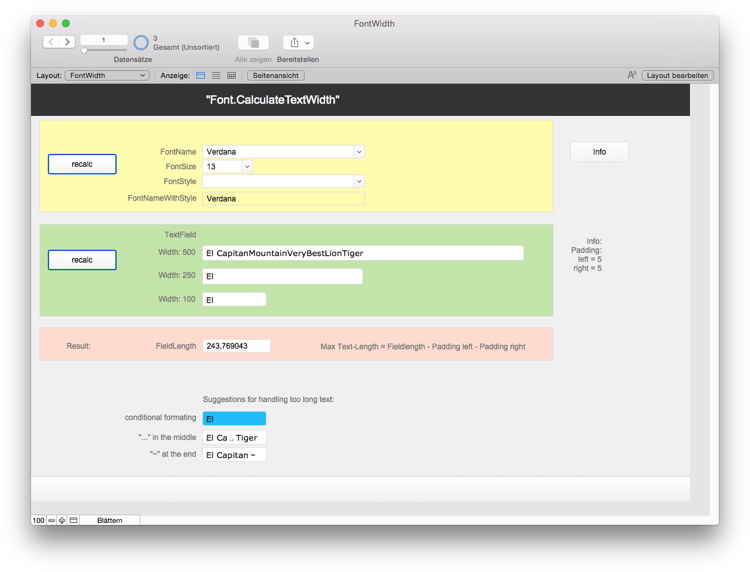
As you can try the example, we can measure the width of a text. This allows conditional formatting in FileMaker. You can for example use a more narrow text font or smaller font size if the text doesn't fit in a field with normal font size. You can even use custom functions to automatically reduce font size or abbreviate text.
Results on Mac OS X and Windows are slightly different due the differences in the rendering code on both platforms. FileMaker may even use other functions to do the text wrapping. But our function should give a good estimate to decide whether something fits.
If FileMaker or Xojo crashes when showing web content with an embedded PDF, you may see in the crash report lines like this:
Thread 0 Crashed:: Dispatch queue: com.apple.main-thread
0 libsystem_platform.dylib 0x00007fff89bf8fc9 _platform_memmove$VARIANT$Unknown + 41
1 com.apple.CoreGraphics 0x00007fff8c887d85 __CGPixelAccessDataInitialize + 733
2 com.apple.CoreGraphics 0x00007fff8c921d18 __CGPixelAccessAccessBitmapData + 489
3 com.apple.CoreGraphics 0x00007fff8c8876ed __CGPixelAccessCreateImageFromRect + 222
4 com.apple.CoreGraphics 0x00007fff8c8875e4 CGPixelAccessCreateImageFromRect + 204
5 com.apple.AppKit 0x00007fff8d7ed7bb -[NSBitmapImageRep initWithFocusedViewRect:] + 1480
6 com.adobe.Acrobat.framework 0x00000001349edf67 0x1349ea000 + 16231
7 com.adobe.Acrobat.framework 0x0000000134a7c375 RunAcrobat + 563935
8 com.adobe.Acrobat.framework 0x0000000134a7bed0 RunAcrobat + 562746
As you see in the crash report, the adobe frameworks crashed when drawing a view.
In that case you may have an old PDF plugin from Adobe installed. You could of course update the PDF Plugin.
Or you can check /Library/Internet Plug-Ins or ~/Library/Internet Plug-Ins folders for plugins. Those folders should normally be empty except Default Browser.plugin file.
If you remove the PDF plugin from Adobe, the webviewer will use the default plugin from WebKit, which may not crash. Try it!

New in this prerelease of the 6.5 MBS FileMaker Plugin:
Download at
monkeybreadsoftware.de/filemaker/files/Prerelease/ or ask for being added to the dropbox shared folder.
For our German speaking clients we have a workshop day:
In Zusammenarbeit mit der DenkForm GmbH bieten wir eine Schulung zum MBS Plugin an. Am 3. November 2016 (auch 2. März 2017 und 7. Dezember 2017) können Sie in Hofheim am Taunus an einer eintägigen Schulung teilnehmen. Lernen Sie die über 4100 Funktionen einmal näher kennen und wie Sie sie effektiv einsetzen. Sammeln Sie Ideen und verbessern Sie ihre FileMaker Lösungen durch den Einsatz unseres Plugins.
Das Monkeybread Software Plugin für FileMaker stellt eine vielseitige Erweiterung der eigenen Datenbank dar. Der Kurs bietet nicht nur einen tiefgreifenden Überblick in die Benutzung und Entwicklung, sondern bietet auch die Chance das Plugin günstiger zu erstehen.
- Einführung in das MBS Plugin
- Überblick über die Funktionsbereiche
- Neues im MBS Plugin dieses Jahr
- Rundgang durch ausgewählte Beispiele
- Gemeinsames Implementieren von Plugin Funktionen in eine Datenbank:
- Upload/Download mit CURL auf einen HTTP/FTP Server
- Ausfüllen eines Formulares auf einer Webseite
- Bilder bearbeiten
- PDF Verarbeitung
- Druckerfunktionen
- Adressbuch und Kontakte abfragen bei Mac OS X.
- Fragen und Antworten
Die Teilnahme kostet 99 Euro inkl. MWSt. und Verpflegung.
Details und Anmeldung bei der
Denkform.
PS: Die Mindestteilnehmerzahl wurde erreicht und der Workshop findet am 3. November statt.
We are always happy to have guests from all over the world. If you come close to mid western area of Germany (near Koblenz), be sure to send us a message. Maybe we have time to meet for a drink and some shop talk. Once again today we met with a client in Koblenz for dinner. But also when I am traveling for conferences or to clients, I try to organize local meetings with other developers and get in touch. For me it is important to see what you guys are doing with Xojo and FileMaker, what issues you see and what things are missing. Later I can fill those with a plugin function or provide you tips for using existing plugin functions.
As you may know I also offer consulting, training and custom plugin development. While you can of course hire me to come to your office for a visit, it may be better for you to leave office. Take a day off and get something done with me. Come for a visit and we develop a solution together.
In the last years we had people come to get a personal MBS Plugin workshop, a training day to get an overview on our plugin features. Another client came to develop a web app in Xojo or implement the usage of a web service in a FileMaker solution. Getting started together, than continue alone in following days. You can also come with a list of issues we should work on in your projects. Most likely I can show you solutions using plugin functions as others had similar problems before. Often it is easier to pay for an hour instead of spending a day yourself looking for a solution!
If time permits we can always add some sight seeing to castles, monastery or mid-age buildings, do some hiking or checkout a brewery or winery. See you someday!
New in this prerelease of the 6.5 MBS FileMaker Plugin:
- Added short data type for Java functions.
- Added PrintDialog.SetResetDestination and PrintDialog.GetResetDestination functions to workaround Sierra printing bugs in FileMaker.
- Updated SQLite to 3.15.0.
- Added FM.ExecuteFileSQLOnIdle function.
- Fixed bug in FM.ExecuteSQLOnIdle (bug since 5.2).
- Added Window.Scrollbar.GetScrollElasticity and Window.Scrollbar.SetScrollElasticity functions.
- Added DynaPDF.WriteStyledText and DynaPDF.WriteStyledTextEx to draw styled text on a PDF.
- Added support to pass string to/from java as char arrays.
- Added support to pass container to/from java as byte arrays.
- Fixed a bug with FM.InsertOrUpdateRecord3 function.
- Added Menu.GetURL, Menu.SetURL, MenuItem.GetURL, MenuItem.SetURL, Schedule.GetURL, Schedule.SetURL, Socket.SetDataAvailableURL, Socket.SetErrorURL, Socket.SetNewConnectionURL, TAPI.GetCallStateEvaluate, TAPI.GetCallStateURL, TAPI.GetNewCallEvaluate, TAPI.GetNewCallURL, TAPI.SetCallStateEvaluate, TAPI.SetCallStateURL, TAPI.SetNewCallEvaluate and TAPI.SetNewCallURL.
- Old stored registration keys are automatically removed when you update plugins and key is expired.
- Unlicensed plugin may show a demo mode note in script editor on Mac.
- Added data type option for Preferences.SetValue to specify data type, so you can overwrite FileMaker preferences like file cache size.
- Added option to contextual menu for script workspace, so you can now jump to the script you perform there in the script.
Download at
monkeybreadsoftware.de/filemaker/files/Prerelease/ or ask for being added to the dropbox shared folder.
Have you seen a dialog like this?
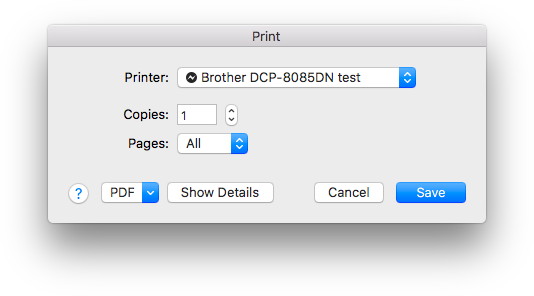
You may have noticed that after printing to PDF, the next print jobs will again print to PDF. The dialog may show "Save" on the button or "Print". The label doesn't matter as all printing goes now to PDF.
With the upcoming 6.5pr3 plugin you can fix this with our
PrintDialog functions:
Set Variable [$r; Value: MBS( "
PrintDialog.Install" ) ]
Set Variable [$r; Value: MBS( "
PrintDialog.Enable" ) ]
Set Variable [$r; Value: MBS( "
PrintDialog.SetResetDestination"; 1 ) ]
Somewhere in your initialization scripts you can call this sequence. It installs our code to observe the print dialog on Mac. You enable the feature and you set the option to reset the print destination each time the dialog shows. This clears the problem with printing to PDF in our tests. We have a couple
more options like preselecting
printer,
paper tray or
paper format.
New plugin will be available tomorrow or by email on request.
After two weeks of conferences I am on my way back home.
This was an exhausting, but also entertaining and very interesting time. I met a lot of people, had shop talk all day and developed new stuff on the fly.

The
Dallas FileMaker user group moved their meeting date for me and over 20 users attended. Next in Houston I met about 100 Xojo developers at the yearly
Xojo developer conference including all the Xojo staff. This week in Salzburg at the
FileMaker Conference I met around 200 FileMaker developers from German speaking countries.
As usual I spend only a little time in sessions. More important for me is the time in the lobby where people show me their projects, explain what issues they have and what functions they'd like to have. I can show what features my plugins have, what may help the client and how we can proceed. Some people even have projects for me I could do and some are interested in personal consulting or training services.
As you may have noticed, I am coding in-between and writing blog articles. For Xojo I hoped for a 64-bit debugger sooner as I worked the last weeks on a CloudKit plugin. Still I hope to get it done and debugged in the next weeks, so you guys can try it.
For FileMaker we got a couple of news:
As usually if you see a feature in the other plugins and you like me to transfer it, please tell me. For a lot of features it makes sense to offer them for both. The styled text feature for DynaPDF is right away built for both tools. We had the Java classes in Xojo for ten years already and now added this functionality for FileMaker as well.
I am looking forward to meet you at the next conferences:
and some more where I don't yet know the dates. Keep me informed if you organize a conference or hear about one. See you there!
Another idea I got on the
FileMaker Conference here in Salzburg: Users may want to have a text field with styled text and transfer that text as good as possible into a PDF page via DynaPDF.
The
Xojo framework provides a
StyledText class where we can query text styles (italic, bold and underline), color, font and font size. Via the
paragraph class, we get alignment information, too.
The
FileMaker plugin SDK offers functions to query styled text. But I have to query style for each character and detect the runs myself (see
feature request). It does provide some more styles, e.g. strikeout. But it does not provide alignment information (see
feature request).
The plugin can now convert styled text as good as we can to format commands in DynaPDF.
WriteFText/
WriteFTextEx functions can process various commands and we can easily support different fonts, alignment, color, styles and even more features.
In
FileMaker the example looks like this:

As you see we have the input field on the top left, the translated commands for review on top right and the final PDF as preview below.
And in
Xojo I made a text editor with live preview:

For the Create PDF button to write a PDF you only need the DynaPDF Starter version. But for live preview with rendering a page, we need a Pro license. whenever you change something in the left text area, we update a few milliseconds later the preview on the right side. The page size is set to match the canvas size, so you get an unscaled high DPI preview.
As you see we have alignment only in Xojo, but strikeout only in FileMaker.
PS: Available soon in plugin version 6.5pr3 or by email now.

As you may have notices in FileMaker 14 a feature was added to support elastic scrolling on Mac OS X 10.7 and newer.
As FileMaker only has one main control used for both a list and a layout, the elastic scrolling is always there for you. But some users don't enjoy it in their layouts.
So just before the lunch today here at FileMaker Conference in Salzburg, I spend approximately 20 minutes on a new function to
query and
set the elasticity mode on the scrollbars in a layout:
MBS("
Window.Scrollbar.SetScrollElasticity"; 0; "none")
You can set the scrollbars to auto, none and allowed. By default it is auto, so the system preferences define whether it is allowed or not. You can now switch it per layout and adjust it when switching to list mode or to layout mode.
PS: Coming soon in the next prerelease. If you like to try earlier, please email me.

As you may know I offer an
iOS SDK Extension for additional commands for the iOS SDK from FileMaker.
Sadly the 15.0.2 SDK has a little change. The updateProjectSettings utility used in the Xcode project overwrites the RequiredToLink.mm file each time. But in this file we put our initialization call for our static library. This breaks the extension.
To fix it, please rename the RequiredToLink.mm file in the project. For example name it "MyRequiredToLink.mm". After the change is made, the file is no longer overwritten and you can enjoy our extension.
And someday we hope to see plugin support in FileMaker iOS SDK and offer our plugin for iOS. I already have one compiled here...
At the FileMaker Conference 2016 in Salzburg I received an award for the best development tool for FileMaker:

Thanks for recognizing my ten year commitment to FileMaker for writing the MBS Plugin.
And thanks to all my customers who supported me with ideas and by using the plugin.
A few of the new ideas from the conference will be in the next prerelease.
One of the ideas I got on the German FileMaker conference:
Add a menu entry to the contextual menu to open the script from a perform script step:
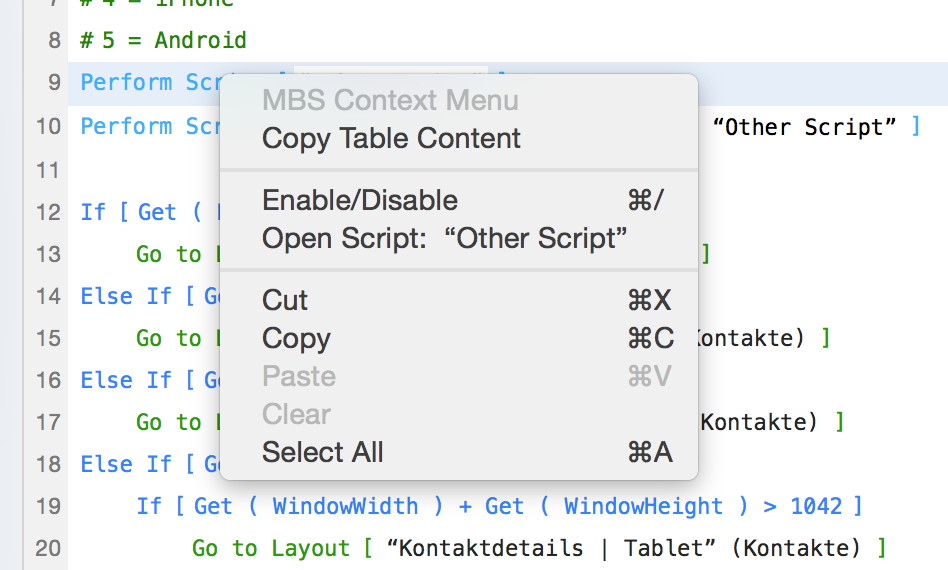
So when you have a script step to perform a script, you can right click it, pick the open command and jump right to that script.
Coming in pr3 soon and already localized for all languages FileMaker supports.
PS: For FileMaker 14 and 15.
Today we have our workshop for our FileMaker Plugin here in Salzburg. We already met with people for dinner yesterday:

If you are in Salzburg right now and you like to join, please contact me soon.
New in this prerelease of the 6.5 plugins:
Download at
monkeybreadsoftware.de/filemaker/files/Prerelease/ or ask for being added to the dropbox shared folder.
We had a nice meeting yesterday with the FileMaker developers from Dallas area:
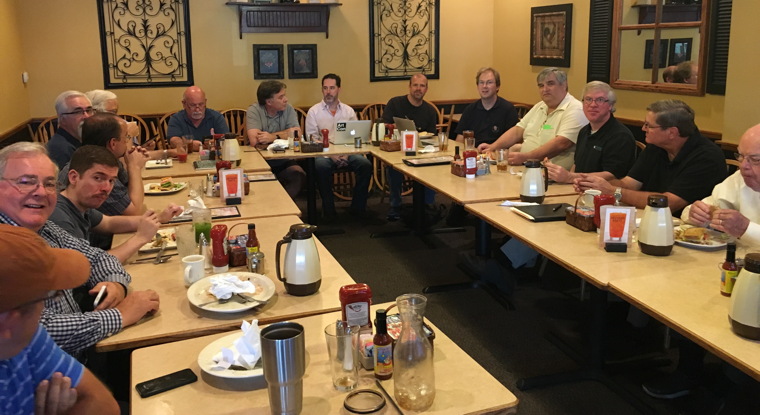
I presented about MBS Plugin and especially demonstrated features from our
last release 6.4 and new features in the upcoming 6.5 version. We a couple of discussions about FileMaker Cloud and the Linux version of the MBS Plugin.
See you in
Salzburg next week or in
Phoenix next year!
New in this prerelease of the 6.5 plugins:
- Updated to DynaPDF 4.0.3.10
- Added Java functions to load and execute java methods.
- Added SendMail.AddAttachmentText and SendMail.AttachmentCount functions.
- Added support for Menus on Windows to draw with
- custom font
- bold, italic, underline, strikeout style.
- font size.
- Font color and background color.
- Disabled/Selected color if needed.
- Diamond, Bullet and Mixed states.
- Added MenuItem.GetStrikeOut, MenuItem.SetStrikeOut, MenuItem.GetBackColor, MenuItem.GetFontColor, MenuItem.SetBackColor and MenuItem.SetFontColor.
- Fixed a memory leak in OCR.WriteToPDF function.
- Changed registration warning dialogs to show old license key name and date, so you better know what license key to find and replace.
- Fixed calendar functions to return plugin IDs for repeating calendar events (with same UUID), so we can distinguish them.
- Added some updater functions to control the updater process on Mac.
- Fixed a problem when Files.List with a file extension on Windows would return an error if no file is found. Now returns empty text.
- Fixed a problem with plugin not loading due to broken preferences file.
- Added Linux version of our plugin.
- Added RichText.RTF function.
- Updated OpenSSL to 1.0.2j
Download at
monkeybreadsoftware.de/filemaker/files/Prerelease/ or ask for being added to the dropbox shared folder.
 Sending emails in FileMaker with MBS Plugin
FileMaker has a built in feature for sending email. While this is easy to use and convenient for a lot of users, some need more: So we have an email sending feature in our MBS Plugin with the following features:
- Send emails with plain text or html
- Several attachments from files, text or containers
- As many TO, CC, BCC, Sender and ReplyTo addresses.
- Subject, HTML and text properly encoded.
- Any SMTP Server
- Custom Port
- Customize SSL options
- Proxy options
- Authentication options
So in order to send an email via MBS Plugin, you need a SMTP server and the credentials. For the server, we need a domain name or an IP, either IPv4 or IPv6. Than we need credentials, typical name and password. Next we need to have an idea about SSL. Your server should require SSL and you need to know if it's SSLv3, TLS 1.0 or best TLS 1.2. You can tell our plugin to use a specific TLS/SSL version and require SSL. Finally you can provide a SSL certificate chain for your server to actually check certificates from server.
To create the email, you use the SendMail functions like the following snippet. You pass HTML text, plain text, subject, from address and smtp details. For our functions we pass email and name separated. The plugin will encode the name properly, so non-ASCII characters survive. Same for subject, plain text and html text.
Set Variable [$EmailID; Value:MBS("SendMail.CreateEmail")]
Set Variable [$r; Value:MBS("SendMail.SetFrom"; $EmailID; EMail::FromEmail; EMail::FromName)]
Set Variable [$r; Value:MBS("SendMail.SetHTMLText"; $EmailID; EMail::HTMLText)]
Set Variable [$r; Value:MBS("SendMail.SetPlainText"; $EmailID; EMail::PlainText)]
Set Variable [$r; Value:MBS("SendMail.SetSubject"; $EmailID; EMail::Subject)]
Add the SMTP settings here or later directly on the CURL functions:
Set Variable [$r; Value:MBS("SendMail.SetSMTPServer"; $EmailID; EMail::SMTP Server)]
Set Variable [$r; Value:MBS("SendMail.SetSMTPUsername"; $EmailID; EMail::SMTP Username)]
Set Variable [$r; Value:MBS("SendMail.SetSMTPPassword"; $EmailID; EMail::SMTP Password)]
The next snippet adds addresses. We take them from a separate table and add them depending of the type. We support here TO, CC and BCC recipients. You can also add Sender and ReplyTo addresses. If you need you can also add other email headers like Company Name, Priority or read receipt request.
Go to Related Record [Show only related records; From table: “Recipient”; Using layout: “Recipient” (Recipient)]
Go to Record/Request/Page [First]
Loop
If [Recipient::Type = "To"]
Set Variable [$r; Value:MBS("SendMail.AddTO"; $EmailID; Recipient::Email; Recipient::Name)]
Else If [Recipient::Type = "CC"]
Set Variable [$r; Value:MBS("SendMail.AddCC"; $EmailID; Recipient::Email; Recipient::Name)]
Else If [Recipient::Type = "BCC"]
Set Variable [$r; Value:MBS("SendMail.AddBCC"; $EmailID; Recipient::Email; Recipient::Name)]
End If
Go to Record/Request/Page [Next; Exit after last]
End Loop
Go to Related Record [From table: “EMail”; Using layout: “EMail” (EMail)]
From another table we pick attachments. You can pass attachments as containers, files or plain text. This way you are flexible to add attachments as you need. For each attachment you can provide a file name and a mime type. If no mime type is specified, our plugin can guess it from the file extensions.
Go to Related Record [Show only related records; From table: “Attachment”; Using layout: “Attachment” (Attachment)]
Go to Record/Request/Page [First]
Loop
If [not IsEmpty(Attachment::Container)]
Set Variable [$r; Value:MBS("SendMail.AddAttachmentContainer"; $EmailID; Attachment::Container; Attachment::Name; Attachment::Type)]
End If
If [not IsEmpty(Attachment::Path)]
Set Variable [$r; Value:MBS("SendMail.AddAttachmentFile"; $EmailID; Attachment::Path; Attachment::Name; Attachment::Type)]
End If
If [not IsEmpty(Attachment::Text)]
Set Variable [$r; Value:MBS("SendMail.AddAttachmentText"; $EmailID; Attachment::Path; Attachment::Name; Attachment::Type)]
End If
Go to Record/Request/Page [Next; Exit after last]
End Loop
Go to Related Record [From table: “EMail”; Using layout: “EMail” (EMail)]
If you like to review the email in source code, you can use the GetSource function and display the email in a text field:
Set Field [EMail::EmailSource; MBS( "String.ReplaceNewline"; MBS("SendMail.GetSource"; $EmailID); 1)]
To send we need a CURL transfer. So you create a new CURL session and pass the email sending settings. Next you can change some CURL settings like SSL settings or switch to a different port. So for this example we do not check SSL certificates, but prefer TLS v1.2.
Set Variable [$curl; Value:MBS("CURL.New")]
Set Variable [$r; Value:MBS("SendMail.PrepareCURL"; $EmailID; $curl)]
#Maybe use alternative SMTP port?
// Set Variable [$r; Value:MBS("CURL.SetOptionPort"; $curl; 587)]
#This turns TLS on and requires connection to be encrypted
Set Variable [$r; Value:MBS("CURL.SetOptionUseSSL"; $curl; 3)]
#force TLS v1.2
Set Variable [$r; Value:MBS("CURL.SetOptionSSLVersion"; $curl; 6)]
#This disables certificate verification, so we accept any:
Set Variable [$r; Value:MBS("CURL.SetOptionSSLVerifyHost"; $curl; 0)]
Set Variable [$r; Value:MBS("CURL.SetOptionSSLVerifyPeer"; $curl; 0)]
#Better with certificates if you have some:
// Set Variable [$r; Value:MBS( "CURL.SetOptionCAInfo"; $curl; "/Library/FileMaker Server/certificates.pem")]
// Set Variable [$r; Value:MBS("CURL.SetOptionSSLVerifyHost"; $curl; 2)]
// Set Variable [$r; Value:MBS("CURL.SetOptionSSLVerifyPeer"; $curl; 1)]
The perform call will actually do the transfer. Our plugin can do transfer synchronously, in background threaded or asynchronously on main thread. This example uses synchronous transfer, so the script waits for the transfer to finish. But you can also run in background or asynchronously and later trigger a script to inform you about the result of the transfer.
Set Variable [$r; Value:MBS("CURL.Perform"; $curl)]
You can show debug log and input in fields if you like:
Set Field [EMail::DebugInput; MBS("CURL.GetInputAsText"; $curl)]
Set Field [EMail::DebugMessages; MBS("CURL.GetDebugAsText"; $curl)]
Finally you can do the cleanup:
Set Variable [$r; Value:MBS("CURL.Cleanup"; $curl)]
Set Variable [$r; Value:MBS("SendMail.Release"; $EmailID)]
If you have trouble with setting this up, please contact us. Our plugin works fine with a lot of smtp servers including google mail and outlook 365.
The next MBS FileMaker Plugin will have new menu functions. See this screenshot:
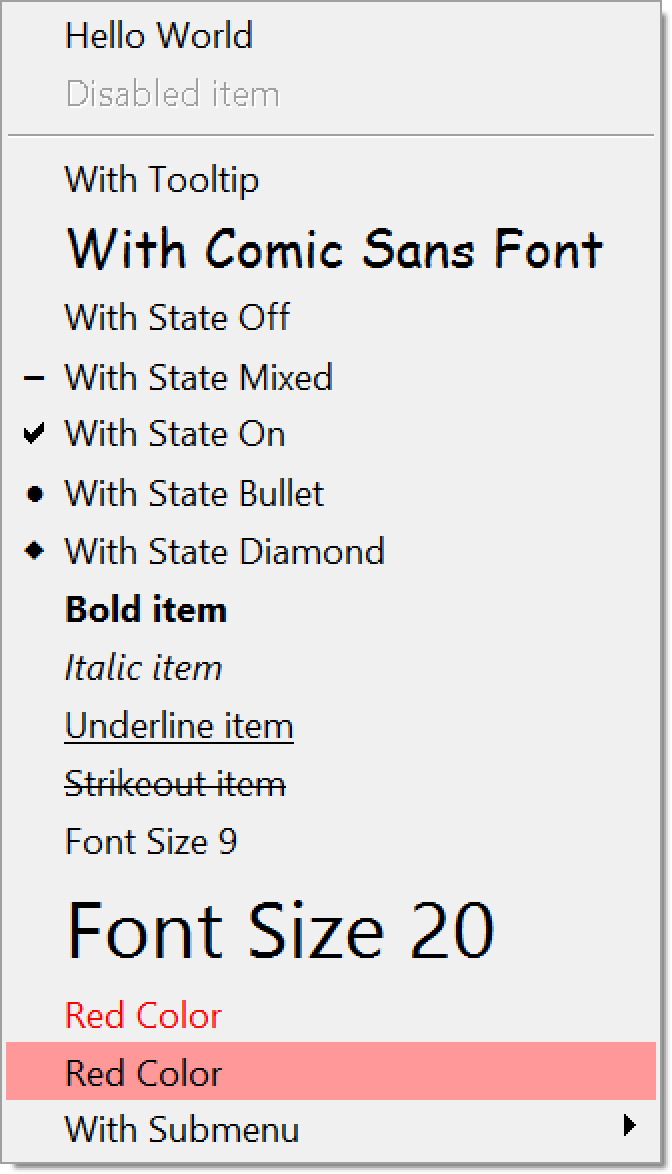
Now supporting background and text color, custom fonts, diamond and bullets marks.