As you may know, you can do SQL queries in FileMaker with MBS Plugin and than get result stored in memory to call other functions on that.
We got a few new functions for this: FM.SQL.Max, FM.SQL.Min, FM.SQL.Avg and FM.SQL.Sum
So you can do a query once and than let the plugin sum up the values or calculate an average on a subset of the result. You can specify column and first/last row to use.
# let FileMaker query data once
Set Variable [ $Records ; Value: MBS( "FM.SQL.Execute"; Get(FileName); "SELECT Price FROM Produkte") ]
# Now get sum, min, max and avg
Set Variable [ $sum ; Value: MBS( "FM.SQL.Sum"; $records; 0) ]
Set Variable [ $min ; Value: MBS( "FM.SQL.Min"; $records; 0) ]
Set Variable [ $max ; Value: MBS( "FM.SQL.Max"; $records; 0) ]
Set Variable [ $avg ; Value: MBS( "FM.SQL.Avg"; $records; 0) ]
Set Variable [ $text ; Value: MBS( "FM.SQL.Text"; $records; "" /* firstRow */; "" /* lastRow */; "" /* firstCol */; "" /* lastCol */; ", " /* rowSep */) ]
Set Variable [ $r ; Value: MBS( "FM.SQL.Release"; $records ) ]
Show Custom Dialog [ "Sum: " & $sum & ¶ & "Min: " & $min & ¶ & "Max: " & $max & ¶ & "Avg: " & $avg & ¶ & "text: " & $text ]
Coming soon for MBS Plugin 9.1.
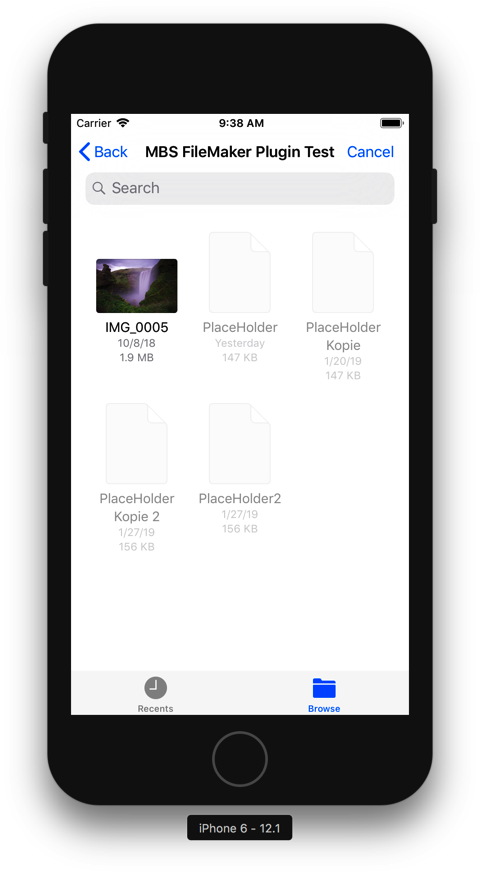
For next version of MBS Filemaker Plugin, we added new DocumentPicker functions to our
FileDialog section. For iOS we didn't yet have a file dialog function and sometimes people like to pick a file via dialog. So we implemented
UIDocumentPickerViewController class from iOS to provide functions for FileMaker.
The document picker supports four modes. Each mode provides a slightly different approach to sharing files between apps:
- Import an external document. The user selects an external document. The document picker copies the document, leaving the original unchanged.
- Export a local document. The user selects an external destination. The document picker copies the document, leaving the original unchanged.
- Open an external document. The user selects an external document. The document picker provides access to the document, and the user can edit the document in place.
- Move a local document. The user selects an external destination. The document picker moves the document; however, the user can still access the document as an external document, and the user can edit the document in place.
In all cases the panel shows asynchronously, the user does something and you get a script triggered when work is done, so you can pick up the list of file paths.
Coming soon for version 9.1 or if you like to try early, please contact us.
Morgen findet der Stammtisch in Karlsruhe statt:
Die Organisatoren von der MKV GmbH laden herzlich zum monatlichen FileMaker Stammtisch in Karlsruhe ein. Das nächste Treffen findet am 29. Januar 2019 um 18:30 Uhr im Restaurant „Badisch Brauhaus“ statt.
Der feste Stammtisch-Termin ist jeweils am letzten Dienstag des Monats ab 18.30 Uhr. Die Veranstalter freuen sich auf informative und gemütliche Abende in großer Runde. Die Eckdaten für das erste Treffen des Jahres:
Aktueller Termin: 29. Januar 2019
Treffpunkt:
Badisch Brauhaus
Stephanienstrasse 38-40
76133 Karlsruhe
Anmeldung und Informationen bei MKV.
Man sieht sich!
We got a problem reported by am user about PDFKit RenderPage function (
PDFKit.GetPDFPageImage in FileMaker Plugin and
PDFPageMBS.Render in Xojo Plugin) in our plugin skipping some content in a PDF file. Precisely a server with MacOS failed to render a PDF completely as one of the images inside was missing.
The PDF itself seems to open fine in Preview.app on that Mac. But when you extract the JPEG, it fails to render
When you open that jpeg on the server in Apple's Preview.app, the app freezes. The stack trace looks like this:
+ 2669 CGImageProviderCopyImageBlockSetWithOptions (in CoreGraphics) + 137 [0x7fff367b16e0]
+ 2669 IIOImageProviderInfo::CopyImageBlockSetWithOptions(void*, CGImageProvider*, CGRect, CGSize, __CFDictionary const*) (in ImageIO) + 650 [0x7fff38ead344]
+ 2669 IIOImageProviderInfo::copyImageBlockSetWithOptions(CGImageProvider*, CGRect, CGSize, __CFDictionary const*) (in ImageIO) + 509 [0x7fff38ead5b1]
+ 2669 IIO_Reader::CopyImageBlockSetProc(void*, CGImageProvider*, CGRect, CGSize, __CFDictionary const*) (in ImageIO) + 101 [0x7fff38ead71d]
+ 2669 AppleJPEGReadPlugin::copyImageBlockSet(InfoRec*, CGImageProvider*, CGRect, CGSize, __CFDictionary const*) (in ImageIO) + 1708 [0x7fff38eae880]
+ 2669 AppleJPEGReadPlugin::createImageBlockSetWithHardwareDecode(InfoRec*, CGImageProvider*, CGSize, bool*) (in ImageIO) + 85 [0x7fff38f77397]
+ 2669 AppleJPEGReadPlugin::createImageBlockSetWithHardware_intel(InfoRec*, CGImageProvider*, __CFData const*, CGSize, bool*) (in ImageIO) + 343 [0x7fff38f16b1b]
+ 2669 AppleJPEGReadPlugin::createIOSurfaceWithHardware_intel(CGImageProvider*, __CFData const*, unsigned int, VPA_HWJPEGDecodeSession*, __IOSurface**) (in ImageIO) + 74 [0x7fff38f15d9a]
+ 2669 AppleJPEGReadPlugin::acquireSession() (in ImageIO) + 24 [0x7fff38f15816]
+ 2669 _pthread_mutex_firstfit_lock_slow (in libsystem_pthread.dylib) + 226 [0x7fff637944b7]
+ 2669 _pthread_mutex_firstfit_lock_wait (in libsystem_pthread.dylib) + 96 [0x7fff63796d6c]
+ 2669 __psynch_mutexwait (in libsystem_kernel.dylib) + 10 [0x7fff636dee76]
So JPEG rendering is done via Intel hardware in Mojave and the server in VMWare has no access to that hardware. But the same file in other places like Finder Icon preview works as that seems to use a different code path!?
Looks like the PDFKit code we use is different from the one Preview.app uses. With PDFKit drawing PDF into memory buffer to create image, it tries to do the hardware. That fails, but it doesn't wait endless, but returns quickly without rendering the JPEG image. Images not embedded in JPEG format render correctly.
Alternative way is to render would be via DynaPDF which brings its own code libraries.
PS: Also happens on a FileMaker Server on MacOS (Without VM) running without display. So if graphics card is deactivated, this seems to fail for PDFKit rendering, too. Reported to Apple with radar 47544376.
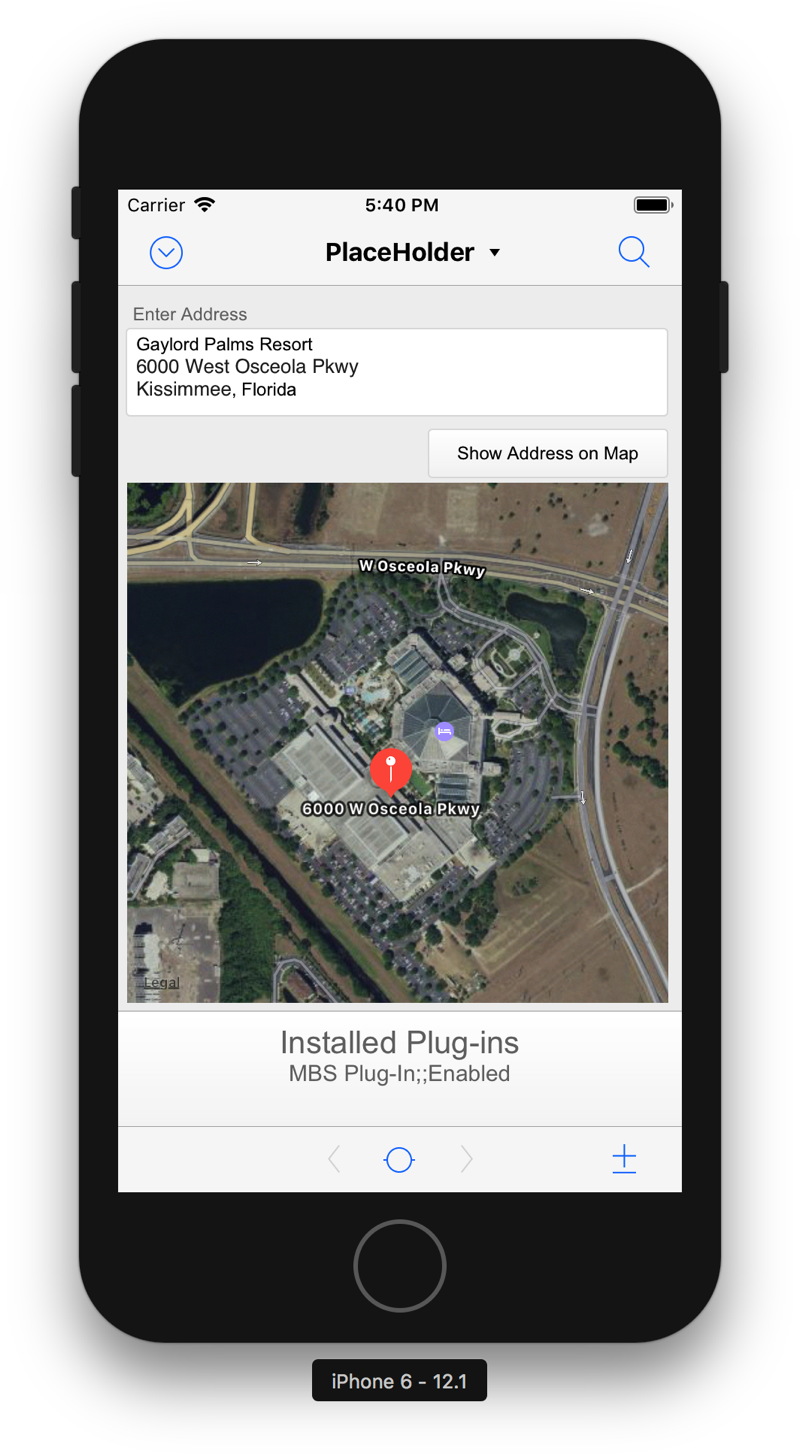
If you ever wondered how to lookup the hotel for the FileMaker DevCon 2019, you could use a self written FileMaker solution on your iPhone or iPad to do so.
With
MapView functions in
MBS FileMaker Plugin you can put a map on the FileMaker layout and show locations.
For next 9.1 plugin we'll add a few more functions for directions and showing routes. The map view will be embedded in the layout better, so it scrolls with other content on the same page.
What other features would you like to see?
Current 9.0 plugin can already render map images with 2D or 3D with
MapView.Snapshot function. When you have the map view on the layout, you can move to an address with
MapView.ShowAddress function and optionally put a pin there. Or just add pins for given coordinates with
MapView.AddPin function.
On the list for 9.1 are poly lines to show routes and get directions. If you have more ideas, please let us know. We'd like to polish the map functions a bit more to present them at DevCon in summer.
If you developer for iOS and need the 9.1 prerelease versions sooner, please contact us.

Xojo Inc. will recognizes developers for their Xojo applications at the upcoming
conference in Miami:
The Xojo Design Awards call for entries is officially open! The Xojo Design Awards foster creativity and encourage independent development by rewarding developers that produce quality products. Judging these awards gets more challenging every time, but the overwhelming response really illustrates how Xojo helps bring ideas to life.
The deadline for entry is March 20, 2019. The awards will be presented at XDC 2019, The Xojo Developer Conference, taking place May 1 - 3, 2019 in Miami, Florida. You do not need to be present to win.
The categories to be awarded (depending on participation) are likely to be:
- Best Overall
- Best iOS App
- Best Business App
- Best Consumer App
- Best Cross-Platform App
- Best Developer Tools
The criteria on which the software will be judged includes: creativity, ease of use, design, utility and best use of Xojo technologies. All software submitted to the Xojo Design Awards must be shipping at the time the software is entered (no beta software). Each winner will receive an engraved Xojo Design Award and the right to use the Xojo Design Award logo in marketing materials. For more information or to submit an entry, please visit xojo.com/designawards .
See you in Miami and good luck to win!

Nickenich, Germany - (Januar 22nd, 2019) -- MonkeyBread Software today is pleased to announce
MBS FileMaker Plugin 9.0 for macOS, iOS, Linux and Windows, the latest update to their product that is easily the most powerful plugin currently available for FileMaker Pro. As the leading database management solution for Windows, macOS, iOS and the web, the FileMaker Pro Integrated Development Environment supports a plugin architecture that can easily extend the feature set of the application.
MBS FileMaker Plugin 9.0 has been updated and now includes over 5600 different functions, and the versatile plugin has gained more new functions:
The new
MapKit functions allow you to show a map control on the layout. We use Apple framework for the map view for Mac and iOS. You can add pin annotations to the maps and show an address. With snapshot function you render a picture of a given map area. Maps can show as standard, satellite, or hybrid, with the option to enable 3D flyover.
Our
CURL functions can download emails from IMAP mail boxes. The new
CURL.GetResultAsEMailList function parses the details returned from IMAP server to provide the list of emails with details in JSON. Each entry contains an URL to download the email, the unique identifier for the email, optional subject, sender and recipient addresses and the message id.
For
JSON we added new functions to create values, compare JSON objects and find values in arrays.
In our documentation we now link to blog articles related to the function. For our Mac users, you can enable links to documentation for MBS functions in the formatted calculations.
Nowadays most users on MacOS use the 64-bit FileMaker version. The 32-bit Mac version of MBS Plugin version is only available on request. We removed QTMovie, QTExport and
MovieView functions as they were 32-bit only.
This version includes an upgrade to
GraphicsMagick library with new and better functions. Now all platforms can use 16 bit color depth for each channel.
GMImage.NewFromContainer now returns better error messages. Try the new repage, extent, auto orient or resize functions.
SQLite is now built with API armor option to increase stability. We fixed bugs with
SQL connections to MySQL and Oracle. Improved default settings for connecting via ODBC to FileMaker.
We got new
path functions for short paths on Windows, more
ScriptWorkspace functions,
Applescript.DeterminePermissionToAutomateTarget to query user permissions for Apple Script usage,
Window.IsMaximized and
Window.IsMinimized.
Finally we upgraded CURL library to version 7.63.0, DynaPDF to 4.0.25.71, freetype to 2.9.1, GraphicsMagick to 1.3.31, iconv to 1.15, libarchive to 3.3.3, libexpat to 2.2.6, OpenSSL to 1.1.1a, png to 1.6.36, regex to 8.42, SQLAPI to 4.2.4 and SQLite to version 3.26.0.
See
release notes for a complete list of changes.
22. Januar 2019 - Monkeybread Software veröffentlicht heute das MBS Plugin für FileMaker in Version 9.0, mit inzwischen über 5600 Funktionen eines der größten FileMaker Plugins überhaupt. Hier einige der Neuerungen:
Die neuen
MapKit Funktionen erlauben Ihnen eine Karte als Steuerelement auf ein Layout zu legen. Wir verwenden dafür das Apple Maps Framework für iOS und MacOS. Sie können Adressen anzeigen und Pins auf die Karte setzen. Mit der Snapshot Funktion rendern Sie Karten als Bilder. Karten können im Standard, Satellit oder Hybrid Modus angezeigt werden, alternative als 3D Überflug.
Unsere
CURL Funktionen können Emails von einem IMAP Emailserver laden. Die neue
CURL.GetResultAsEMailList Funktion parst die Antwort vom Email Server und gibt eine Liste der Emails als JSON zurück. Jeder Eintrag entält eine URL zum Laden der Email, die eindeutige Nummer der Email, optional den Betreff, Absender und Empfänger Adressen und die Message ID.
Für
JSON haben wir neue Funktionen zum Erzeugen von Werten, zum Vergleichen von JSON Objekten und um Werte in einem Array zu finden.
In der Dokumentation finden Sie bei den Funktionen Links zu relevanten Blog Artikeln. Für MacOS können Sie die Anzeige von MBS Plugin Funktionen als Links zur Dokumentation in den Voreinstellungen aktivieren.
Inzwischen verwenden die meisten Mac Anwender FileMaker in der 64-bit Version. Daher ist die 32-bit Mac Version des MBS Plugins nur noch auf Anfrage zu haben. Wir haben außerdem einige reine 32-bit Funktionen entfernt, u.a. QTMovie, QTExport und
MovieView Funktionen.
Diese Version hat eine neuere
GraphicsMagick Bibliothek mit neuen und verbesserten Funktionen. Auf allen Platformen können wir jetzt Bilder in 16-bit Farbtiefe pro Farbkanal verarbeiten.
GMImage.NewFromContainer gibt bessere Fehlermeldungen zurück. Probieren Sie die neuen Funktionen repage, extent, auto orient und resize.
Die SQLite Bibliothek bauen wir mit der API Armor Option für bessere Stabilität. Wir haben Fehler korrigiert für
SQL Verbindungen zu MySQL oder Oracle. Neue Voreinstellungen helfen für Verbindungen zu FileMaker über ODBC.
Wir haben neue Pfad Funktionen für Kurzpfade bei Windows, mehr
ScriptWorkspace Funktionen,
Applescript.DeterminePermissionToAutomateTarget um die Berechtigung für Apple Script zu überprüfen oder anzufragen und zwei neue Funktionen
Window.IsMaximized und
Window.IsMinimized für den Fensterstatus abzufragen.
Außerdem haben wir die CURL Bibliothek auf Version 7.63.0 aktualisiert, DynaPDF auf 4.0.25.71, freetype auf 2.9.1, GraphicsMagick auf 1.3.31, iconv auf 1.15, libarchive auf 3.3.3, libexpat auf 2.2.6, OpenSSL auf 1.1.1a, png auf 1.6.36, regex auf 8.42, SQLAPI auf 4.2.4 und SQLite auf Version 3.26.0.
Alle Änderungen in den
Release Notes.
There is another
PauseOnError conference:

Organized by the SmallCo team, there is an upcoming conference in Tulum (Mexico) for up to 120 FileMaker developers. Between 8th and 11th April 2019, you have the possibility to deep dive into FileMaker and X, where X = javascript, web services, big data, IOT & just about anything else you can imagine. Sounds like integration into other services, databases and devices will be a big topic here!
The next big airport is in Cancun. With direct flights from USA, Canada, Germany, Spain, Belgium, Argentina and many more, this should be easy reachable for most attendees. The hotel shuttle can pick you up from the airport.
I visited PauseOnError conference before in Berlin and Cleveland. Mexico as location has a big advantage and that is immigration. Not everyone can get the Visas for USA or Europe, so it may be easier to get to Tulum for some attendees. And for South American visitors, I expect this to be a cheaper alternative than
FileMaker DevCon in Orlando.
New in this prerelease of version 9.0 of the MBS FileMaker Plugin:
Download at
monkeybreadsoftware.de/filemaker/files/Prerelease/ or ask for being added to the dropbox shared folder.
With Apple Maps support coming for
MBS Xojo and
FileMaker Plugin you can even get 3D flyover hybrid snapshots:
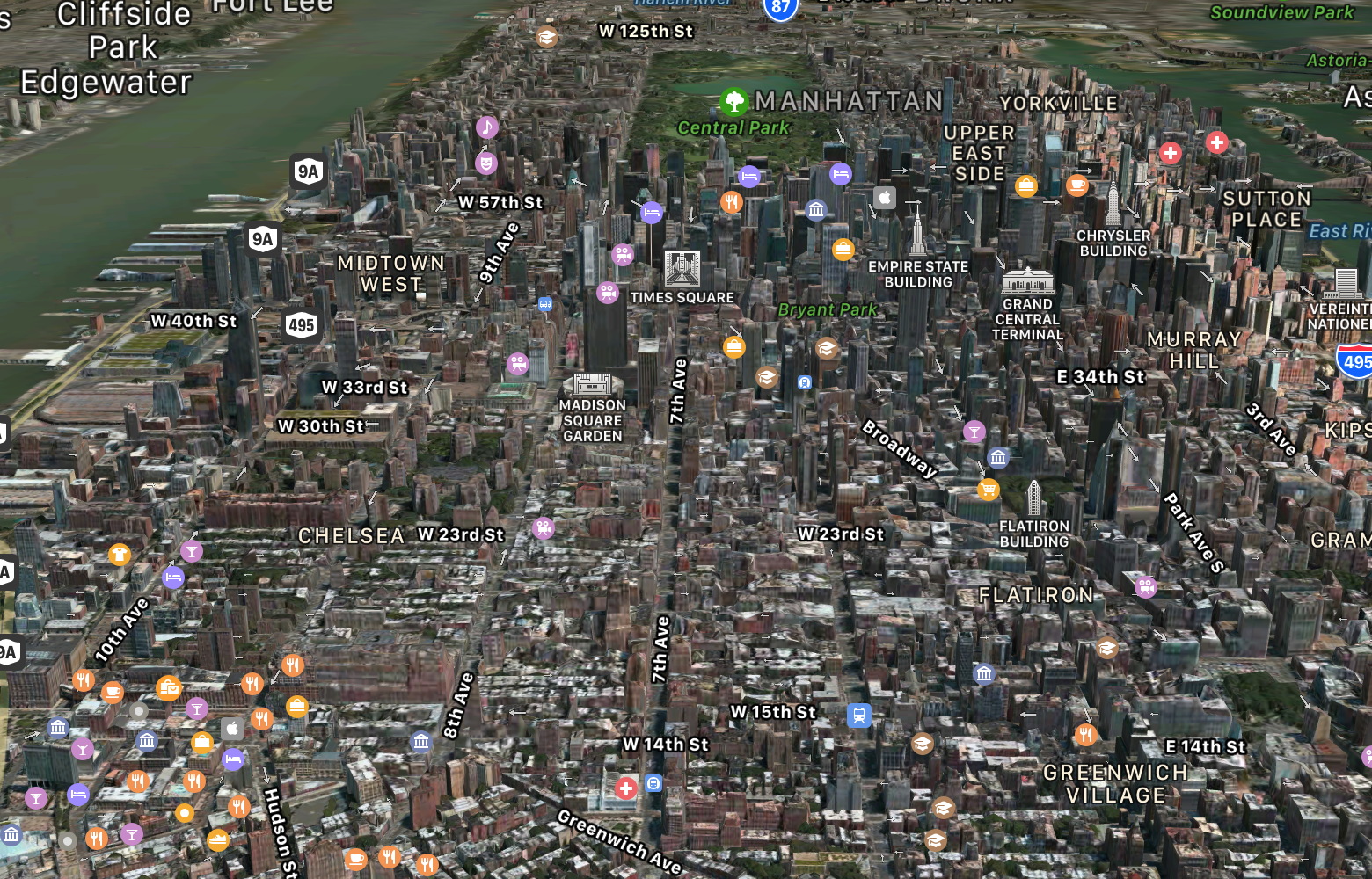
This example renders with MapType=HybridFlyover with a camera set to 40.7457172/-73.9941266 coordinate. The distance is set to 3000 meter, the pitch is set to 70 degree and heading is at 28 degree. Please try soon with next prerelease or next week with final release.
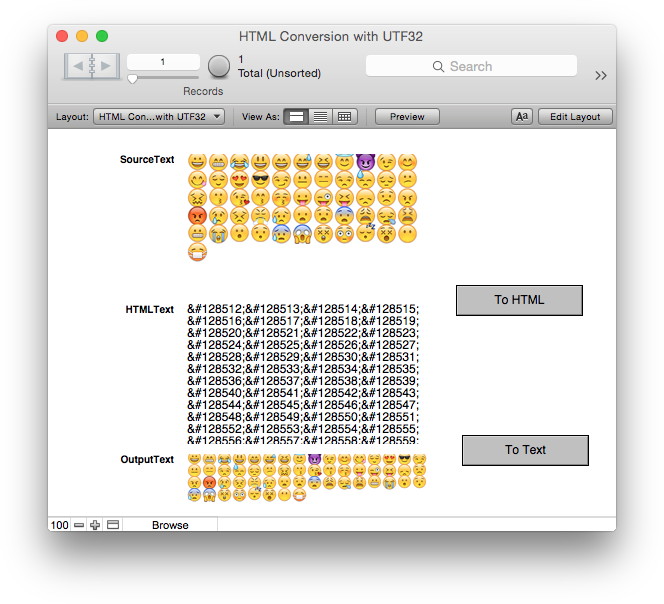
Here a few smileys:
😀😁😂😃😄😅😆😇😈😉😊😋😌😍😎😏😐😑😒😓😔😕😖😗😘😙😚😛
😜😝😞😟😠😡😢😣😤😥😦😧😨😩😪😫😬😭😮😯😰😱😲😳😴😵😶😷
Do you see all 56?
Well, in our plugins we have functions to encode text to HTML and it didn't work for those smileys. The reason is that those are outside the normal 16-bit unicode range. They need 2 characters to encode in UTF-16 format. Most functions in our plugins don't care for this details. Normally it doesn't matter as we pass through texts. But for encoding to HTML we need to process text in UTF-32 well. So plugin needs to decode 16bit character pairs to make sure they are encoded correctly.
After a couple of hours work on our plugin's text handling you can enjoy plugins doing it right!
See
Text.EncodeToHTML function in
MBS FileMaker Plugin and
EncodingToHTMLMBS function in
MBS Xojo Util Plugin.
If you see an error message in FileMaker Server installer like this, you may need to remove or disable the built-in web server software to be able to install FileMaker Server.

So in order to disable it, you can dig into how to disable services in MacOS. But we found a simpler way. Just move the com.apple.serverd.plist out of the /Library/LaunchDaemons folder and restart the Mac.
We'd prefer to change the ports from either MacOS Server's web server or the FileMaker Server's web server, but both is not supported. As you may guess a lot of code simply expects https at port 443, so they don't even bother to offer you a way to enter a port number.
New in this prerelease of version 9.0 of the MBS FileMaker Plugin:
- Added MapView functions to put map control on the layout for Mac and iOS.
- Added MapView.Snapshot function to render map images.
- Manually applied CURL fix: vauth/oauth2: Fix OAUTHBEARER token generation #3377 (for Mac)
- Fixed bug with inline email text decoding and an extra space character sometimes.
- Updated to DynaPDF to version 4.0.25.69.
- Changed Printer.Print to prefer selecting exact match over beginning of text.
Download at
monkeybreadsoftware.de/filemaker/files/Prerelease/ or ask for being added to the dropbox shared folder.

Last year there was a little change in the CURL library for handling email downloads via IMAP. We used to download the list of email, get the index in the email box and download the email by passing the index with UID parameter in the URL. The first email in the mailbox is 1. If you delete email with ID 1, than the second email moves down to become the new first email.
Now since CURL version 7.62.0 from October, the default fetch is using the IMAP UID command. That means the IMAP server gives every email in the mailbox an unique ID which counts up for every new email coming in. The UID does not change if emails are moved or deleted, so we can address emails on the server much better. Now the new parameter is named UID and the old UID parameter is renamed MAILINDEX.
As you may guess, the old and new UID are not the name values, so existing applications with newer plugin fail to load emails. You can fix your script by changing UID to MAILINDEX.
MBS FileMaker Plugin in version 9.0 for FileMaker and
MBS Xojo CURL Plugin version 19.0 for Xojo have a mitigation to switch to MAILINDEX if the query via UID failed.
For newer projects we recommend to do the lookup of the emails in the mailbox with UID FETCH and get the emails with unique IDs. Next we recommend to use BODY.PEEK instead of just BODY to avoid emails being marked as read automatically. When switching to BODY.PEEK you can remove workarounds which removed the seen flag. And you can include options like INTERNALDATE for the date of the email and/or RFC822.SIZE for the email size:
UID FETCH 1:* (FLAGS INTERNALDATE RFC822.SIZE BODY.PEEK[HEADER.FIELDS (Message-Id DATE FROM SUBJECT TO SENDER REPLY-TO CC BCC)])
As you see we include a few headers fields in this sample query.
The result looks like this:
* 1 FETCH (UID 103 FLAGS (\Seen $junk) INTERNALDATE "06-Apr-2018 19:42:11 +0200" RFC822.SIZE 2091 BODY[HEADER.FIELDS (MESSAGE-ID DATE FROM SUBJECT TO SENDER REPLY-TO CC BCC)] {214}
From: Christian Schmitz
Subject: Hello World
Message-Id: <6F3B718F-8427-4EFB-B291-106A8ABFC1AA@monkeybreadsoftware.de>
Date: Fri, 6 Apr 2018 19:42:05 +0200
To: test@macsw.de
)
Now you can parse that easily. But for our FileMaker plugin we made a new function CURL.GetResultAsEMailList to parse the list and return as JSON. The JSON looks like this:
[{
"Index": 1,
"UID": 103,
"Size": 2091,
"InternalDate": "06-Apr-2018 19:42:11 +0200",
"URL": "imap://imap.macsw.de/INBOX;UID=103",
"Flags": ["Seen"],
"Subject": "Hello World",
"Message-Id": "<6F3B718F-8427-4EFB-B291-106A8ABFC1AA@monkeybreadsoftware.de>",
"Addresses": [{
"Type": "from",
"Email": "testing@monkeybreadsoftware.de",
"Name": "Christian Schmitz"
}, {
"Type": "to",
"Email": "test@macsw.de",
"Name": ""
}],
"Date": "06.04.2018 09:42:05"
}]
This JSON contains all the parsed values. We convert the date to the timestamp for FileMaker into local time zone. The subject lines and names are decoded if needed. For each email we include the URL to the email for easier download. Please try the new functions for UID fetch and let us know how you like them.
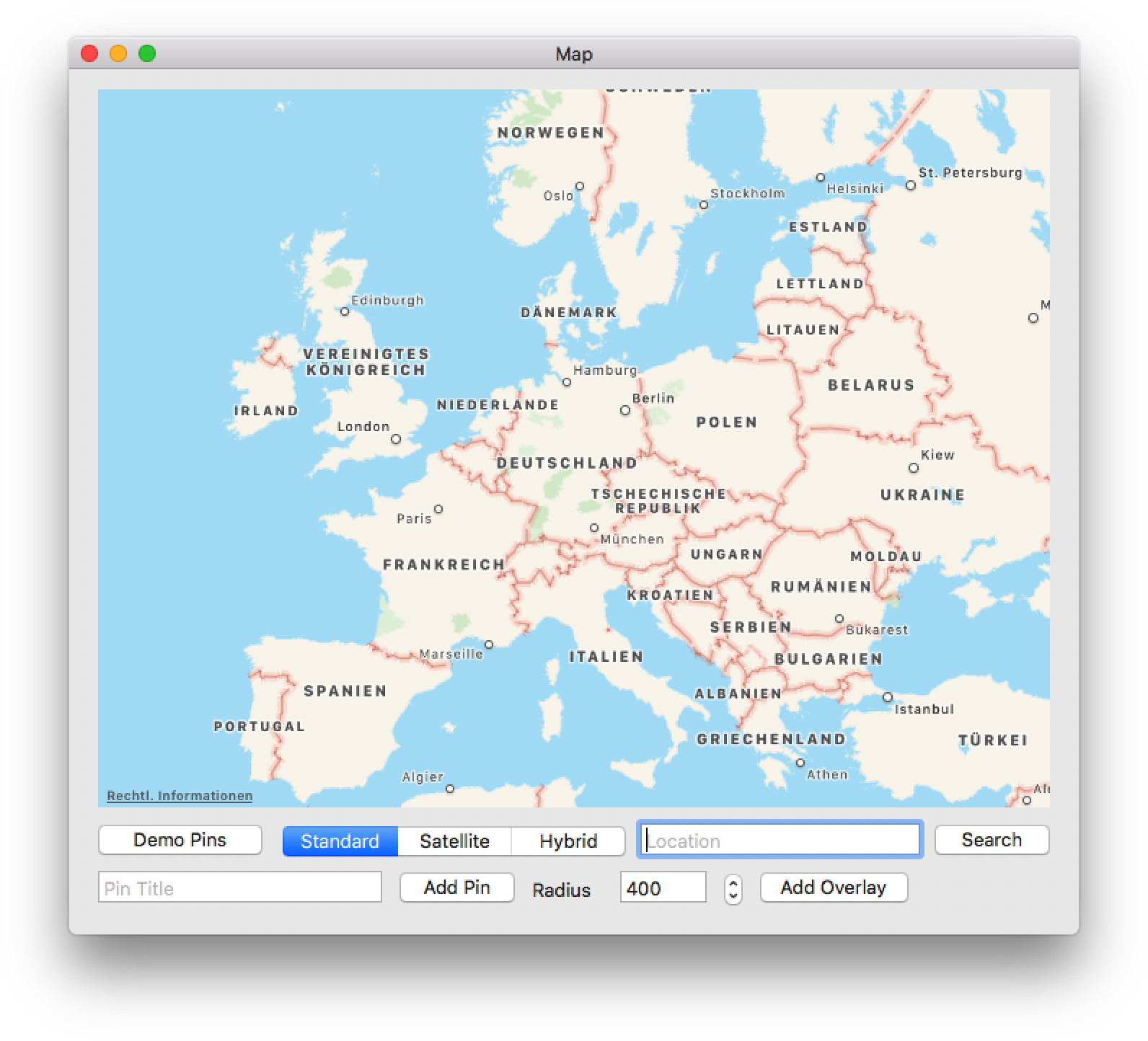
After weeks of work, the new
MapKit plugin for MacOS is done. We have all the features included and got a few example projects for you. One example shows the MapKit control, one to search for local items and one to get directions.
The classes include support for
- Showing map with standard, hybrid or satellite.
- Adding annotations like pins or lines
- Adding overlays like colored areas.
- Using customized renderes for overlays
- Get directions for routes
- Calculate expected time of arrival.
- Format distances as localized text
- Do local search query for finding items
- Show suggestions for auto complete for local search
- Control camera for fly over
- Render snapshots of maps
- Show user location
(more)
Did you sign up for
FileMaker Conference dotfmp.berlin 2019?
This conference is organized by
Egbert Friedrich and takes place from 6th to 8th June 2019 in Berlin, Germany.
As the conference is in english, this is your chance to meet people from around the world at a conference in Europe. And for a lot of people it's easier to get to Berlin than to cross the atlantic and deal with US immigration officers.
Who
dotfmp is an effort of various leading European FileMaker Developers. It is meant to bring all kinds of higher level developers together to share knowledge, educate and challenge each other.
When
dotfmp starts at the 5th June 2019 in the later afternoon with a relaxed "Beer and Sausages" in one of the most famous Berlin Beergarden. The session days itself last from 6th until 8th June with various socializing events in the evenings. Additionally we offer support on 10th June to see more from Berlin and its surroundings.
What
dotfmp is a 3 Day-Unconference, Meetup, Hangout or Barcamp. It is an informal and self-organized effort to meet on a personal base.
Where
dotfmp takes place in one of the most famous spots in Berlin. The GLS Campus is located in a vibrant area with a very short walking distance to all the famous restaurants.
Why
We feel there are far too few possibilities to talk to, learn from, and hangout with fellow developers in a relaxed and informal environment. And we'd like to share work and get feedback from people chewing on similar challenges.
If you like to join the conference and present something, please
register soon.

Im Januar gibt es mindestens noch die folgenden
FileMaker Stammtische:
Herzliche Einladung an alle FileMaker Entwickler bei einem Stammtisch vorbeizuschauen!
Wir versuchen in Karlsruhe und Bonn vorbei zu schauen.
New in this prerelease of version 9.0 of the MBS FileMaker Plugin:
Download at
monkeybreadsoftware.de/filemaker/files/Prerelease/ or ask for being added to the dropbox shared folder.
First you need to add MBS FileMaker Plugin for iOS to your FileMaker iOS SDK app project as you can watch in following video on our website:
FileMaker iOS SDK and MBS Plugin
Next you need to copy MBSInit.framework to the Frameworks folder. In Xcode in the project settings, please add MBSInit.framework there to the list of libraries to link to. See the following screenshot with our two MBS files in the files list on the left and the MBSInit framework in the link list in the middle:
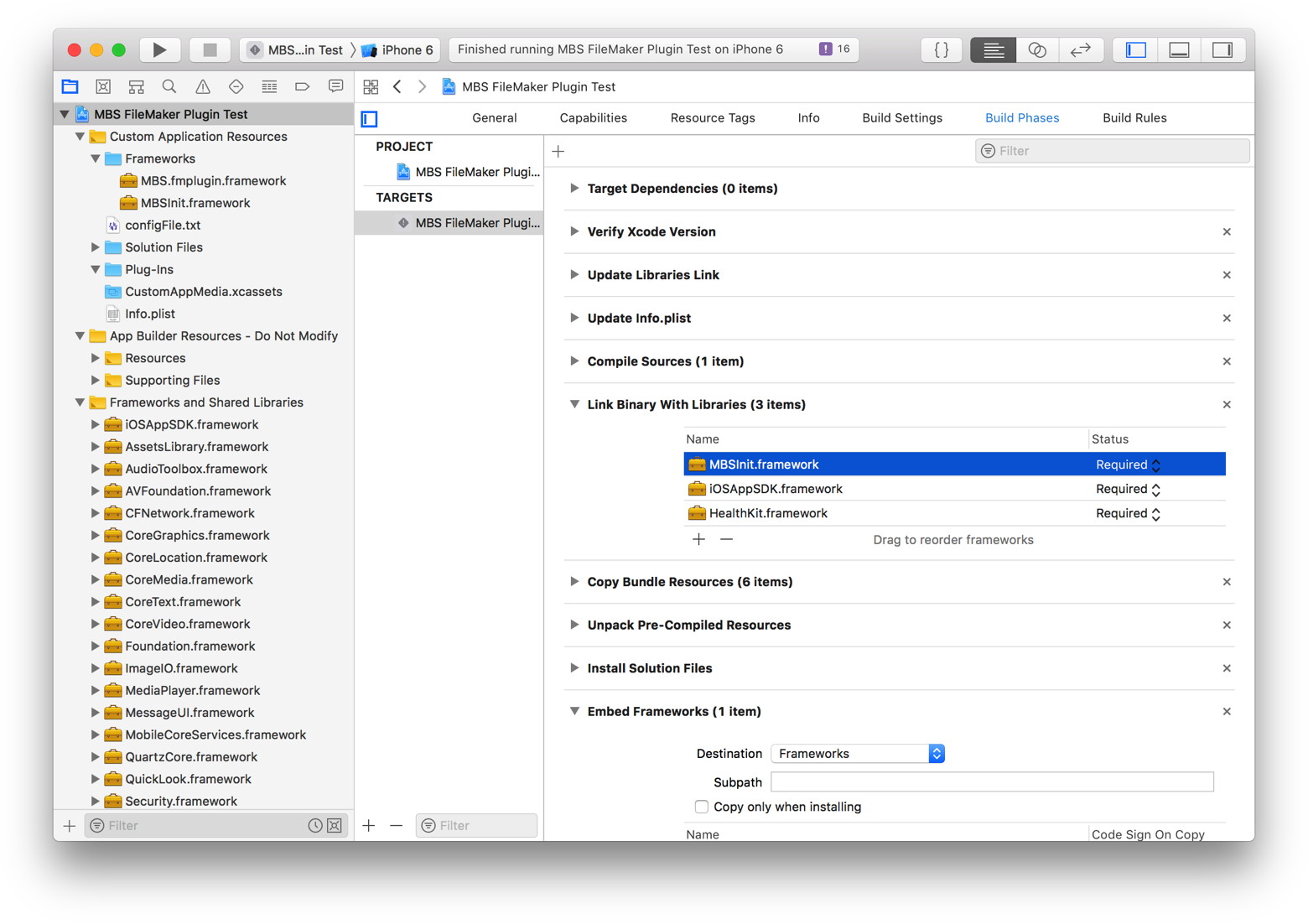
This makes sure the MBSInit framework is loaded at start of the application and initializes the notification system. Once your app runs, you'll see the following dialog asking for permissions:

If you click allow,
UNNotification.AuthorizationGranted function will return 1 and
UNNotification.AuthorizationError will be empty. If you like, query device token with
UNNotification.RemoteNotificationsDeviceToken and than pass this token to the server for push notifications.
Please also check system settings for your application for whether notifications are allowed. Especially if you want more than just text, you may need to allow sound or badges:
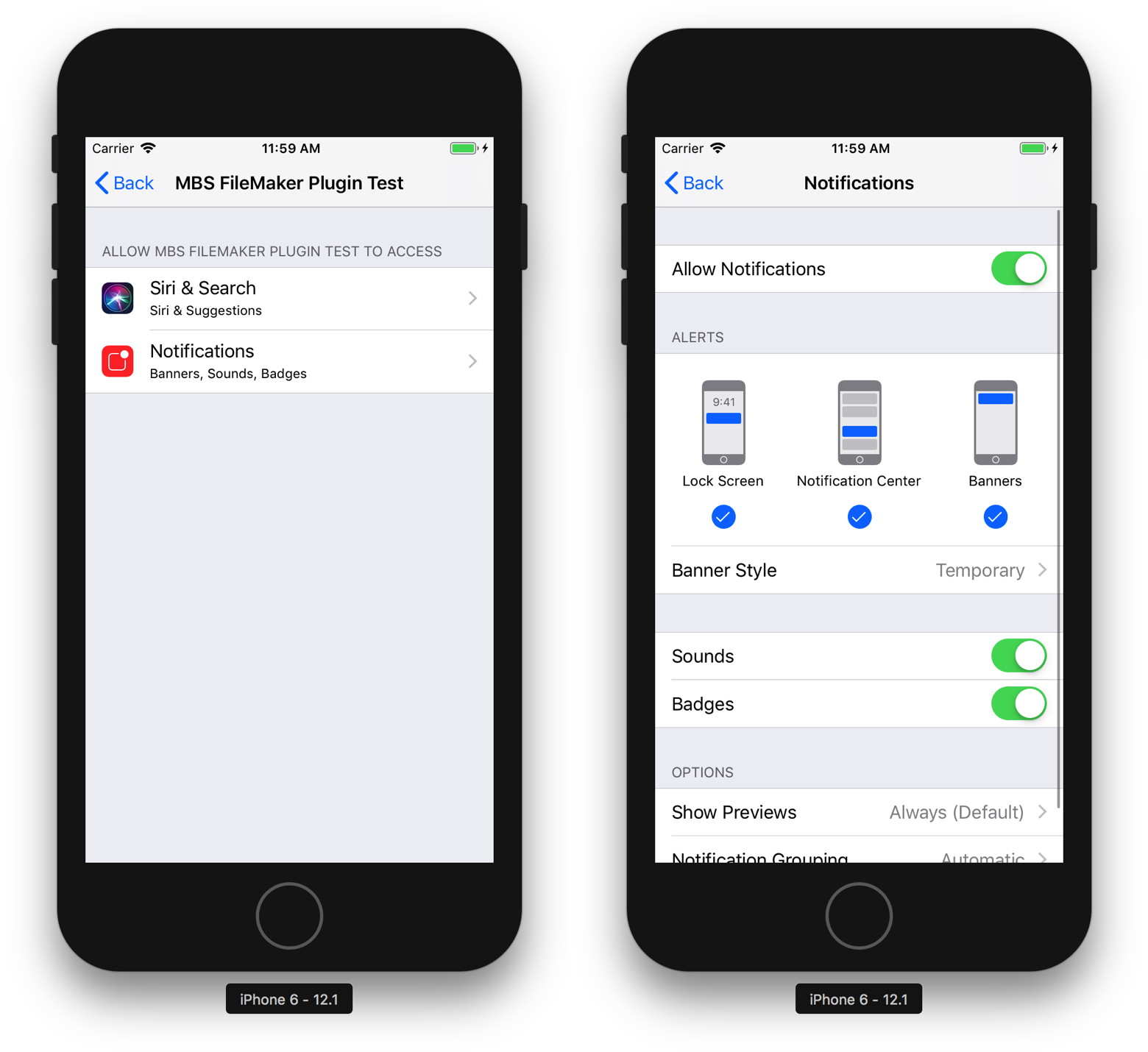
Once you got the notification system initialized, you can show a local notification with a script. The following example script creates a new notification, sets title and body texts, a time interval and schedules the notification.
# Create a new notification
Set Variable [ $notification ; Value: MBS("
UNNotification.New") ]
# Set Title and Body
Set Variable [ $r ; Value: MBS("
UNNotification.SetTitle"; $notification; "Hello") ]
Set Variable [ $r ; Value: MBS("
UNNotification.SetBody"; $notification; "Greetings from FileMaker") ]
# Set a time interval trigger
Set Variable [ $r ; Value: MBS("
UNNotification.SetTimeIntervalTrigger"; $notification; 60; 0) ]
# and schedule
Set Variable [ $r ; Value: MBS("
UNNotification.Schedule"; $notification; "test") ]
The notification shows while application is in background:
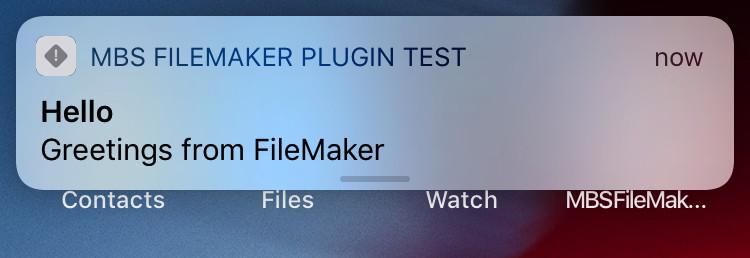
If you have questions, please do not hesitate to contact us.

Wir haben die Artikel zum MBS Plugin aus dem FileMaker Magazin gesammelt hier online gestellt: FileMaker Magazin Artikel.
- FMM 201805: Alles in Code, Erzeugen von Barcodes in FileMaker
- FMM 201805: Import von XML und JSON, Die Importierautomatik im MBS-Plugin
- FMM 201803: SQL in FileMaker, Neue Möglichkeiten mit dem MBS - Plugin
- FMM 201802: Universelle Suche, Mein Mitbringsel für die FileMaker Konferenz in Kanada
- FMM 201801: PDF/A und ZUGFeRD, Rechnungen mit eingebettetem XML
- FMM 201706: PDFs drucken, Automatisch via MBS-Plugin
- FMM 201705: Automatisiertes Drucken, Mehr Möglichkeiten mit dem MBS-Plugin
- FMM 201704: Audit per MBS-Plugin, Wie FileMaker Änderungen mitschreiben kann
- FMM 201703: XML-Funktionen, Nützliches zu XML im MBS-Plugin
- FMM 201702: Hole (Cloud), Was meldet die Cloud eigentlich bei „Hole“-Funktionen?
- FMM 201701: Plugin-Installation, Wie man FileMaker Plugins richtig installiert
- FMM 201606: Word-Dateien ausfüllen, Ein Tipp zum MBS-Plugin
- FMM 201605: Das MBS-Kontextmenü, Script-Schritte schneller aktivieren/deaktivieren
- FMM 201604: Webservices in FileMaker einbinden, Verwendung von CURL-Befehlen im „MBS-Plugin“
- FMM 201603: 4000 Funktionen in zehn Jahren, Ein kleiner Rückblick auf das MBS-Plugin
- FMM 201601: iOS App SDK, Eigene iOS-Apps auf Basis von FileMaker
- FMM 201506: Authentizität durch Signaturprüfung, Daten übertragen und Veränderungen bemerken
- FMM 201505: Wünsche werden wahr, Neues im „MBS-Plugin“ bei der FMK 2015
- FMM 201504: Datensätze effizient kopieren, Mit etwas SQL und dem MBS-Plugin
- FMM 201503: Neue Datensätze ohne Layoutwechsel, Mit Hilfe von SQL-Befehlen und dem MBS-Plugin
- FMM 201501: QuickList, Schnelle Listen für FileMaker
- FMM 201405: E-Mail-Versand, Mehr Möglichkeiten mit dem MBS Plugin
- FMM 201405: Vorbereiten von PDFs für den Versand, Verkleinern großer Dateien
- FMM 201402: Variablen, Globalisierte Lösungen per Plugin
- FMM 201401: Kalendertermine und Erinnerungen, Wie man Ereignisse aus FileMaker anlegt
- FMM 201306: Zip-Archive auslesen, Bilder aus OpenOffice-Dokumenten extrahieren
- FMM 201303: Script-Träger übers Netzwerk, Scripts triggern übers Netzwerk
- FMM 201303: Syntax Coloring, Berechnungen und Scripts bekennen Farbe
- FMM 201203: Arbeiten mit Dateidialogen, Komfortablere Dateiexporte per MBS Plugin
- FMM 201105: Bilder skalieren mit dem MBS FileMaker Plugin, So bleibt Ihre Datenbank schlank
Wir empfehlen allen FileMaker Anwender ein Abo vom Magazin und den Kauf der alten Ausgaben. Das FileMaker Magazin ist eine exzellente Quelle von Informationen, Anleitungen und Profitips.
New in this prerelease of version 9.0 of the MBS FileMaker Plugin:
Download at
monkeybreadsoftware.de/filemaker/files/Prerelease/ or ask for being added to the dropbox shared folder.
We got a new options in preferences for the MBS Plugin to make all function names clickable links within calculations:

Coming soon in next prerelease.