Today we have the Xojo training day for our beginners and intermediates. Plenty of seats available.
Like to join? Just come here!

Everyone else is invited to check out Andernach city and later join our welcome reception in the Sky Restaurant.
For live updates, please watch the
Xojo forum.

Just one week left until the conference starts. Spring arrived in Andernach and the city looks beautiful with all the flowers in parks and gardens.
You can still sign-up and join our conference and/or training day.
![]()
Currently we have over 40 people from 14 countries:
🇩🇪, 🇳🇱, 🇬🇧, 🇺🇸, 🇫🇷, 🇨🇭, 🇪🇸, 🇨🇦, 🇵🇱, 🇦🇹, 🇩🇰, 🇸🇪, 🇧🇪 & 🇮🇹
Seems like cancellations (please get well soon!) and last minute registrations balance out.
(more)
 Here is a table documenting the release versions of our MBS FileMaker Plugin from the last years. You see how regular we release and what the build number the final version had. If you still use an older one like 11.1.0.7, you may notice you have the pre-release version. Pre-release versions usually are not ready for new/changed features and contain some more debug code to do runtime checks. We disable those for final builds.
(more)
The CURL project is a well run open source project and includes a command line tool (curl), a library for C/C++ application developers to use (libcurl) and various smaller utilities like trurl, a command line tool for URL parsing and manipulation. Since this is all publicly hosted on curls.se and github.com/curl, everyone can take a look there and contribute.
Everyone can download the current source code and build their own version of the command line tools, add the library to their product like we do for our plugins and modify them as needed. Yes, if you like, you could customize it and make your own version.
From time to time you may have made changes on your copies, which you would like to push back to the project. This could be:
- fixing a typo in the documentation or source code
- adding an option to build process
- adding a new feature
- port the project to build with a different compiler or on a new operation system
- fix a bug or improve something
(more)
Check out the FMTraining.tv website. Richard Carlton and his team do a daily free live stream about FileMaker to watch.
A few days ago Christian Schmitz from Monkeybread Software joined a live episode to talk a bit about the MBS FileMaker Plugin. Watch it on YouTube.

We talk about what printing functions we have in MBS FileMaker Plugin: PrintDialog functions for macOS, Printer.SetPrinter and Printer.Print functions for Windows, PDFKit.Print, PDFKit.SelectPrinter and PDFKit.SetPrintSetting functions for iOS. You may print on iOS without print dialog to print a receipt in a POS software. And even on server you can print a PDF directly to a nearby printer in the same network with PDFKit.Print or DynaPDF.Print functions.
(more)

You can use our new MFMessageComposeViewControllerMBS class in MBS Xojo iOS Plugin to let the user send a text message. A dialog pops up with prefilled text and attachments, so the user can edit the message and then send it using their messages account, either using SMS or iMessage.
To handle the result, please either subclass the MFMessageComposeViewControllerMBS class and implement the didFinishWithResult event. Or you use addHandler to add the event and use a method in your current screen. You get result integer, which you can compare to the constants MailComposeResultCancelled for user cancelled, MailComposeResultSent for when message is sent, MailComposeResultSaved for the message being saved for sending later or MailComposeResultFailed if it failed like being offline.
(more)

New in this prerelease of the 24.2 plugins:
- Improved WebView2ControlMBS to pick temp folder for user data folder if you don't set userDataFolder property.
- Updated DynaPDF to version 4.0.87.250.
- Updated SQLAPI to version 5.3.1.
- Updated SQLite to version 3.45.3.
- Improved PhidgetMBS classes to prevent crashes with disconnected devices.
Download:
monkeybreadsoftware.de/xojo/download/plugin/Prerelease/ or
from DropBox.
Or ask us to be added to our shared DropBox folder.
You can subscribe to our Xojo mailing list to get notified for new pre-release and release versions.
New in this prerelease of version 14.2 of the
MBS FileMaker Plugin:
- Updated DynaPDF to version 4.0.87.250.
- Added IsSwipeNavigationEnabled and HiddenPdfToolbarItems as options to WebView.SetPreferences and WebView.GetPreferences for Windows.
- Updated SQLAPI to version 5.3.1.
- Updated SQLite to version 3.45.3.
Download at
monkeybreadsoftware.com/filemaker/files/Prerelease/, in
DropBox folder or ask for being added to the DropBox shared folder.
You can subscribe to our FileMaker mailing list to get notified for new pre-release and release versions.

If you use FileMaker iOS SDK, we can provide a few new print commands for iOS in the MBS FileMaker Plugin in version 14.2. The new PDFKit.SelectPrinter function allows you to pick a printer. And the PDFKit.Print function got extended to print PDF documents as well as images. You can configure printing with PDFKit.SetPrintSetting function.
Let's start with selecting a printer:
If [ Length ( PDFKit Print::PrinterURL ) > 0 ]
Set Variable [ $r ; Value: MBS( "PDFKit.SetPrintSetting"; "PrinterURL"; PDFKit Print::PrinterURL ) ]
End If
# show the dialog
Set Variable [ $userDidSelect ; Value: MBS( "PDFKit.SelectPrinter" ) ]
If [ MBS("IsError") ]
Show Custom Dialog [ "Failed to show printer selecto…" ; $r ]
Else If [ $userDidSelect ]
# and check what we got
Set Variable [ $printerURL ; Value: MBS( "PDFKit.GetPrintSetting"; "PrinterURL" ) ]
End If
(more)
For MBS Xojo XL Plugin in version 24.2 we include new XL classes to create conditional formatting in an Excel file created in code. While you can always load an existing document with conditional formatting or diagrams and just fill the cells with data, we now can create the rules for conditional formatting in a script. Let us show you four examples from our example file.
Please check the XLConditionalFormatMBS and XLConditionalFormattingMBS classes. The first defines the format to apply and the second one defines the rules.
Highlighting cells that begin With the given Text

This example defines a conditional format with a bold font. The conditional formatting is applied for the cells in the range B3:B11 to highlight all cells that begin with 'a'. The AddRule function allows you to define rules with various conditions like to highlight empty cells, duplicate or unique values, values starting or ending with a value or by an expression.
Dim cFormat As XLConditionalFormatMBS = book.addConditionalFormat()
cFormat.Font.bold = true
Dim cf As XLConditionalFormattingMBS = sheet.addConditionalFormatting()
cf.addRange(2, 10, 1, 1)
cf.addRule(cf.FormatTypeBeginWith, cFormat, "a")
(more)
You can use our new MFMailComposeViewControllerMBS class in MBS Xojo iOS Plugin to let the user send an email message. A dialog pops up with prefilled text and attachments, so the user can edit the message and then send it using their mail account.

To handle the result, please either subclass the MFMailComposeViewControllerMBS class and implement the didFinishWithResult event. Or you use addHandler to add the event and use a method in your current screen. You get result integer, which you can compare to the constants MessageComposeResultCancelled for user cancelled, MessageComposeResultSent for when message is sent or MessageComposeResultFailed if it failed like being offline.
(more)
New in this prerelease of the 24.2 plugins:
- Improved WindowsDisplayMBS class to better query per screen DPI values.
- Added LogX, LogHeight, LogWidth and LogY properties to WindowsDisplayMBS class.
- Added touchesMatchingPhase, coalescedTouchesForTouch and predictedTouchesForTouch methods to NSEventMBS class.
- Added LogScaleFactor property to WindowsDisplayMBS class.
- Added PictureTypeSVG constant for XLBookMBS class.
- Fixed an issue with copy constructor in WindowsDeviceInformationPairingMBS class not retaining the device object.
- Added Close method to WindowsDeviceInformationPairingMBS class to explicitly close it.
- Removed a few deprecated methods in CWInterfaceMBS class, which Apple removed and so they stopped working years ago.
- Added respondsToSelector to CanvasGesturesMBS class, so the system can query which events you implemented.
- Improved PhidgetMBS classes to prevent crashes with disconnected devices.
- Improved MFMessageComposeViewControllerMBS and MFMailComposeViewControllerMBS class to better dismiss and provide dismissed event.
- Fixed a problem with translate method in Graphics class when used with DynaPDF.
- Added NextPage(width, height) support for graphics class in DynaPDF.
- Added handling of MiterLimit property for using graphics class in DynaPDF.
- Updated LibXL to version 4.3.0.
- Added keepAllSheets parameter for LoadPartially methods in XLBookMBS class.
Download:
monkeybreadsoftware.de/xojo/download/plugin/Prerelease/ or
from DropBox.
Or ask us to be added to our shared DropBox folder.
You can subscribe to our Xojo mailing list to get notified for new pre-release and release versions.
New in this prerelease of version 14.2 of the
MBS FileMaker Plugin:
Download at
monkeybreadsoftware.com/filemaker/files/Prerelease/, in
DropBox folder or ask for being added to the DropBox shared folder.
You can subscribe to our FileMaker mailing list to get notified for new pre-release and release versions.
Just two weeks until the conference starts. Spring arrived in Andernach and the city looks beautiful with all the flowers in parks and gardens.
You can still sign-up and join our conference and/or training day.
![]()
Currently we have over 40 people from 14 countries:
🇩🇪, 🇳🇱, 🇬🇧, 🇺🇸, 🇫🇷, 🇨🇭, 🇪🇸, 🇨🇦, 🇵🇱, 🇦🇹, 🇩🇰, 🇸🇪, 🇧🇪 & 🇮🇹

Dinner on Tuesday
If you arrive early and you join the Tuesday dinner, please meet in front of the hotel with other attendees at 18 o'clock.
We then walk over to Villa am Rhein, the hotel on the other side of the street to go to their restaurant.
The address is Konrad-Adenauer-Allee 3. Our hotel has house number 8. Walking distance is less than 100 meter.
(more)
Check out the FMTraining.tv website. Richard Carlton and his team do a daily free live stream about FileMaker to watch.
A few days ago Christian Schmitz from Monkeybread Software joined a live episode to talk a bit about the MBS FileMaker Plugin. Watch it on YouTube.

We talk about what is new in version 14.1: New functions, Release Notes and Announcement. Check out the new Overlay functions!
(more)
 We are glad to inform you that the new LibXL version 4.3.0 is available now.
What's new in the version 4.3.0:
- added the possibility to remove all VBA code and macros from xlsm and xlsb files
- added the possibility to remove all printer settings from xlsx, xlsm and xlsb files
- added the possibility to set an active cell for splitted sheets (xlsx)
- added keepAllSheets flag for the partial loading methods, if it's true, all sheets are saved back with Book::save() method,
but only one specified sheet is available for processing, thus LibXL can save more memory. It works only for xlsx files,
LibXL ignores this flag for xls files
- added the multi-level sorting for AutoFilter::addSort() and Sheet::applyFilter() (xlsx)
- added the updating/moving existing tables with Sheet::insertRow() and Sheet::removeRow() methods (xlsx)
- improved SVG support
- fixed a bug with adding a hyperlink after setting a picture, the output xlsx file was unreadable by Excel
- fixed a bug with incorrect return values in Sheet::rowHeight() and Sheet::rowHeightPx() for non-standard DPI settings for some xlsx files
- fixed Sheet::setPrintAread(), Sheet::setPrintRepeatRows(), Sheet::setPrintRepeatCols() for working with Japanese/Chinese sheet names
- fixed a bug with reading some values in double quotes in the Sheet::readFormula() (xlsx)
- fixed a bug with a workbook overwriting dialog message in Excel when an existing sheet is copied in xlsx file
- fixed a bug with reading some cells after using functions which changes sheet's size (xlsx)
- fixed a bug with reading tables in some xlsx files
- fixed some bugs with partial loading/saving some workbooks in the Book::loadSheet() and Book::save() methods (xlsx)
- fixed a bug with using non UTF-8 character encodings on Linux and Mac
- fixed a bug with reading some data from a partially loaded workbook (xlsx)
New methods:
- Book::removeVBA()
- Book::removePrinterSettings()
The LibXL library can be used with MBS Plugins in Xojo and FileMaker. Updated plugins will be available soon. As usual we add the new functions soon. If you need help or want to try the new version early, let me know.
At the Spanish developer conference an attendee asked me about whether we have something to show a nice colored progress bar in a portal, preferable possible for Web Direct, too.
After a bit of research, I found an easy way to do this with MBS FileMaker Plugin and without using web viewers and JavaScript. We simply use GraphicsMagick functions to generate a nice picture on demand and show it as a container field. This can either be a script to generate the picture on the fly using a trigger. Or it can be a calculated field to generate it when needed. In both cases you can trigger the recreation of the image by changing a field with the percent value.

First let us show you the sample script. It creates a 300x30 Pixel big image with white background. Then we take the color from a field and if the color is "auto", we calculate the color based on a formula based on the percent value. Once we got a color, we draw a 20 pixel wide line with round caps with the background color. That background color for the bar is dynamically calculated to be lighter than the actual bar color. After the background bar line we draw the normal color bar on top. And save it to the container field, so FileMaker shows it. Don't forget to free the image on the end and avoid the memory get filled with images.
(more)

For iOS you may miss the print dialogs in Xojo. For upcoming 24.2 version of MBS Xojo Plugins we have new classes for you: The UIPrinterPickerControllerMBS class allows to show a printer picker dialog to choose the printer. And the UIPrintInteractionControllerMBS allows to show a dialog for printing a PDF or image.
Pick Printer
First we want to pick a printer. Let's show the printer picker. If you like, you can set a few properties like the SelectedPrinter property to preselect a printer.
Sub PickPrinter()
picker = New MyUIPrinterPickerControllerMBS
picker.Present
End Sub
In the Completed event, you can react to the user's choice. Check the error property for an error and the userDidSelect property. If the userDidSelect property is true, the check the selectedPrinter property.
Class MyUIPrinterPickerControllerMBS Inherits UIPrinterPickerControllerMBS
Sub Completed(userDidSelect as Boolean, error as NSErrorMBS)
System.DebugLog CurrentMethodName+" "+userDidSelect.ToString
If error <> Nil Then
MessageBox error.LocalizedDescription
End If
If userDidSelect Then
Dim p As UIPrinterMBS = Me.selectedPrinter
If p <> Nil Then
MainScreen.printer = p
MessageBox "You picked "+p.displayName+EndOfLine+p.printerID
End If
End If
End Sub
End Class
(more)
For MBS FileMaker Plugin 14.2 we include new XL functions to create conditional formatting in an Excel file created in a script. While you can always load an existing document with conditional formatting or diagrams and just fill the cells with data, we now can create the rules for conditional formatting in a script. Let us show you four examples from our example file.
Highlighting cells that begin With the given Text
This example defines a conditional format with a bold font. The conditional formatting is applied for the cells in the range B3:B11 to highlight all cells that begin with 'a'. The XL.ConditionalFormating.AddRule function allows you to define rules with various conditions like to highlight empty cells, duplicate or unique values, values starting or ending with a value or by an expression.
Set Variable [ $cFormat ; Value: MBS("XL.Book.AddConditionalFormat"; $book) ]
#
# set font to be folder
Set Variable [ $font ; Value: MBS("XL.ConditionalFormat.Font"; $book; $cFormat) ]
Set Variable [ $r ; Value: MBS("XL.Font.SetBold"; $book; $font; 1) ]
#
Set Variable [ $cf ; Value: MBS("XL.Sheet.addConditionalFormatting"; $book; $sheet) ]
Set Variable [ $r ; Value: MBS("XL.ConditionalFormating.AddRange"; $book; $cf; 2; 10; 1; 1) ]
Set Variable [ $r ; Value: MBS("XL.ConditionalFormating.AddRule"; $book; $cf; 0 /* BeginWith */; $cFormat; "a") ]
(more)
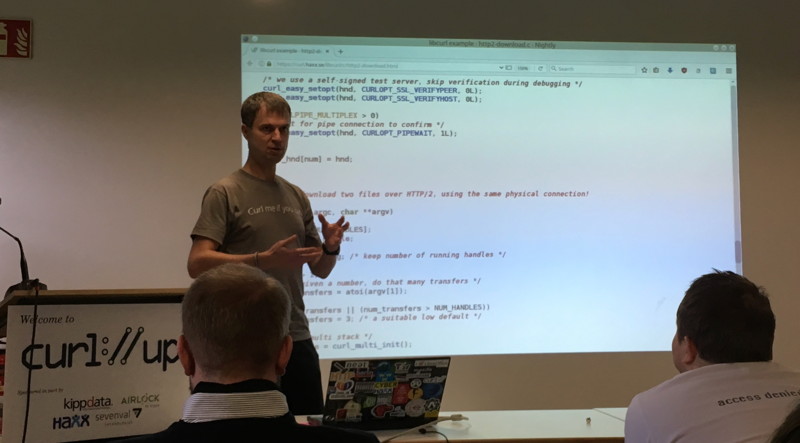
Recently Daniel Stenberg, the main developer behind the CURL project, announced the curl://up conference for 2024:
curl up 2024 will take place in Stockholm, Sweden in early May.
📅 May 4-5, 2024
📍 Stockholm, Sweden 🇸🇪
🏨 Best Western Hotel
🎤 English
🌍 github.com/curl/curl-up/wiki/2024
Anyone interested in the CURL project is welcome to join the conference!
For details, please check the website.
Monkeybread Software is proud to be a sponsor for the curl project and we will join the conference.

